4.6 Additional functions
4.6.1 Configuring the Z-Wave network using the ZWMP weather module (INCLUDE function).
Adding a device to the “Z-Wave” network is possibly only with the use of PRIMARY controller
(e.g. keyboard ZWK15, ZWK1, ZWP15, ZWPTV). The ZWMP module should be associated with the network
as SECONDARY. However, there is a possibility of programming the module for the network as PRIMARY.
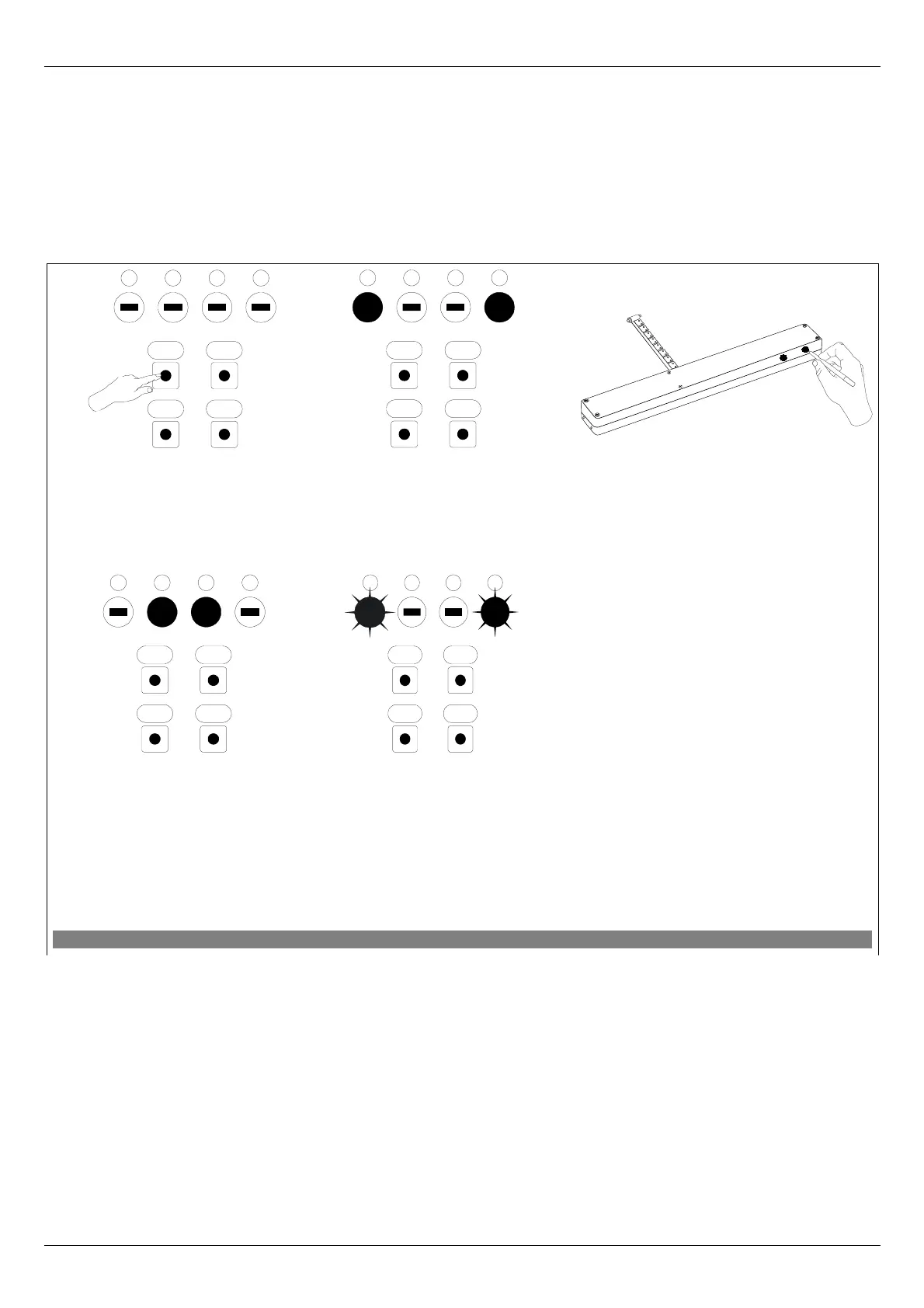
The procedure of device adding to the network with the use of the ZWMP module is presented in Figure 7.
*) Programming error results from the fact of not receiving any response from the device and may be caused
by:
• failure to press the programming button within 10 seconds from the module signalling its readiness for
adding the device to the network;
• long distance between the module and the device being added;
• the module has been earlier associated with the network as SECONDARY – it is necessary to perform
DEFAULT procedure.
11.09.21 NC815 10/16 ©2011, FAKRO
Figure 7: Removing device from the Z-Wave network using ZWMP weather module
4. The controller is signaling that the
device has been successfully
associated with the network (two
LEDs on for app. 2-3 sec.). For
operating accessories with the use of
the module, proceed to section 4.2.
5*. Programming error – LEDs
flashing for app. 2-3 sec.
2. The controller is signaling its
readiness for adding a new device
to the network (two external
LEDs on for 10 sec.).
3. Press “P” button on the device and
hold it for 0.5 sec. (see Device
Programming Manual).
1. Press “In/Ex” button once.
OC
SelIn/Ex
4321
x1
OC
SelIn/Ex
4321
OC
SelIn/Ex
4321
OC
SelIn/Ex
4321
x1


 To Next Page