The Li-Po baeries may be recycled
Please discard old baeries in a proper recycling staon.
Do not throw baeries in the regular trash. If you have quesons,
please contact your local environmental agency to collect old baeries.
*Do not expose the charged baery to high temperatures, such as flames or near
electronic devices. This may cause damage or explosion.
*Make sure all baeries are connected in the proper orientaon to avoid damage
or explosion.
*Do not use the baery to impact any hard surfaces. Avoid contact with metal.
*If the baery becomes damaged, bulges, or appears to change shape, please
stop using the baery and discard it.
*When charging the baery, to avoid accident, put the power supply on the ground.
Avoid seng the charger on cloth or other flammable materials because the
charger will get hot.
*Do not immerse the baery in water. The baery should be kept in a dry place.
*Do not break the baery or aempt to open the baery.
*Do not leave the baery charging without supervision.
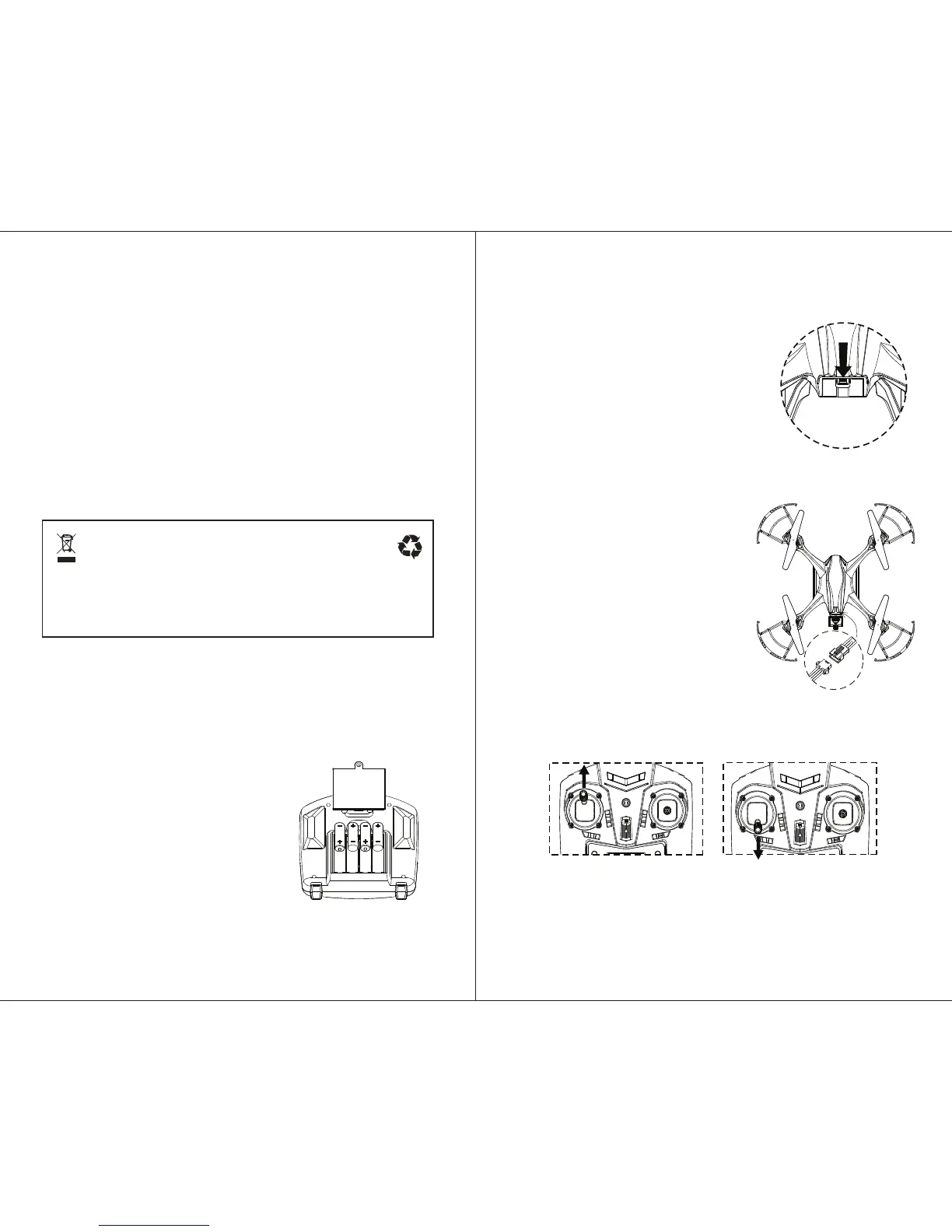
2. Install Li-Po Baery in Quadcopter
Install To install the Li-Po baery in the quadcopter,
press the tab at the front of the baery compartment
down to access the baery compartment, and insert
the baery base-first into the compartment so that
the cable on the baery is exposed. To remove the
Li-Po baery from the copter, press down on the tab
with one hand and grasp the baery with your other
hand to pull the baery out by its sides (never pull
the baery out by its cables).
3. Connect the Baery
*For safety, make sure the switch beneath the copter is
in the OFF posion before you electrically connect the
baery cables. Connect the baery to the quadcopter
by gently plugging the cable on the baery to the
power cable underneath the copter. Make the sure
receptacles are oriented correctly so that one
receptacle slides smoothly into the other.
*To disconnect the baery, grasp the plasc receptacles
with your fingers. Never pull the cables apart by pulling
on the cables.
NOTE: The copter will not operate unless you follow
these steps in the order listed.
1. First make sure the quadcopter is OFF. Turn
the controller / receiver ON. This procedure
must be followed precisely for the controller and
copter to find and bind with each other.
2. The controller will beep once and the light will
blink rapidly. Move the LEFT STICK to the top
and then to the boom. The controller will stop
blinking to show the throle is calibrated.
Leave the sck at the boom.
Press Down on
Tab to Access
Baery Compartment
Connect Baery
1. Install 4 AA Baeries in Controller
To assemble the Controller, install 4 1.5V AA baeries (not included) in the
controller/ transmier. You may need a small screwdriver to open and then close
the cover over the baery compartment.
FLIGHT PREPARATION
PRE-FLIGHT ADJUSTMENTS
5
6


 To Next Page