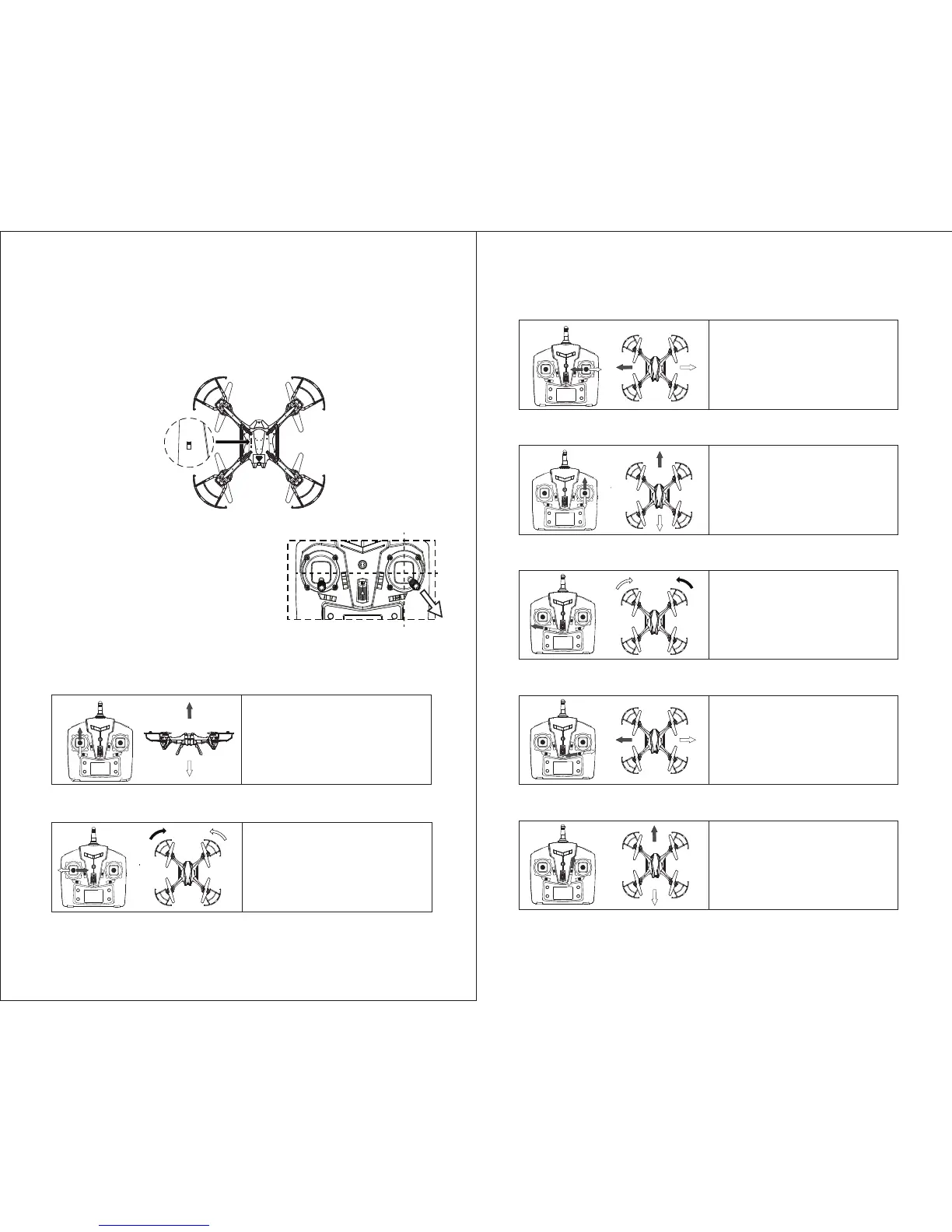
3. Now turn quadcopter ON by flipping the switch underneath the quadcopter to
the ON posion. Aer about 3 second the controller will beep “di do di”.
The lights on the copter will stop flashing. This shows the quadcopter has
become bound to the controller.
4. Put the copter on level ground. Move the
RIGHT STICK on the controller in a circle.
The controller will beep “di do di” and
the copter lights will blink briefly. This
calibrates the copter gyroscopes for level
flying.
Power Switch
Push the LEFT STICK forward to
make the copter go up, or backward
to go down (throle). The throle
will stay where you leave it.
1. Up / Down (Throle)
Push the LEFT ST ICK le or right to
rotate the direcon the copter is
facing (yaw).
Release the sck to stop rotang.
2. Rotate Direcon
3. Move Le / Right
If the copter dris forward or back
when the sck is centered, click this
switch forward or backward unl
the copter is stable.
7. Adjust Forward/Backward Trim (Pitch)
Push the RIGHT STICK le to move
le, or right to move right.
Release the sck to stop moving.
Push the RIGHT STICK forward to
move forward, or back to move
backwards.Release the sck to stop
moving.
4. Move Forward / Backwards
If the copter rotates when the sck
is centered, click this switch le
or right unl the copter is stable.
5. Adjust Rotaon Trim (Yaw)
If the copter dris to the side when
the sck is centered, click this switch
le or right unl the copter is stable.
6. Adjust Le/Right Trim (Roll)
FLIGHT CONTROL
7 8
OFF ON


 To Next Page