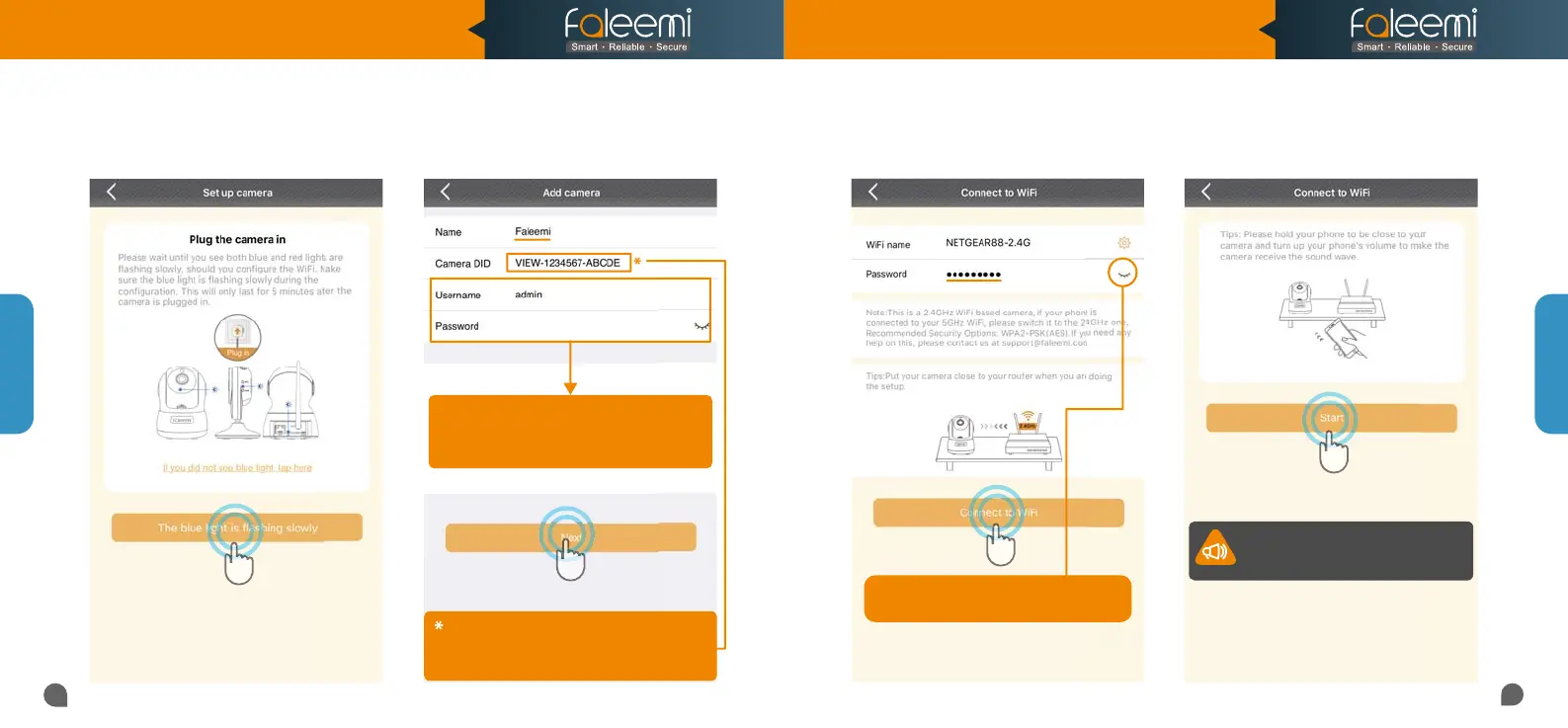
5. Click on [The blue light is flashing
slowly].
7. Input your WiFi password and click on
[Connect to WiFi].
8. Click on [Start].6. Type in the name you have selected for your
camera and click on [Next].
if you can't scan the QR code, please enter the
if you can't scan the QR code, please enter the
DID (something like
VIEW-1234567-ABCDE
in the label on the camera manually.
in the label on the camera manually.
Please use the default username of
Please use the default username of
admin
and password of
123456
here.
You can change them when the camera is all set up.
You can change them when the camera is all set up.
You will find the instructions in
You will find the instructions in
Page 28
11
12
Note: Please click on "
Start" button.
Your phone will make a loud sound to
Your phone will make a loud sound to
transmit the data to the camera.
transmit the data to the camera.
Click on it to make sure your
Click on it to make sure your
WiFi password is correct.
Setup Option C
Setup Option C
123456
Model: FSC882
Quick Start Guide
1080P Pan/Tilt Wireless Network Camera



 To Next Page