26
DEUTSCHENGLISH
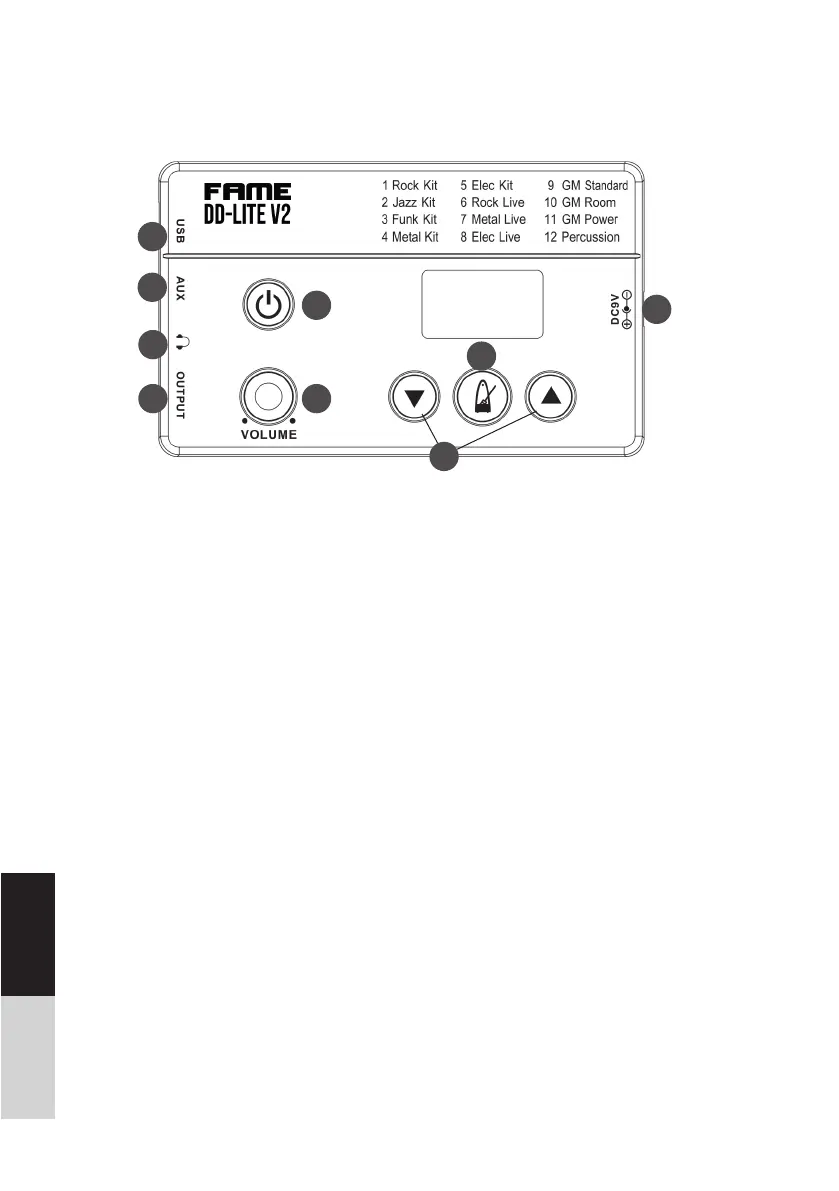
Panel and Function Description:
1
2
3
4
5
6
7
8
1. [POWER] Knob
Press to turn On power/ Press and hold to
turn Off power.
2. [VOLUME] Knob
Adjust the output volume level.
3. [][] Button
Choose different drum Sound Kits/ Adjust
metronome tempo.
4. [METRONOME] Button
Press Button to start metronome. Press
[] and [] buttons to choose the ideal
click tempo. Press button again to stop the
metronome.
5. USB MIDI port
Connect the USB host with audio devices.
(Only transmit MIDI data.)
6. AUX IN Jack (3.5mm)
For connecting an extra audio player, for
example MP3 and so on via stereo plug. You
can enjoy playing the drum along with your
favorite song.
7. PHONES Jack (3.5mm)
Connect stereo headphones here.
8. OUTPUT Jack (3.5mm)
Connect to your audio system or ampli er.
9. DC9V Jack
Connect to DC9V power adapter.
9



 To Next Page