,6
HOLD MODE
TO ENTER
TRIP DATA
FUEL LEVEL
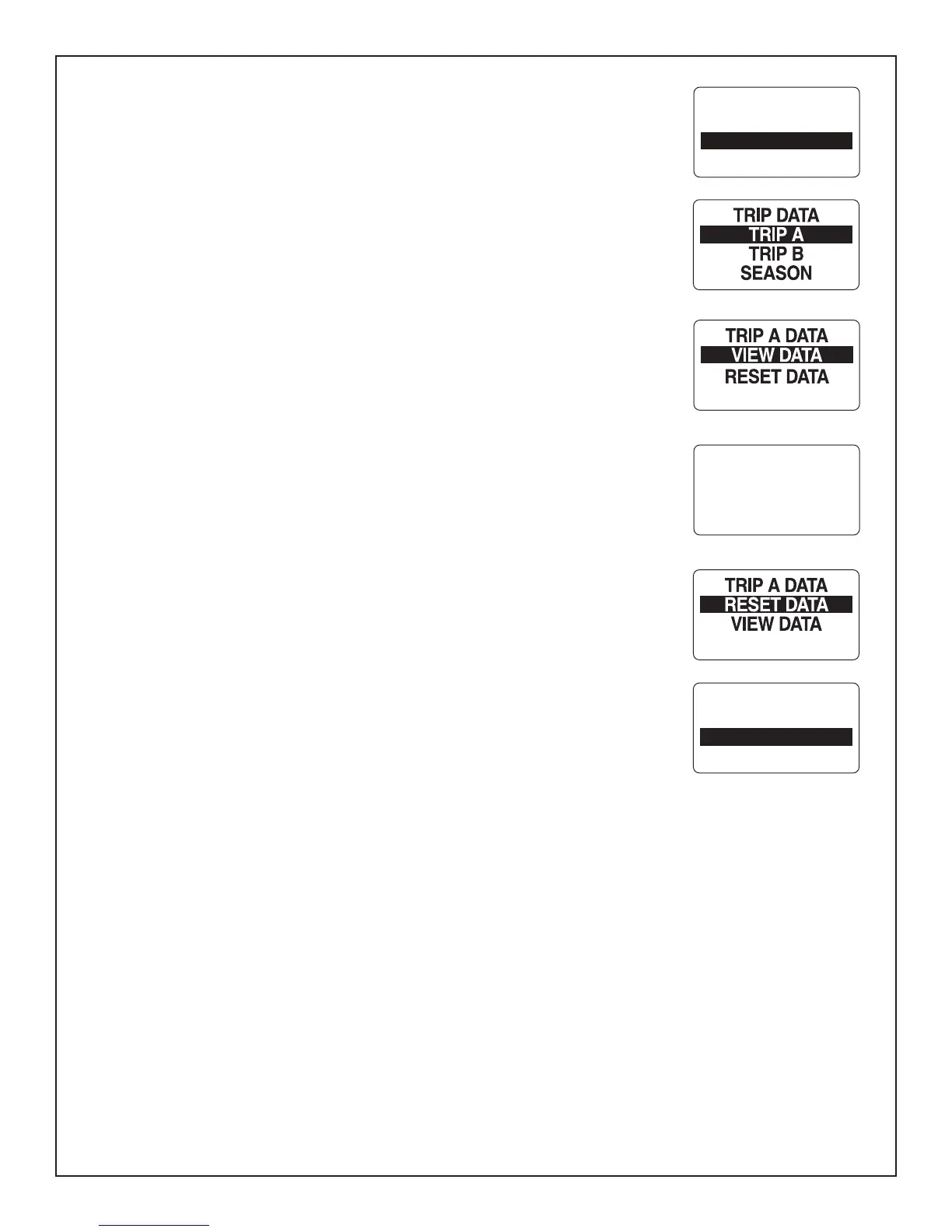
Trip Data
7KH7ULS'DWDIHDWXUHUHFRUGV(1*,1(+2856)8(/86('2'20(7(5DQG)8(/
5$7(IRUWZRWULSVDQGWKHVHDVRQ7RYLHZWKH7ULS'DWDHQWHUWKH0HQX2SWLRQVPHQX
SDJHWKHQ
)URPWKH1250$/PRGHSUHVVDQGKROGWKH02'(EXWWRQWRHQWHUWKH0HQX
2SWLRQV
2) Use the UP or DOWN buttons to select TRIP DATA.
3) Press and hold the MODE button to make selection.
)ROORZWKHVWHSVLQWKHQH[WVHFWLRQV
View Trip and Season Data
1) Use the UP or DOWN buttons to select TRIP A, TRIP B or SEASON.
2) Press and hold the MODE button to enter the selection.
3) Use the UP or DOWN buttons to select VIEW DATA.
4) Press and hold the MODE button to make a selection.
5) Use the UP or DOWN buttons to select information to be shown.
Note$YDLODEOH7ULSLQIRUPDWLRQLV(QJLQH+RXUV)XHO8VHG'LVWDQFHDQG)XHO5DWH
Resetting Trip and Season Data
1) Use the UP or DOWN buttons to select TRIP A, TRIP B, or SEASON.
2) Press and hold the MODE button to enter the selection.
3) Use the UP or DOWN buttons to select RESET DATA.
4) Press and hold the MODE button.
$WWKHSURPSW5(6(7'$7$"
5) Use the UP or DOWN buttons to select YES to reset the data, or select NO to exit.
3UHVV DQG KROG WKH 02'( EXWWRQ WR UHVHW WKH GDWD 7KH /&' VFUHHQ GLVSOD\V
6(77,1*6$9('DQGWKH0*LVVXHVDQDXGLEOHEHHS
TRIP A
RESET?
NO
YES
ENGINE HOURS
4.7
FUEL USED
32.8 GAL
Page 10



 To Next Page