EVA USER MANUAL - EN
Edition 1.0 April 2020 Pag. 7 di 14
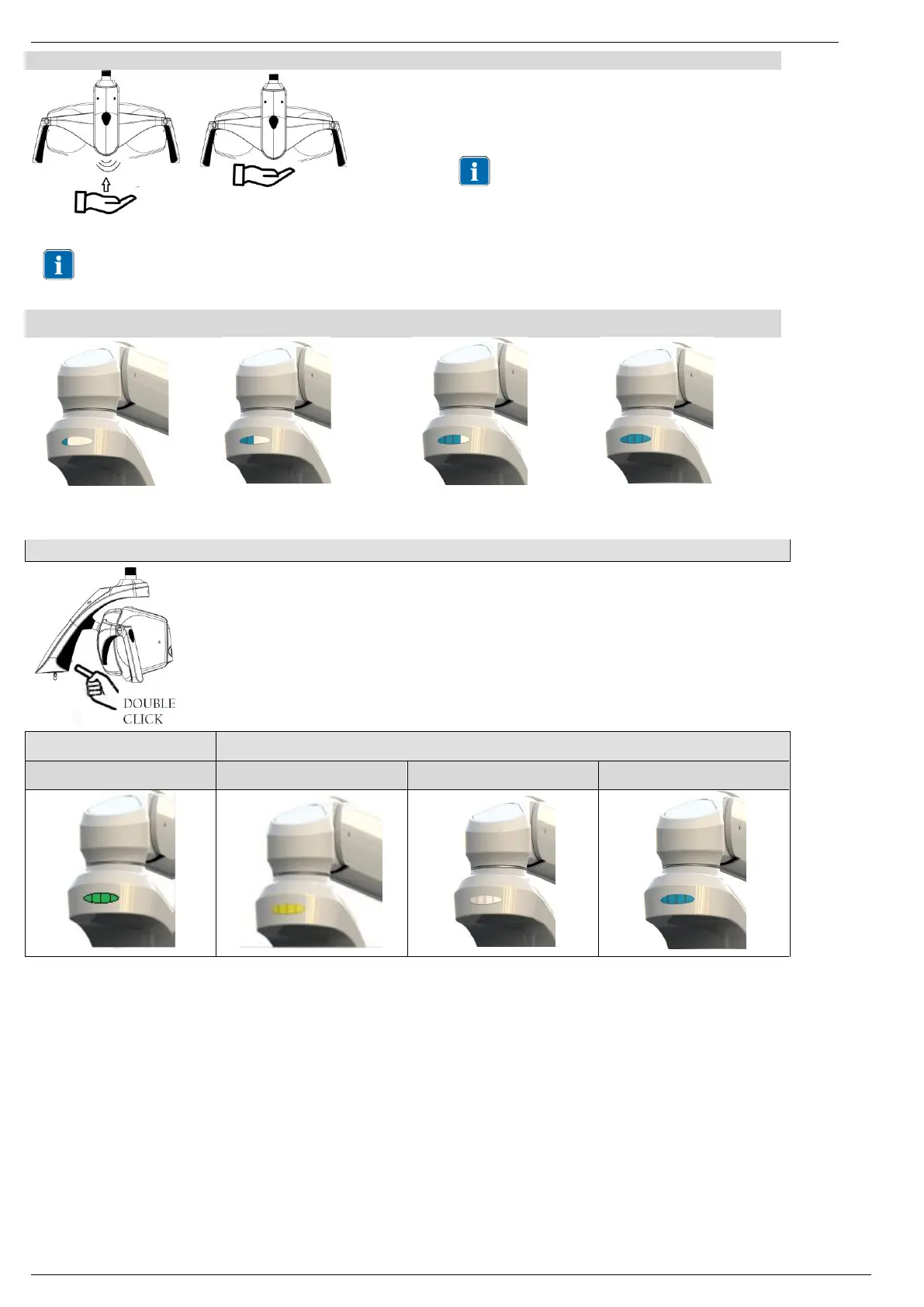
Sensor - Increase and decrease light intensity
Bring the hand towards the sensor up to 2 cm and keep this
distance until the desired light intensity is reached
Acoustic signal: 1 beep at command
Maximum intensity reached: 2 beeps
Minimum intensity reached: 1 beep
in sensor version the light intensity changes
continuously decreasing until minimum and
increasing until maximum
when changing the light intensity the indicator light changes according to the illuminance level, according to the images below:
Light Intensity:
Medium Minimum
Light Intensity:
Medium Maximum
4.3 CHANGING COLOR TEMPERATURE ON TUNABLE WHITE VERSION
Every time a double click is performed, the Tk of the light changes.
Repeat the procedure until the desired colour temperature is shown on the indicator light.
2 beeps will inform the user that Tk is changing.
TK 5000 K
Green Luminous Indicator Strip
TK 4000 K
Yellow Luminous Indicator Strip
TK 5000 K
White Luminous Indicator Strip
TK 5700 K
Blue Luminous Indicator Strip


 To Next Page