Fasep 2000 srl Rev. 1.1
Balatron 202: User’s Manual June,1 2013
5-i
FIG. 12
FIG. 13
FIG. 14
FIG. 15
4.2 How to check the calibration of Wheel Balancer (USER)
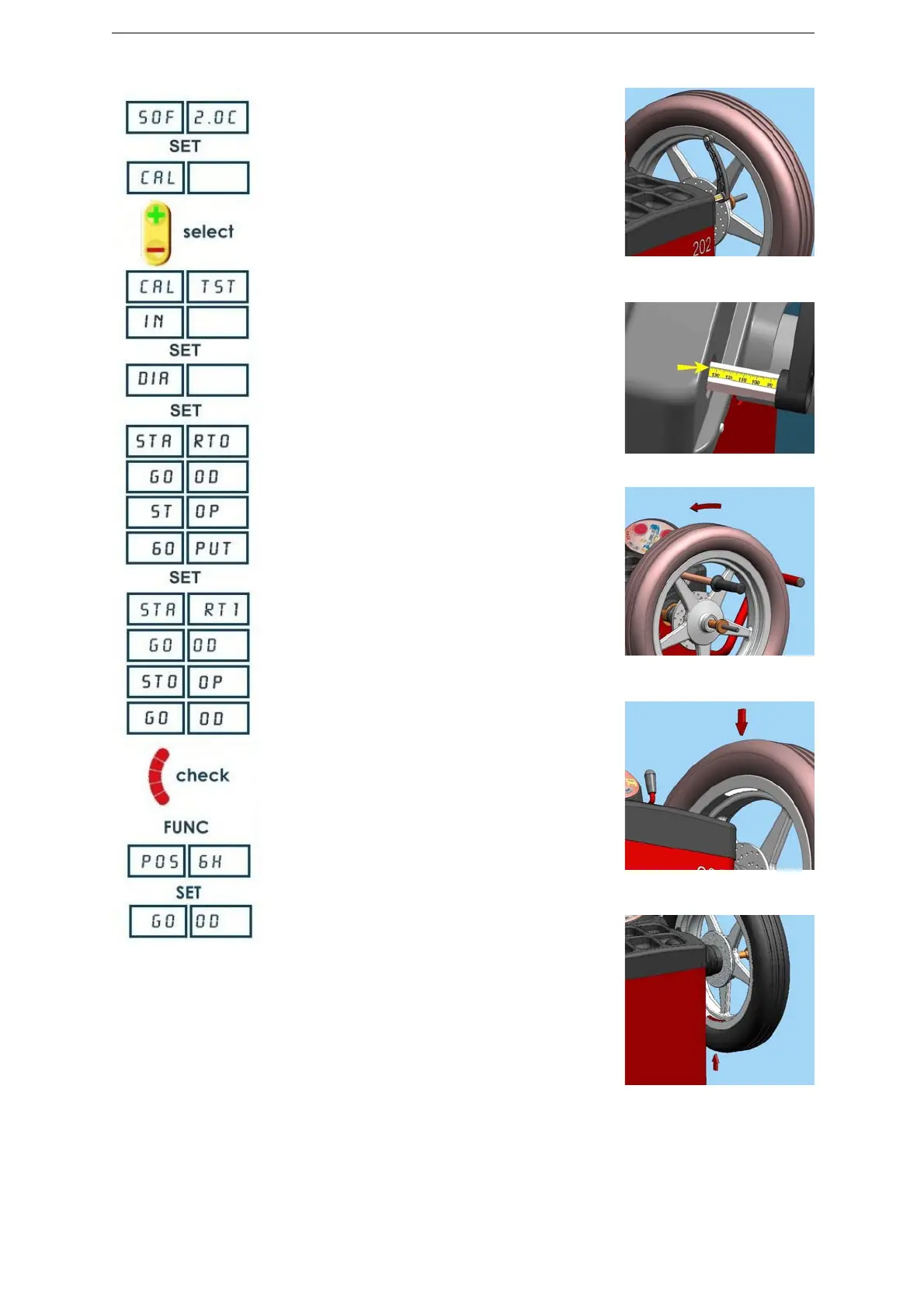
Press <+/-> to select CAL TEST
Place a wheel on the flange.
Insert the distance measure (IN) (Fig.13).
Insert the diameter measure (DIA).
Execute the first wheel calibration launch using the
appropriate wheel spinner (Fig. 14).
NOTE: ACC EL: impress greater speed.
RED UCE: reduce the speed.
GO OD: the speed is corrected.
Turn the wheel until the writing 60 PUT is displayed.
Apply a 60g adhesive weight on the internal side of the
wheel (Fig.15).
Execute the second wheel calibration launch.
Press <FINE> to see actual values. 60-0 (±3) is correct
result.
When all LED (left side) are lit, calibration weight must be
at exactly 6 o’clock.
If no, press <FUNC> to calibrate position.
Turn the wheel until the calibration weight is located at 6
o’clock.
Press <SET> to calibrate.
Press <MODE/ESC> to return to normal balancing mode.
NOTE technical calibration is only available for qualified personnel.
FIG. 16


 To Next Page