www.fastinc.com 1-800-243-9271 229-51414C © 2008-2010 FAST
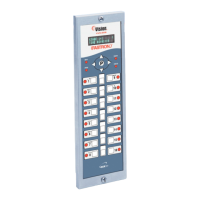
Vision Vertical Oven Controller
Programming the Controller
5
This document contains confidential information. The dissemination, publication, copying, or duplication of this document or the software described herein without prior written authorization is strictly prohibited.
Hold Fan Speed will be displayed, then either HIGH or
LOW. Use the left or right arrow keys to change be-
tween the 2 settings. Then press the “P” key.
Setback Time will be displayed, then XX:XX. To change
the Setback time, type in your new time. Then
press the “P” key.
Setback Temp will be displayed with the current set-
back temp XXXF. To change the setback tempera-
ture, type in your new temperature. Then press
the “P” key.
Preheat Time will be displayed then XX:XX. To change
the preheat time, type in your new time. Then
press the “P” key.
Factory Programming—3228
Entering Factory Programming and
Changing Factory Settings
Press and hold the “P” key for 3 seconds.
Product Cnt will be displayed. Press the down
arrow.
Programming will be displayed. Press the “P” key.
ENTER CODE will be displayed.
From ENTER CODE type in 3228, then press the “P”
key.
Display will show System.
Press the down arrow key to Factory, then press
the “P” key.
Max Prog Temp will be displayed, then either 550F or
500F. Use the left or right arrow keys to change
between the 2 settings. Then press the “P” key.
Fan Speed Type will be displayed, then either 1 SPEED
or 2 SPEED. Use the left or right arrow keys to
change between the 2 settings. Then press the “P”
key.
If you change the default setting, the controller
will prompt (Are you sure? Existing recipes fan
speed will be reset!). Choose YES or NO, then press
the “P” key.
Exit System Programming
System will be displayed. Press the arrow up key
and Exit will be displayed. Then press the “P” key.


 To Next Page