How do I know I am in an autostop?
• The engine will shut down, the tachometer
will
move to the zero position and the Stop/
Start telltale will illuminate in the instru
-
ment cluster.
How do I start the engine while in an autostop?
• While in a forward gear, the engine will start
when
the brake pedal or clutch is released or
the throttle pedal is depressed.
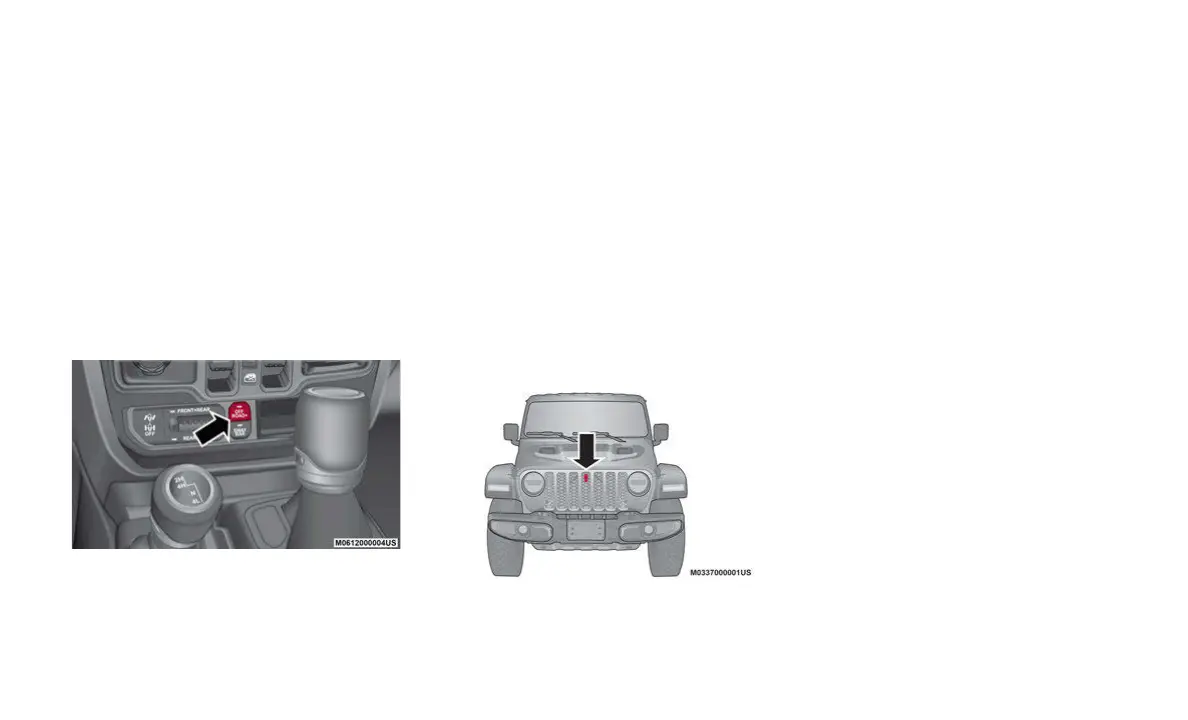
OFF ROAD+ BUTTON
Off Road+ Button
This feature allows the customer to clearly
communicate to the vehicle and the terrain it
will be operating on. The vehicle will automati
-
cally adjust the operating parameters of key
syste
ms (Throttle, Selec-Speed Control, Trac-
tion Control, Transmission Shift Mode) for
o
ptim
al performance on that terrain. The Off
Road+ button is a single button with two
distinct missions:
• If enabled in 4H, it will adjust the operation
of t
he vehicle for higher speeds and perfor-
mance.
• I
f enabled in 4L, it will adjust the operation
of t
he vehicle for very low speed rock picking
maneuvers.
TRAILCAM SYSTEM
TrailCam Location
Your vehicle may be equipped with the
TrailCam System that allows you to you see
an on-screen image of the terrain in front of
the vehicle. The image will be displayed on
the touchscreen display along with a caution
note “Check Entire Surroundings” across the
top of the screen.
The TrailCam view will be displayed in any
forwa
rd gear, and NEUTRAL, as long as the
vehicle speed is below 8
mph (13 km/h).
When
the vehicle speed is above this range,
a timer is started and will deactivate the
camera view after ten seconds.
NOTE:
The TrailCam System will stay active while
the v
ehicle is in 4L (Four-Wheel Drive Low
Range).
TRAILER HITCH ZOOM
If equipped, the Trailer Hitch Zoom feature
aids the driver in lining up the vehicle’s
trailer hitch to a trailer.
While the vehicle is in REVERSE, and the
back
up camera is active, the operator can
zoom in the camera’s display screen by 4x
the original view. This is done by selecting
the “magnifying glass” icon in the corner of
the display screen. To exit this view, select
the icon a second time, or place the vehicle
in a gear other than REVERSE.


 To Next Page