TOWING
NOTE:
The trailer tongue weight must be considered as part of the combined weight of occupants and cargo (ie. the GVWR), and the GVWR should
never
exceed the weight referenced on the Tire and Loading Information placard.
PHONE PAIRING
PAIRING PROCEDURE
Make sure the ignition is in the ACC or ON posi-
tion.
1. Press either the Phone button or the Settings
button in the Menu Bar on the touchscreen.
2. F
rom the Settings list, select Phone/Blue-
toot
h®, and then select Paired Phones or
Audio
Devices.
NOTE:
A message will display asking, “No Phone
C
onne
cted. Would you like to pair a phone?”
Select Yes. After pressing Yes, the radio prompts
will take you through the steps to connect your
phone via Bluetooth®. Uconnect Phone will
display an “In progress” screen while the system
is connecting. Once the pairing has been
successful, a message will display “Bluetooth®
pairing successful: The device supports Phone
and Audio”. Click the OK button.
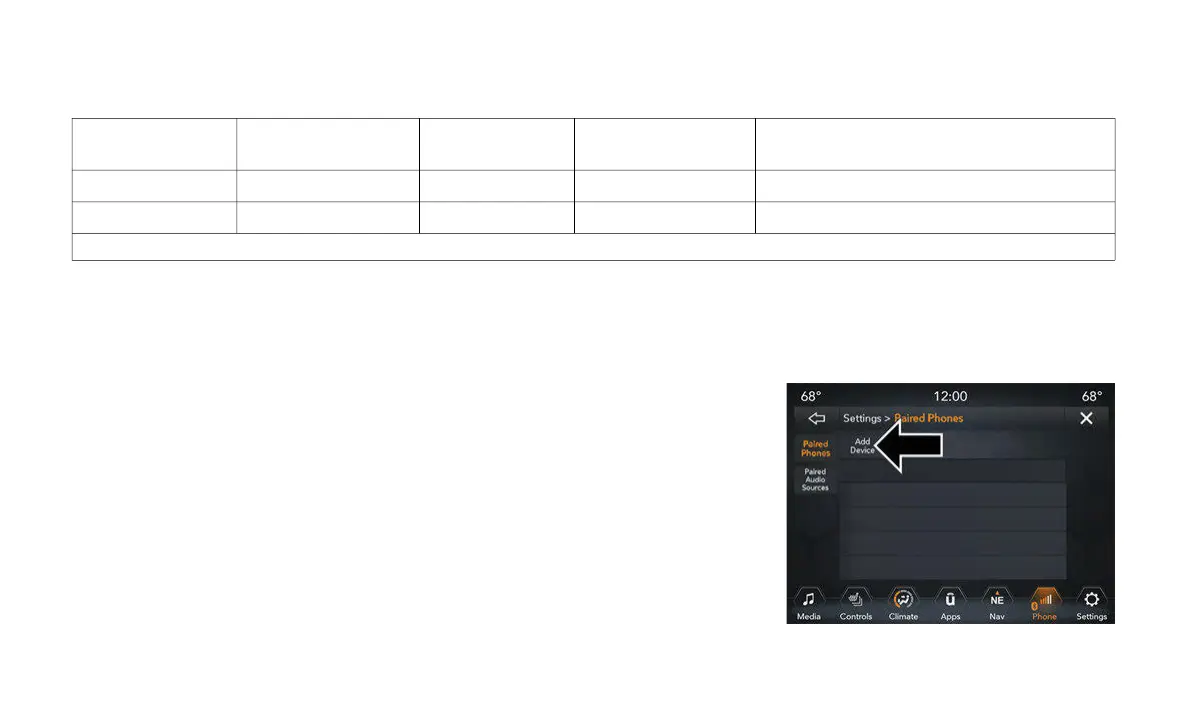
3. From the Paired Phone button, the Add
Devi
ce option will be listed under the “Paired
Phones” section.
Phone Pairing
Engine
GCWR (Gross
Combine
d Wt. Rating) Frontal Area
Max. GTW (Gross
Trailer Wt.) Max. Trailer Tongue Wt. (See Note)
3.6L 9,100 lbs (4,128 kg)
30 ft
2
(2.79 m
2
)
4,000 lbs (1,814 kg) 400 lbs (181 kg)
3.6L With Max Tow 12,800 lbs (5,806 kg)
30 ft
2
(2.79 m
2
)
7,650 lbs (3,470 kg) 765 lbs (347 kg)
Refer to local laws for maximum trailer towing speeds.


 To Next Page