Guilin Feiyu Technology Incorporated Company
Guilin Feiyu Technology Incorporated Company www.feiyu-tech.com service@feiyu-tech.com
- 7 -
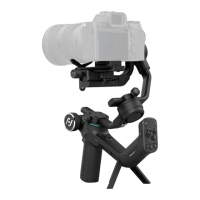
13. Long press function button until the screen lights up fully, the connection between
the gimbal and the computer will be established automatically, and the connection
status shows up.
14. Click on UPDATE START button to start upgrading, the process will display on the
software.


 To Next Page