7
Auto-rotation Mode
The G6 gimbal can easily create constant speed movements in the auto-rotation mode. This mode can be used for
recording both regular video and motion timelapse photography. For better performance, attach gimbal to the
FeiyuTech tripod, or other tripod, to keep it completely still.
( 1 ) Set rotation speed in Feiyu ON App
Note: Both the pan and tilt directions can be rotated.
G6
Rotation Speed
18s/
turn
12s/
turn
24s/
turn
30s/
turn
1min/
turn
2min/
turn
15min/
turn
8min/
turn
4min/
turn
4h/
turn
1h/
turn
(Default)
8h/
turn
30min/
turn
Connect to the Feiyu ON App and select desired speed from the auto-rotation mode rate option in the settings menu.
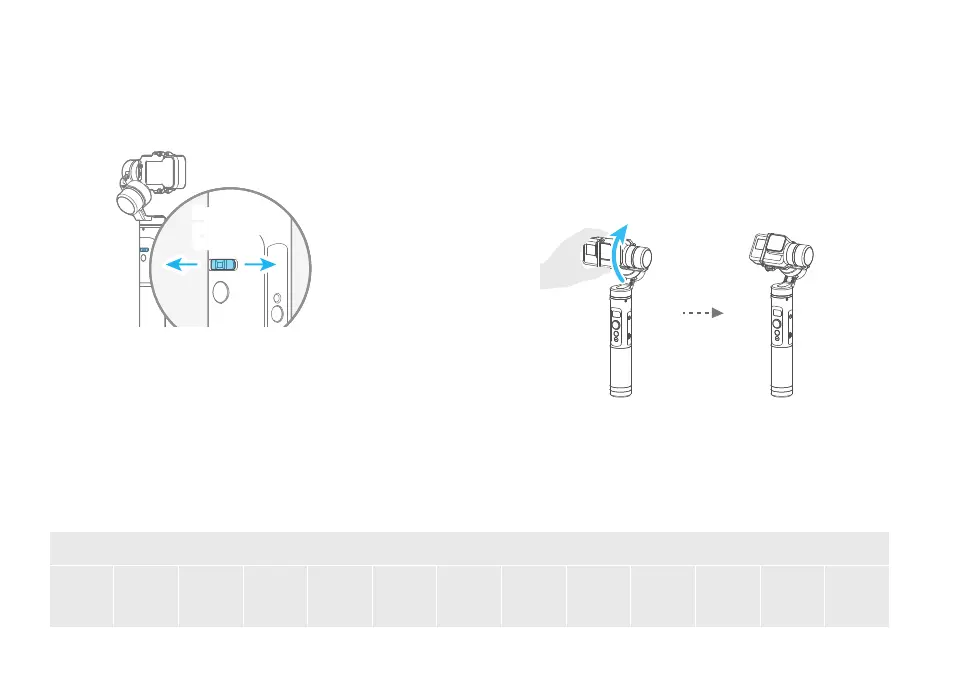
Manual Lock
Manually move camera to desired position,and hold for half a
second. New tilt and/or pan positions are automatically saved.
Take the tilt axis setting for example:
Camera can be manually positioned while in panning mode ,
follow mode or lock mode. Both the pan axis and tilt axis can
be manually set up.
Horizontal Angle Control
You can control the horizon angle via the horizontal
adjustment button while in panning mode, follow
mode or lock mode.
Horizontal
adjustment
button
Horizontal
adjustment
button
Move the horizontal adjustment button
to left or right














 To Next Page