4
TROUBLESHOOTING
0WFSIFBU*OEJDBUPS8IFOUIF0WFSIFBU*OEJDBUPSJTJMMVNJOBUFEUIFTISFEEFSIBTFYDFFEFEJUTNBYJNVNPQFSBUJOHUFNQFSBUVSFBOEOFFETUPDPPMEPXO5IJTJOEJDBUPS
will remain illuminated and the shredder will not operate for the duration of the recovery time.
#JO0QFO5IFTISFEEFSXJMMOPUSVOJGUIFCJOJTPQFO8IFOJMMVNJOBUFEDMPTFUIFCJOUPSFTVNFTISFEEJOH
* Shredder will not run when lid is open.
3FNPWF1BQFS8IFOJMMVNJOBUFEQSFTTSFWFSTF ); open lid and remove paper.
#JO'VMM8IFOJMMVNJOBUFEUIFTISFEEFSXBTUFCJOJTGVMMBOEOFFETUPCFFNQUJFE6TF'FMMPXFTXBTUFCBH
PRODUCT MAINTENANCE
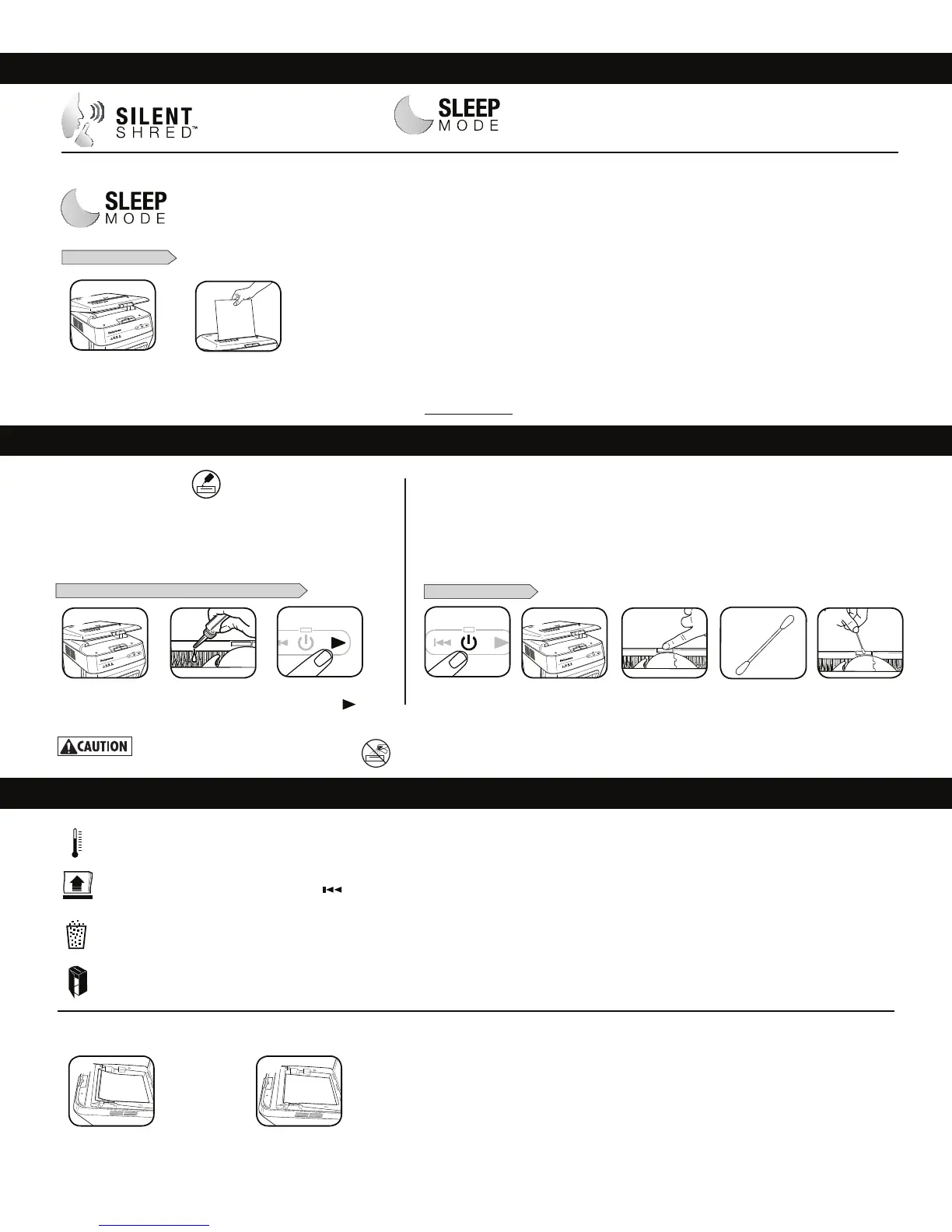
TO CLEAN THE SENSORS
CLEANING AUTO-START INFRARED SENSORS
1BQFSEFUFDUJPOTFOTPSTBSFEFTJHOFEGPSNBJOUFOBODFGSFFPQFSBUJPO)PXFWFSPOSBSFPDDBTJPOTUIFTFOTPST
may become blocked by paper dust causing the motor to run even if there is no paper present.
(Note: the paper detection sensors is located in the center of the paper entry).
"MMDSPTTDVUBOENJDSPDVUTISFEEFSTSFRVJSFPJMGPSQFBLQFSGPSNBODF*GOPU
PJMFEBNBDIJOFNBZFYQFSJFODFEJNJOJTIFETIFFUDBQBDJUZJOUSVTJWFOPJTF
XIFOTISFEEJOHBOEDPVMEVMUJNBUFMZTUPQSVOOJOH5PBWPJEUIFTFQSPCMFNT
we recommend you oil your shredder each time you empty your waste bin.
OILING SHREDDER
* Only use a non-aerosol vegetable oil in long
nozzle container such as Fellowes 35250
FOLLOW OILING PROCEDURE BELOW AND REPEAT TWICE
5VSOPGGBOEVOQMVH
shredder
*Carefully apply oil
across cutters (do not
get oil in paper tray)
Close lid. Press and
hold forward (
)
2-3 seconds
Open lid
Locate Auto-start
infrared sensor
6TJOHDPUUPOTXBC
wipe away any
contamination from
the paper sensors
Dip cotton swab in
rubbing alcohol
4
Open lid
1
3 1
2 53
ADVANCED PRODUCT FEATURES
For more information about all of Fellowes Advanced Product Features go to www.fellowes.com
SilentShred™
Technology
4JMFOU4ISFEOPJTFRVBMJUZ
shreds without noisy disruptions.
Energy Saving Sleep Mode
Feature shuts down the shredder
after 2 minutes of inactivity
WHEN IN SLEEP MODE
5PHFUPVUPGTMFFQNPEF
open lid and load paper
Insert paperor
2
1
2
If paper is not shredding
UISPVHIBVUPGFFEUSBZ
check position of paper.
Paper should be flat and
aligned with front of
paper tray.
1 2
SLEEP MODE OPERATION
Feature shuts down the shredder after 2 minutes
of inactivity





 To Next Page