EasyManua.ls Logo

Fellowes Venus 125 - Maintenance and Easi-Access Technology; Opening Laminator for Maintenance; Cleaning Laminator Rollers; Troubleshooting Common Issues

Fellowes Venus 125
6 pages
Print Icon
To Next Page IconTo Next Page
To Previous Page IconTo Previous Page
Loading...
http://www.monomachines.com
I
MAINTENANCE
-
Unique
Easi-Access
technology
This
laminator
is
equipped
with
the
unique
Easi-Access
technology
for
easy
maintenance.
This
allows
the
user
to
open
the
laminator
for
maintenance,
just
like
a
photocopier.
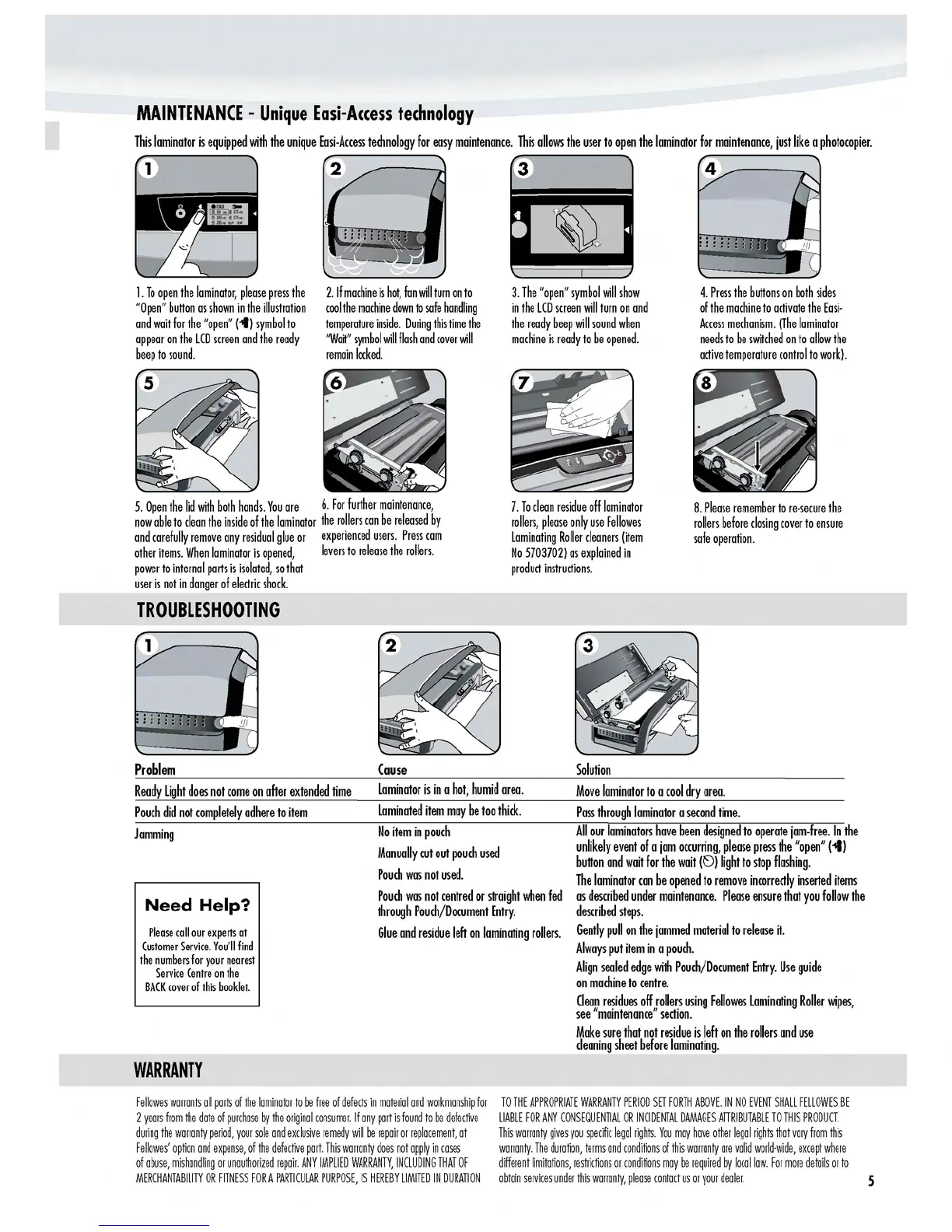
1.
To
open
the
laminator,
please
press
the
"Open"
button
as
shown
in
the
illustration
and
wait
for
the
"open"
(-t)
symbol
to
appear
on
the
LCD
screen
and
the
ready
beep
to
sound.
2.
If
machine
is
hot,
fan
will
turn
on
to
cool
the
machine
down
to
safe
handling
temperature
inside.
During
this
time
the
"Watt"
symbol
will
flash
and
cover
will
remain
locked.
3.
The
"open"
symbol
will
show
in
the
LCD
screen
will
turn
on
and
the
ready
beep
will
sound
when
machine
is
ready
to
be
opened.
4.
Press
the
buttons
on
both
sides
of
the
machine
to
activate
the
Easi-
Access
mechanism.
(The
laminator
needs
to
be
switched
on
to
allow
the
active
temperature
control
to
work).
7.
To
clean
residue
off
laminator
rollers,
please
only
use
Fellowes
Laminating
Roller
cleaners
(item
No
5703702)
as
explained
in
product
instructions.
8.
Please
remember
to
re-secure
the
rollers
before
closing
cover
to
ensure
safe
operation.
5.
Open
the
lid
with
both
hands.
You
are
6.
For
further
maintenance,
now
able
to
clean
the
inside
of
the
laminator
the
rollers
can
be
released
by
and
carefully
remove
any
residual
glue
or
experienced
users.
Press
cam
other
items.
When
laminator
is
opened,
levers
to
release
the
rollers.
power
to
internal
parts
is
isolated,
so
that
user
is
not
in
danger
of
electric
shock.
TROUBLESHOOTING
Problem
Solution
Cause
Ready
Light
does
not
come
on
after
extended
time
Laminator
is
in
a
hot,
humid
area.
Move
laminator
to
a
cool
dry
area.
Pouch
did
not
completely
adhere
to
item
Laminated
item
may
be
too
thick.
Pass
through
laminator
a
second
time.
Jamming
No
item
in
pouch
Manually
cut
out
pouch
used
Pouch
was
not
used.
All
our
laminators
have
been
designed
to
operate
jam-free.
In
the
unlikely
event
of
a
jam
occurring,
please
press
the
"open"
(-4)
button
and
wait
for
the
wait
(~)
light
to
stop
flashing.
The
laminator
can
be
opened
to
remove
incorrectly
inserted
items
Need
Help?
Pouch
was
not
centred
or
straight
when
fed
through
Pouch/Document
Entry.
as
described
under
maintenance.
Please
ensure
that
you
follow
the
described
steps.
Please
call
our
experts
at
Glue
and
residue
left
on
laminating
rollers.
Gently
pull
on
the
jammed
material
to
release
it.
Customer
Service.
You'll
find
the
numbers
for
your
nearest
Service
Centre
on
the
BACK
cover
of
this
booklet.
Always
put
item
in
a
pouch.
Align
sealed
edge
with
Pouch/Document
Entry.
Use
guide
on
machine
to
centre.
Clean
residues
off
rollers
using
Fellowes
Laminating
Roller
wipes,
see
"maintenance"
section.
Make
sure
that
not
residue
is
left
on
the
rollers
and
use
cleaning
sheet
before
laminating.
WARRANTY
Fellowes
warrants
all
parts
of
the
laminator
to
be
free
of
defects
in
material
and
workmanship
for
TO
THE
APPROPRIATE
WARRANTY
PERIOD
SET
FORTH
ABOVE.
IN
NO
EVENT
SHALL
FELL
OW
ES
BE
2
years
from
the
date
of
purchase
by
the
original
consumer.
If
any
part
is
found
to
be
defective
LIABLE
FOR
ANY
CONSEQUENTIAL
OR
INCIDENTAL
DAMAGES
ATIRIBUTABLE
TO
THIS
PRODUCT.
during
the
warranty
period,
your
sale
and
exclusive
remedy
will
be
repair
or
replacement,
at
This
warranty
gives
you
specific
legal
rights.
You
may
have
other
legal
rights
that
vary
from
this
Fellowes'
option
and
expense,
of
the
defective
part.
This
warranty
does
not
apply
in
cases
warranty.
The
duration,
terms
and
conditions
of
this
warranty
are
valid
world-wide,
except
where
of
aruse,
mishandling
or
unauthorized
repair.
ANY
IMPLIED
WARRANTY,
INCLUDING
THAT
OF
different
limitations,
restrictions
or
conditions
may
be
required
by
local
law.
For
more
details
or
to
MERCHANTABILITY
OR
FITNESS
FOR
A
PARTICULAR
PURPOSE,
IS
HEREBY
LIMITED
IN
DURATION
obtain
services
under
this
warranty,
please
contact
us
or
your
dealer.
s
http://www.monomachines.com

Other manuals for Fellowes Venus 125

Related product manuals