G-DEC 3O
f e n d e r . c o m
15
G-DEC 3O G-DEC 3O
f e n d e r . c o mf e n d e r . c o m
Streaming MIDI Files to the G–DEC 30
If you wish to play any available General MIDI file from your
PC through the G–DEC 30, you will need a third party PC
application that is able to play MIDI files to an external MIDI
port. Search for a MIDI player or MIDI sequence utility from
your favorite search engine online that works with your specific
computer. Consult the documentation for your application
on proper configuration. Once properly configured, play any
MIDI file (typically a file with the .MID extension) from your
MIDI player or sequence application. The MIDI Out port of
your MIDI interface device must be connected to the MIDI
In port on the G–DEC 30. Note that if the song is playing but
sounds cluttered, make sure any MIDI thru function in your
application is disabled, or simply unplug the MIDI cable from
the MIDI Out port on the G–DEC 30. The G–DEC 30 always
outputs any MIDI information received on the MIDI In port on
the MIDI Out port which may result in a repeated loop if your
application has MIDI throughput enabled.
Advanced MIDI sequence applications will allow you to create
your own MIDI songs for playback on the G–DEC 30. Note that
although the G–DEC 30 can store MIDI music, G–DEC 30 will
only play streamed audio from a PC and will not store streamed
audio directly. Storing MIDI music is accomplished through a
different mechanism. To store audio to the G–DEC 30, see
section “Storing MIDI Files to the G–DEC 30” below.
If you would like to construct a MIDI song of your own using
some of the patterns onboard the G–DEC 30 simply play the
pattern you would like and record as much MIDI Out data
from the G–DEC 30 as you desire using your MIDI sequence
utility application on the PC. Note this will not record any
guitar audio, simply MIDI data from the patterns. You can
then modify and arrange patterns into songs using your MIDI
sequencer software application and stream the resulting
file back to the G–DEC 30 as mentioned above. Refer to the
Appendix for channels of General MIDI voicings.
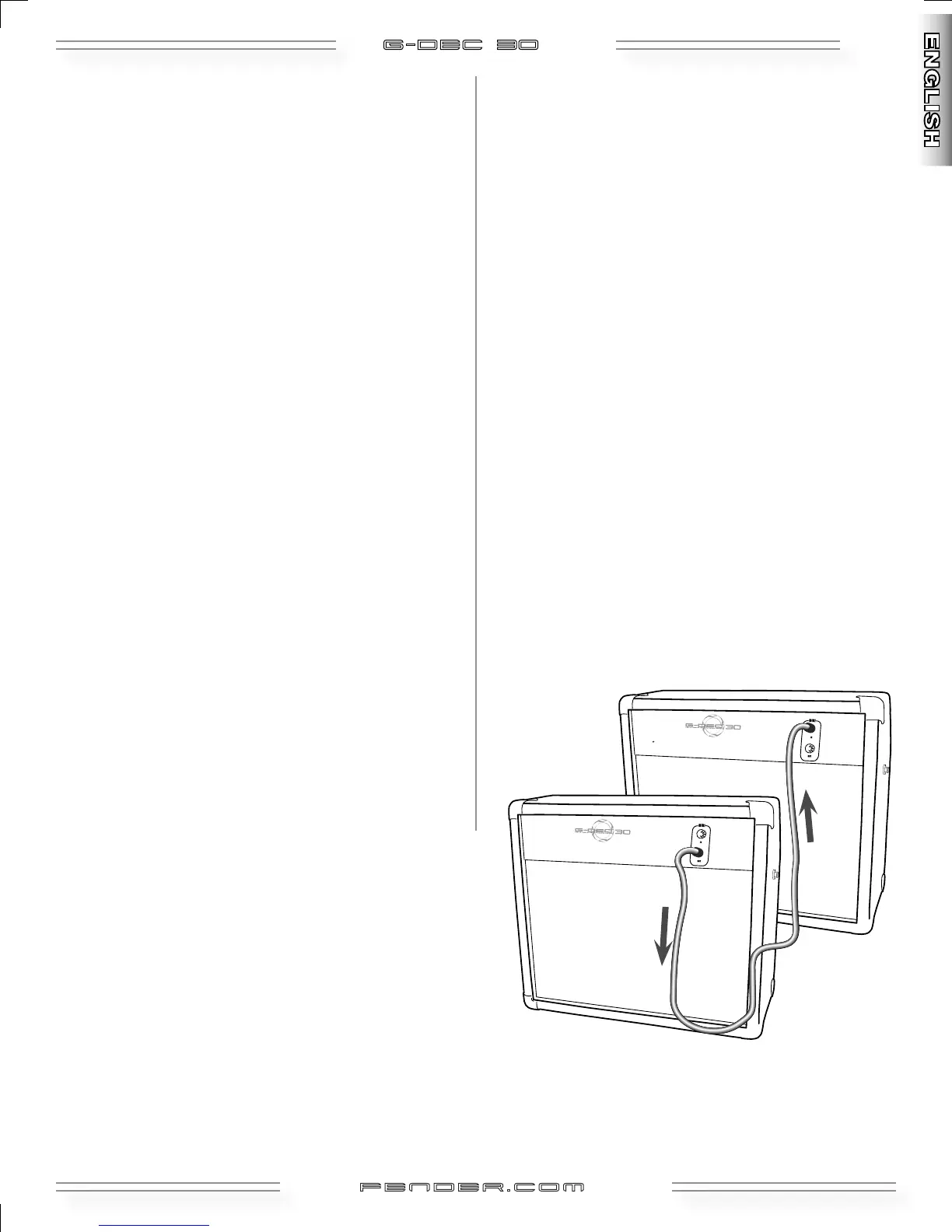
Connecting Two G–DEC 30s Together
You may also share presets directly from one G–DEC 30 to
another by simply connecting the two G–DEC 30s with a
standard MIDI cable. Connect the MIDI cable to the MIDI Out
port of the G–DEC 30 that holds the preset you want to share.
Then connect the other end of that MIDI cable to the MIDI In
port on the G–DEC 30 into which you wish to load the preset.
Then follow the Dump preset procedure (see Utility Mode,
page 12) on the G–DEC 30 that holds the preset you want to
share.
Another fun thing to try with two G–DEC 30s is to connect
them with a MIDI cable as described above for a synchronized
jam session or lesson! On the G–DEC 30 with the MIDI Out
port connected, select a desired preset to jam along with.
On the other G–DEC 30 select any guitar tone desired. Then
press Start/Stop on the first G–DEC 30 to start the drum
pattern. The MIDI data is then sent from the first G–DEC 30
to the second and is synchronized. Now you are both able to
jam along to the same synchronized drum pattern with two
different guitar tones!
Storing MIDI Files to the G–DEC 30
Download the G–DEC 30 MIDI file utility available at:
http://www.fender.com/support/downloads/index.php
Follow the instructions included with the application.
Sending
MIDI
Receiving
MIDI






 To Next Page