10
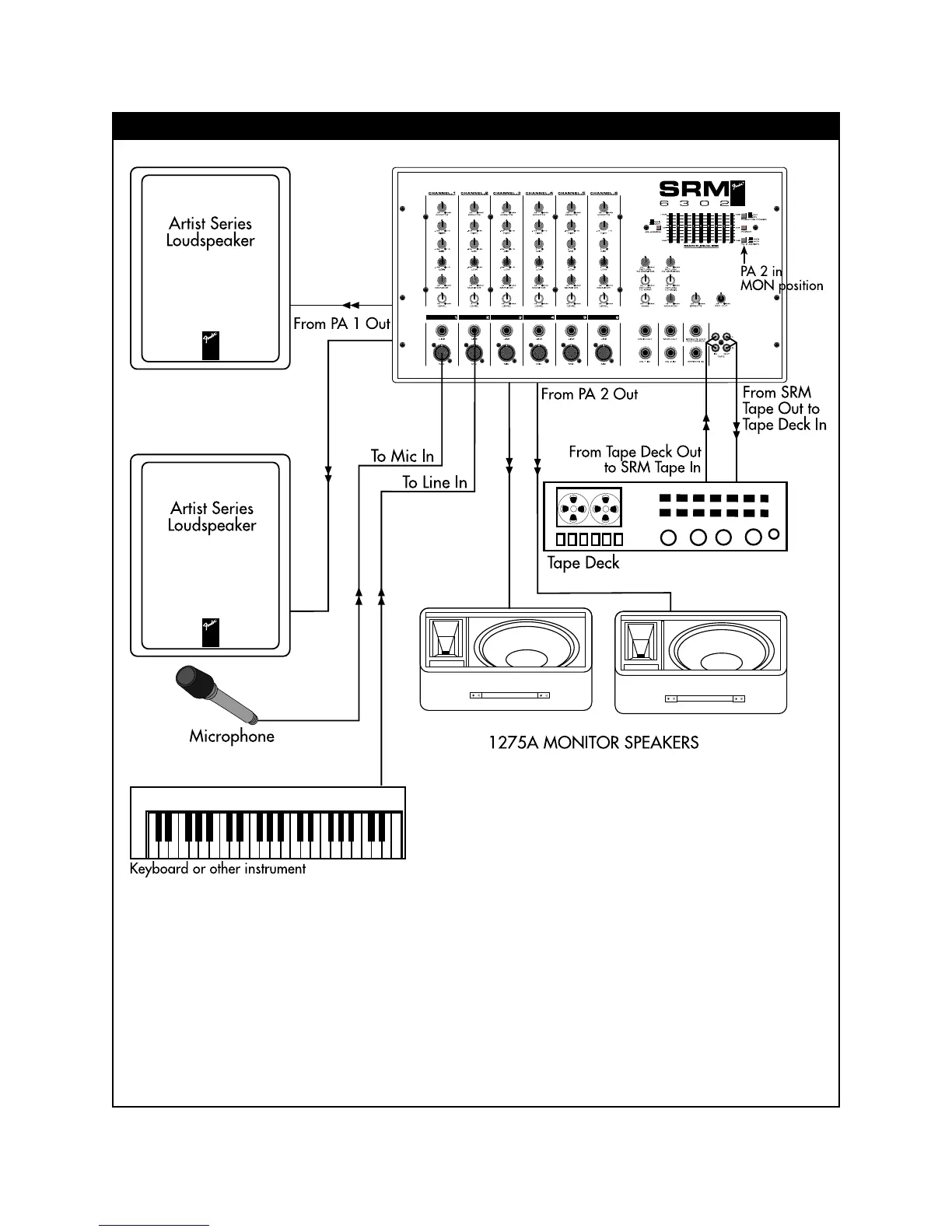
SIMPLE SRM SETUP WITH MONITORS
1. Connect a microphone to a Mic input jack and any
keyboard or other instrument to a Line input jack.
2. Next, connect speaker cords from the PA 1 Out
jacks to the main speakers and from the PA 2 Out
jacks to the monitor speakers.
3. The level control in each channel strip adjusts the
amount of signal sent to the main bus where all
channel signals are summed. The Main control in
the master section adjusts the volume level to the
main speakers. The Monitor control in each
channel strip adjusts the amount of signal sent to
the monitor bus where all monitor channel signals
are summed. The Monitor control in the master
section adjusts the volume level to the monitor
speakers.
4. Be sure to turn the tape deck, keyboard or other
instruments and gear on first, then the SRM 6302 /
8302.


 To Next Page