5
FERtech 25 OV
Cod. 3540U431 - 11/2009 (Rev. 00)
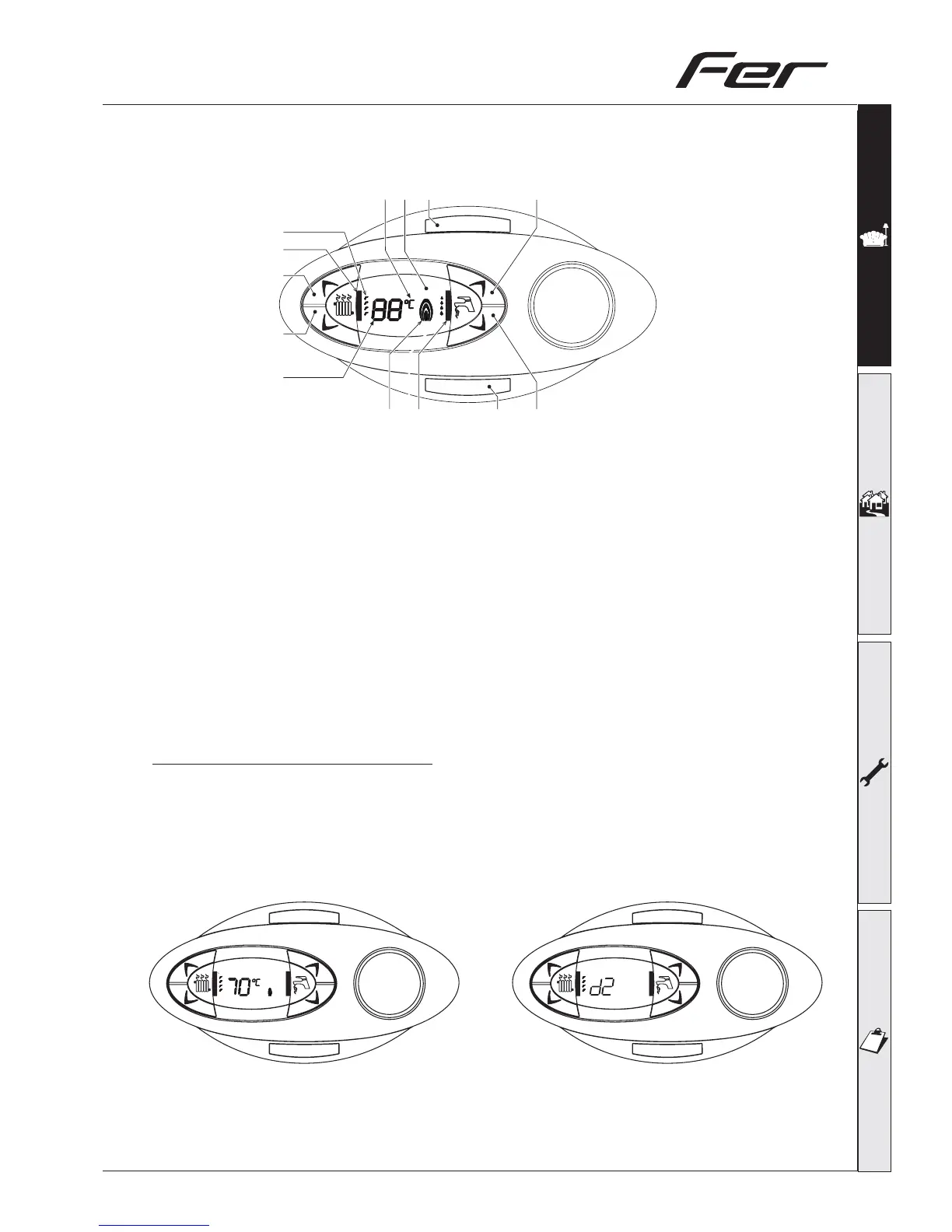
1.2 Control panel
eco/comfort
reset
1
14
11
7
6
5
4
3
2
15
13
8
12
fig. 1
1 = Domestic Hot Water temperature setpoint decreasing push button (not used)
2 = Domestic Hot Water temperature setpoint increasing push button (not used)
3 = Central Heating water temperature setpoint decreasing push button
4 = Central Heating water temperature setpoint increasing push button
5 = Display LCD
6 = Reset
7 = On-Off push button
8 = Domestic Hot Water symbol
11 = Multi-function indication
12 = Degrees indication
13 = Central Heating mode operation
14 = Central Heating symbol
15 = Burner on and actual load indication
Indication during boiler operation
Demand mode
The Boiler heat demand (generated by the Programmer, room thermostat and cylinder thermostat) is
indicated by the flashing of the Hot Air symbol over the radiator (part. 13 and 14 – fig. 1). The display
(part. 11 – fig. 1) indicates the actual System water temperature and, during the delay time, the text
“d2”.
eco/comfort
reset
eco/comfort
reset
I
I
I
I
I
I
I
I
I
I
I
I
I
I
I
I
I
I
I
I
I
fig. 2



 To Next Page