15
CONNECTIONS
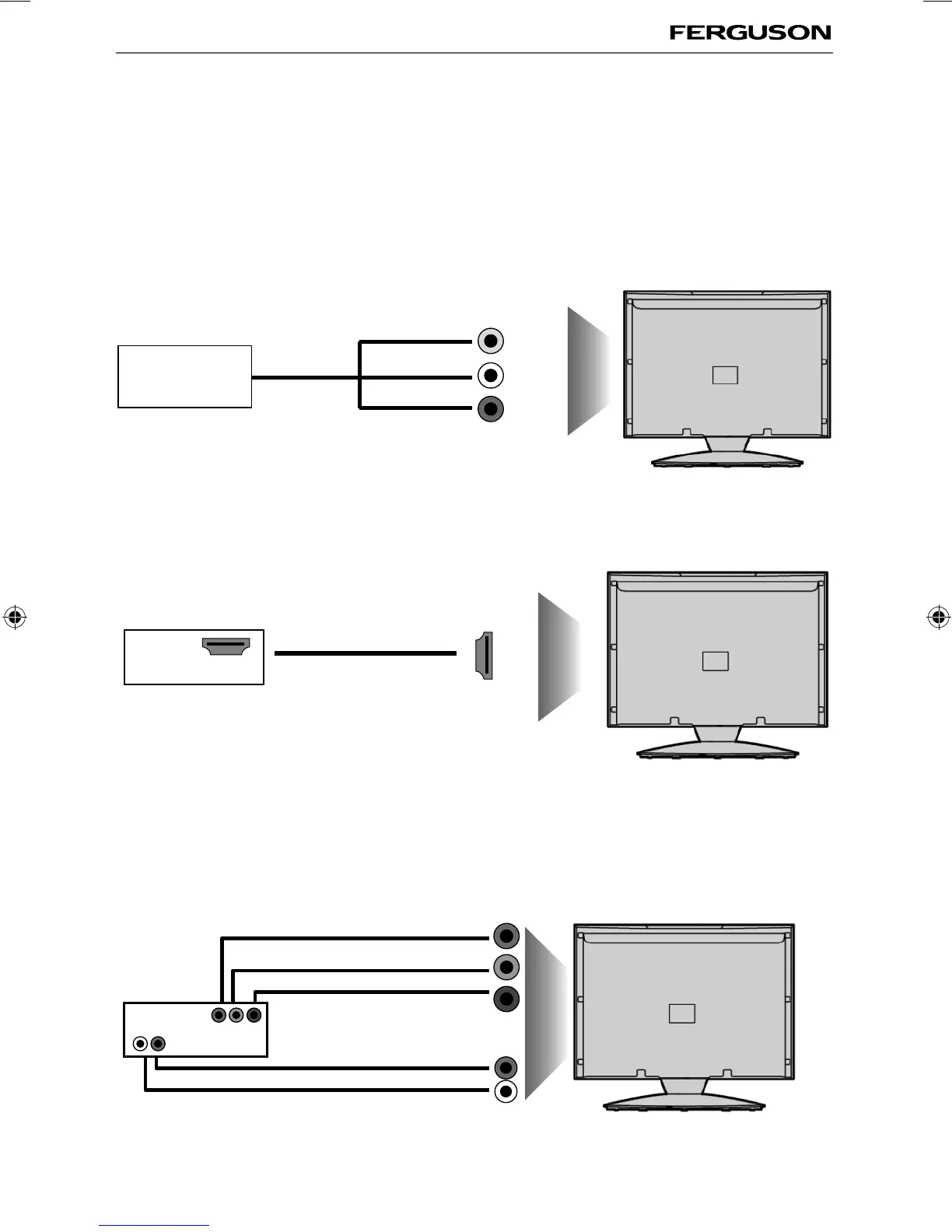
Connecting a Camcorder, Camera or Games Console
Source should be set to Video
Connecting a High Defi nition (HD) Device
Option 1 - via HDMI to HDMI cable
A HDMI cable can output both video and audio and enables you to enjoy digital-quality video and audio
with minimal loss of quality.
TVs Input/Source should be set to HDMI.
Option 2 - via Component cable
If you are supplied with a cable from the device which has RED, GREEN, BLUE, RED & WHITE connectors
you must connect via Component (for picture) and by phono cable (for sound).
TV Source should be set to Component.
Connections
Component (HD)
Component
Green
Blue
Red
A udi o L/R
White
Red
Audio
In L/R
Camera or
Camcorder
Yellow
White
Red
Audio
In L/R
Video
HDMI OUT
HDMI
ferguson user manual F3216LVD2.indd Sec1:15ferguson user manual F3216LVD2.indd Sec1:15 22/06/2011 10:55:5322/06/2011 10:55:53



 To Next Page