28
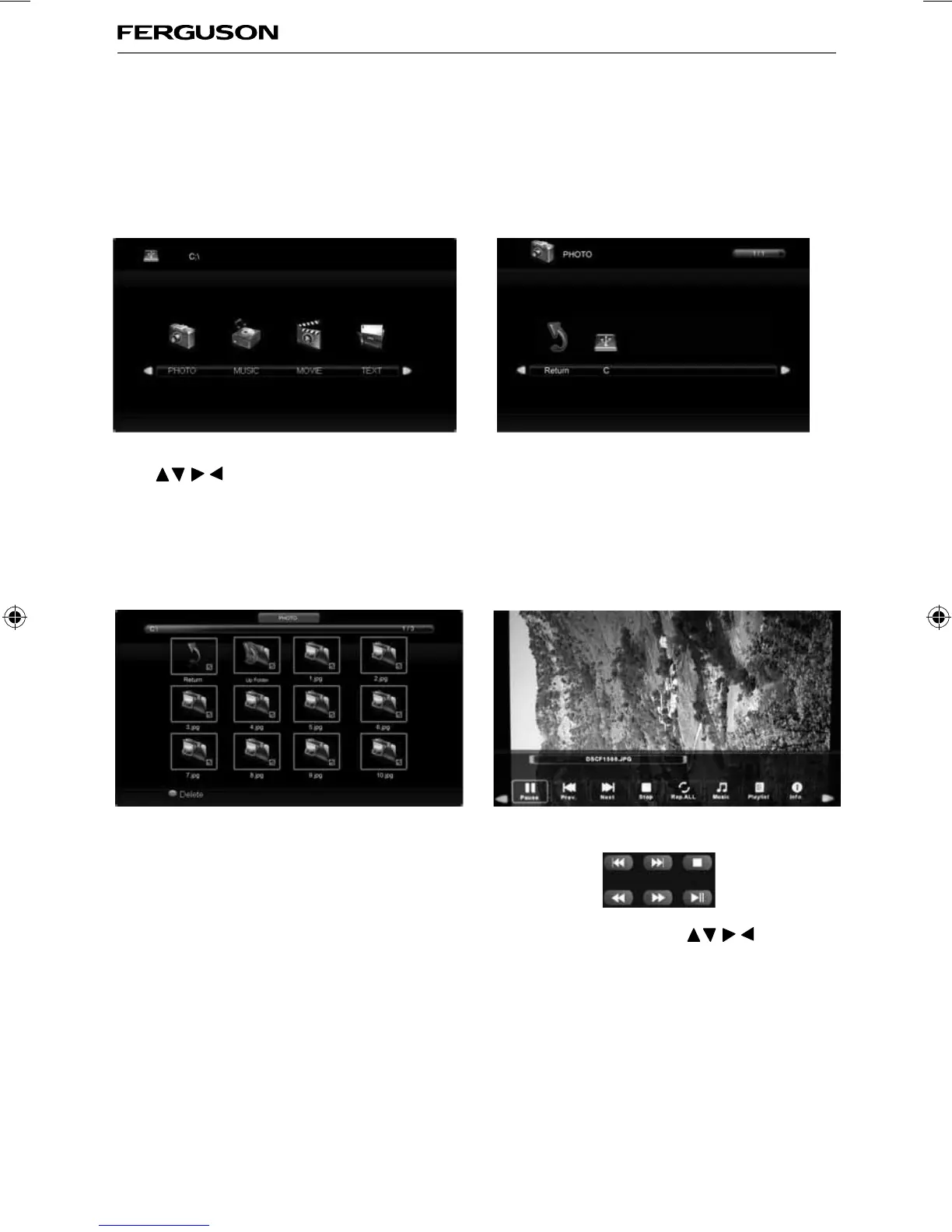
USB Mode / Media Player
USB MODE / MEDIA PLAYER
1) You can navigate through the menus using the
scroll
buttons. To confi rm the item you
wish to play/view press [OK] button.
2) Select the drive you require. (If your drive only
has 1 partition you will only see 1 item).
3) You can now access the item. Press OK to view. 4) While viewing you control the item using
or by pressing ( i ) and using
and (OK)
USB mode offers playback of various different types of content that you have saved on your USB Memory
Stick.
Please refer to technical specifi cation page for compatible fi le types
On switching to USB source the above menu screen will appear. The content will be divided into Photo,
Music, Movie and Text based on fi le type.
ferguson user manual F3216LVD2.indd Sec1:28ferguson user manual F3216LVD2.indd Sec1:28 22/06/2011 10:55:5922/06/2011 10:55:59


 To Next Page