26
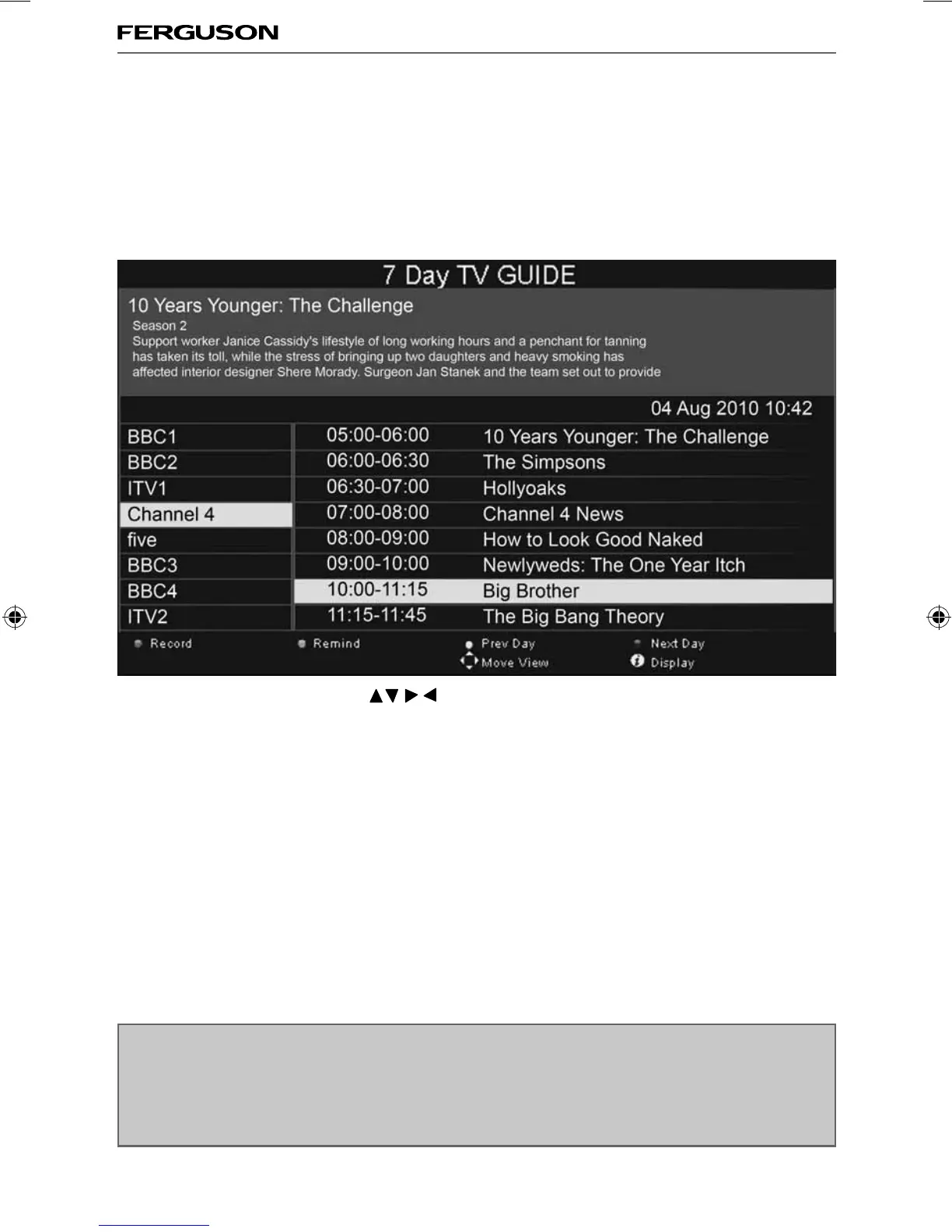
7 Day TV Guide
7 DAY TV GUIDE / USB RECORD
TV Guide is available in Digital TV mode. It provides information about forthcoming programmes (where
supported by the freeview channel). You can view the start and end time of all programmes and on all
channels for the next 7 days and set reminders.
1) Press [TV GUIDE]. The following 7 Day TV Guide will appear.
2) Navigate through the menu using
You can now:
Record a Programme by pressing RED
Set a reminder by pressing GREEN
View a previous day by pressing YELLOW
View the next day by pressing BLUE
3) Press [EXIT] to exit the 7 day TV Guide.
Note: This TV is designed to operate with USB memory sticks up to 32GB. It is possible to use either a
USB memory stick or a USB portable Hard Drive of a larger capacity, however, it must be formatted to
the FAT32 fi le system in order to operate correctly. At the time of printing this user guide, Windows
XP/Vista computers are only capable of formatting up to 32GB, therefore, you will need a software
programme/utility to format larger USB drives/hard drives to FAT32. Additional help and support is
available from the web site.
ferguson user manual F3216LVD2.indd Sec1:26ferguson user manual F3216LVD2.indd Sec1:26 22/06/2011 10:55:5922/06/2011 10:55:59



 To Next Page