3VDS SMILE MONITOR 3
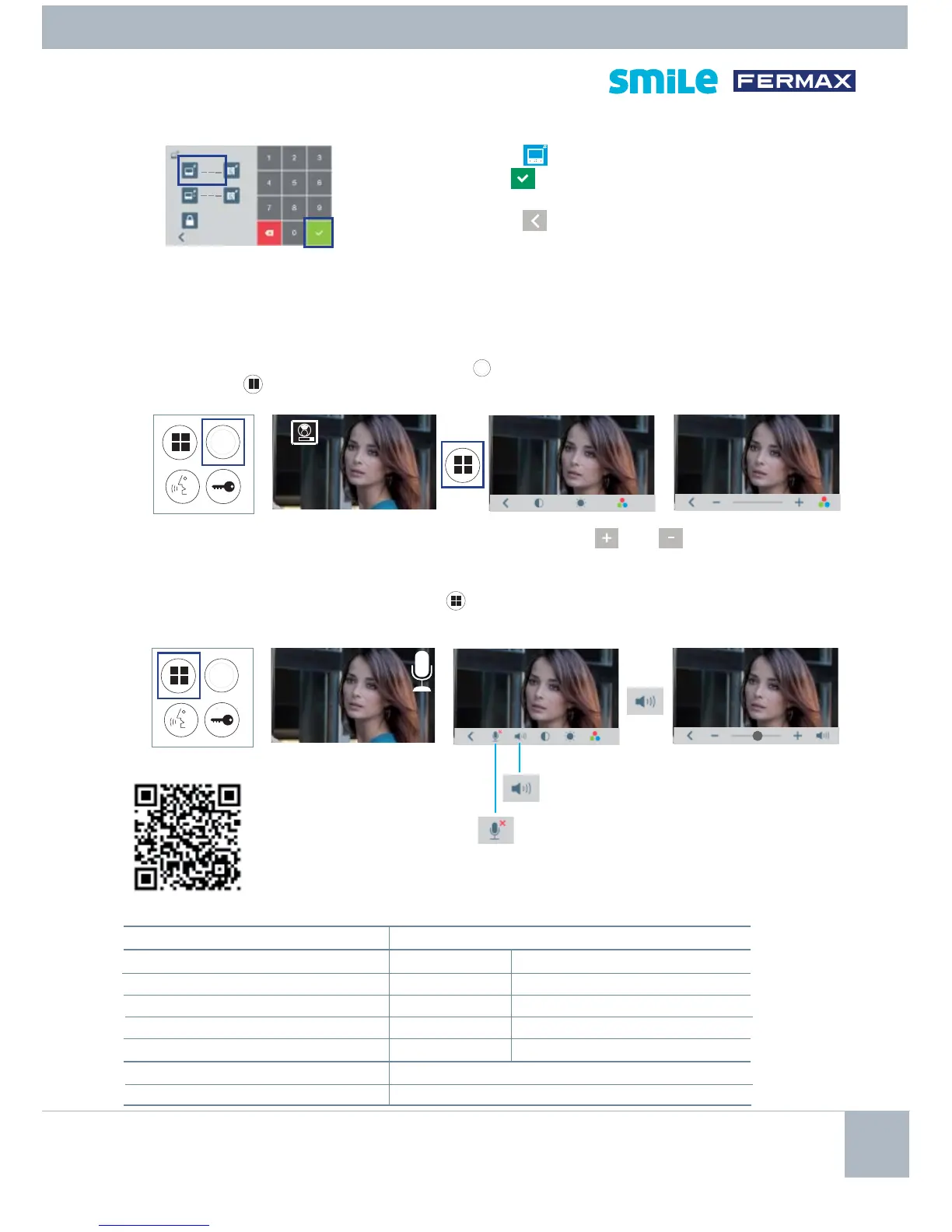
With an image on the monitor, by pressing the
button,
(or upon receiving a call without picking
up), press the
key to show the video settings.
While the audio channel is open, press the
button and a menu screen appears for this setting.
Select the settings option and increase or
decrease with
and .
Mute: function to delete the audio.
TECHNICAL CHARACTERISTICS (7" touch screen)
Power supply 18 Vdc
Consumption Home Automation mode
in standby 45 mA 190 mA
audio + video 720 mA 870 mA
audio + video with inductive loop 1050 mA
in menu 450 mA 570 mA
Operating temperature [-5º , +40ºC]
Humidity 5% - 95%
Select the icon and enter the code via the keypad and
confi rm with
upon completion. VDS Call range from
1...199.
Exit the menus
until the monitor returns to standby.
PROGRAMMINGFROM THE MONITOR
3. MONITOR SETTINGS
VIDEOSETTINGS
AUDIOSETTINGS
FULL
MANUAL
PROGRAMMING MENU
Audio volume
1111
12 3 4
1
12 3 4









 To Next Page