DUOX PLUS WIFI VEO XS MONITOR 9
PRODUCT DESCRIPTION
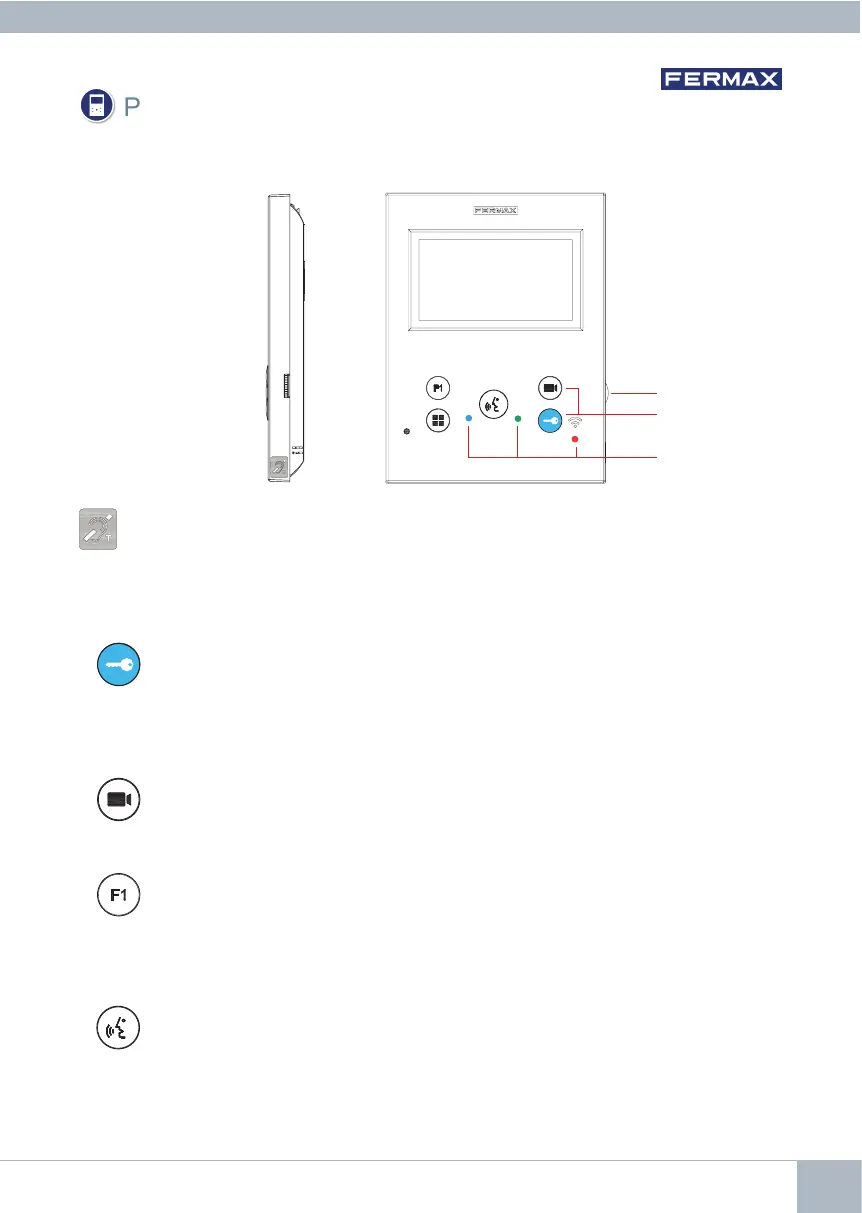
WIFI VEO XS Monitor
InductionloopIdentiedwiththislabel(depending on model).
· Includes an induction loop that works with devices worn by people with hearing
disabilities.
Note: In hearing aids with manual mode selection, the Digital Mode must be set.
Potentiometer
Buttons
Leds
Button for lock release / calls to the concierge.
·When you are in communication with the Outdoor Panel (audio only or video
only or audio+video), pressing this button activates the lock release.
· With the monitor in idle mode, pressing this button makes a call to the conci-
erge (if there is a concierge and the monitor is in Day Mode or Mixed Mode).
Auto-On button.
Connection via block camera or General Entrance camera(feature available
depending on the type of installation see Chapter Operation: Auto-on).
Auxiliary Function F1.
Auxiliary Function (negative output "-" / command transmission).
Negative transmission: Negative output is emitted by terminal F1 when the F1
button is pressed, which also
sends an F1 activation command in order to ac-
tivate an auxiliary device.
BUTTONS
Audio Button.
When you receive a call, press this button to speak with the visitor. The outdoor-in-
door audio channel is opened, (the blue LED lights up steadily to indicate that you
are in conversation with the outdoor panel and everything you say will be heard
on it), and the device is in hands-free mode. Press to end the communication (the
blue audio button LED will turn off again and the red LED will come on).














 To Next Page