10 DUOX PLUS WIFI VEO XS MONITOR
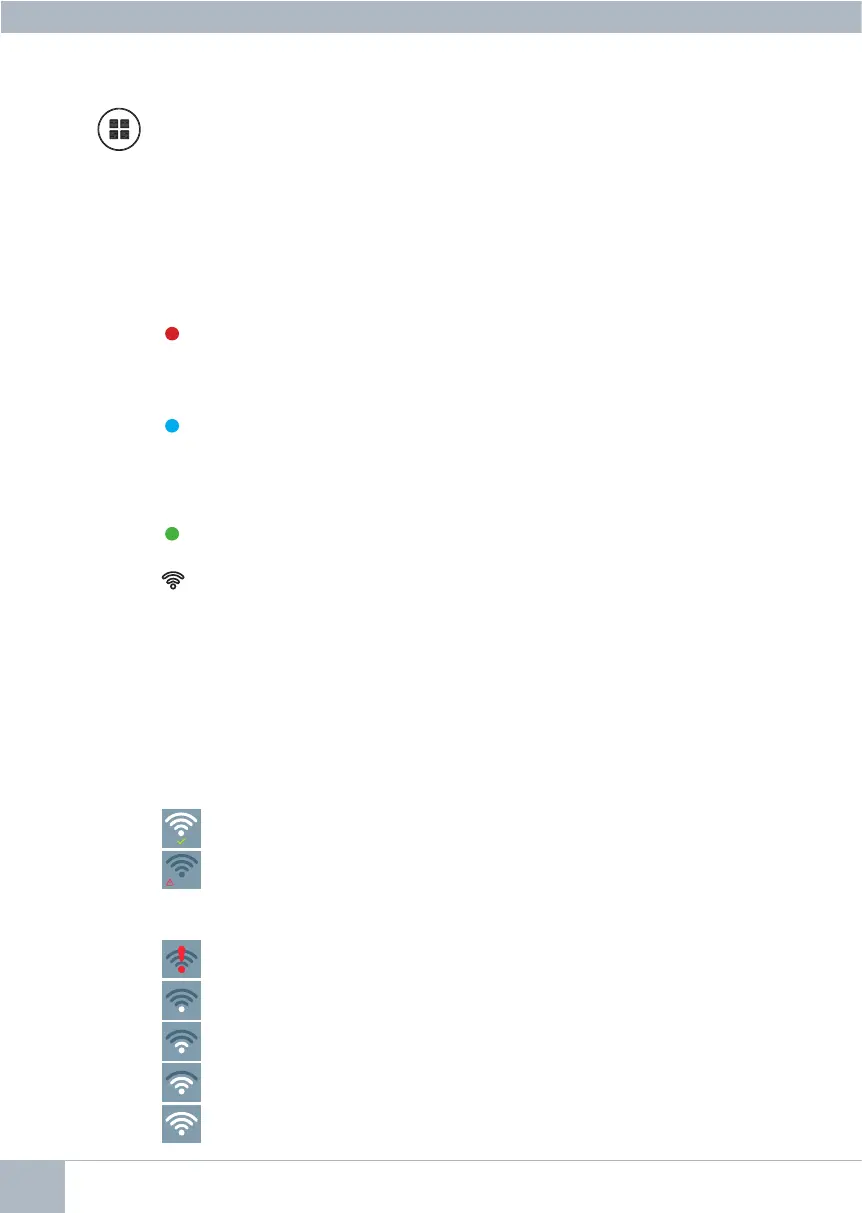
Menu Button.
· To access:
- Programming Menu, it is accessed when the monitor is not programmed.
From this menu, you can program the monitor according to your installation
needs.
- User Menu, (once the monitor is programmed). From this menu, you can
access the user settings and customise them as you wish.
Red LED:
Switched on. Monitor is idle.
Intermittent. Indicates that the Do Not Disturb feature is enabled.
Blue LED:
Intermittent. Monitor not programmed (idle).
Switched on. Conversation in hands-free audio mode.
On/Intermittent. Conversation in simple audio mode
Green LED: Accordingtoconguration.
LEDs
Led Connectivity (wi).
See Operation chapter: Pairing. Call forwarding.
On the monitor:
-Intermittentfastblinking.ThewhiteWIFILEDonthemonitorwillstartashing
whentheapplicationandthemonitorbegintosynchronizewitheachother.
- On. The monitor's white WIFI led remains lit when the new linked home is
shown as available and connected.
- Intermittent slow blinking. If a call is accepted in the application, the monitor
willremainlockedandwillshowtheWIFILEDashingoncepersecond.
On the monitor screen:
ERROR
Messageofconrmationinthemonitorpairingprocess.
Error message in the monitor pairing process.
Wisignalstrengthicondisplayedinthemenu:Shows5levelsbetween0%
and 100%:
Signal strength between 0% and 20% or unpaired monitor.
Signal strength between 20% and 40%.
Signal strength between 40% and 60%.
Signal strength between 60% and 80%.
Signal strength between 80% and 100%.














 To Next Page