12 DUOX PLUS WIFI VEO XS MONITOR
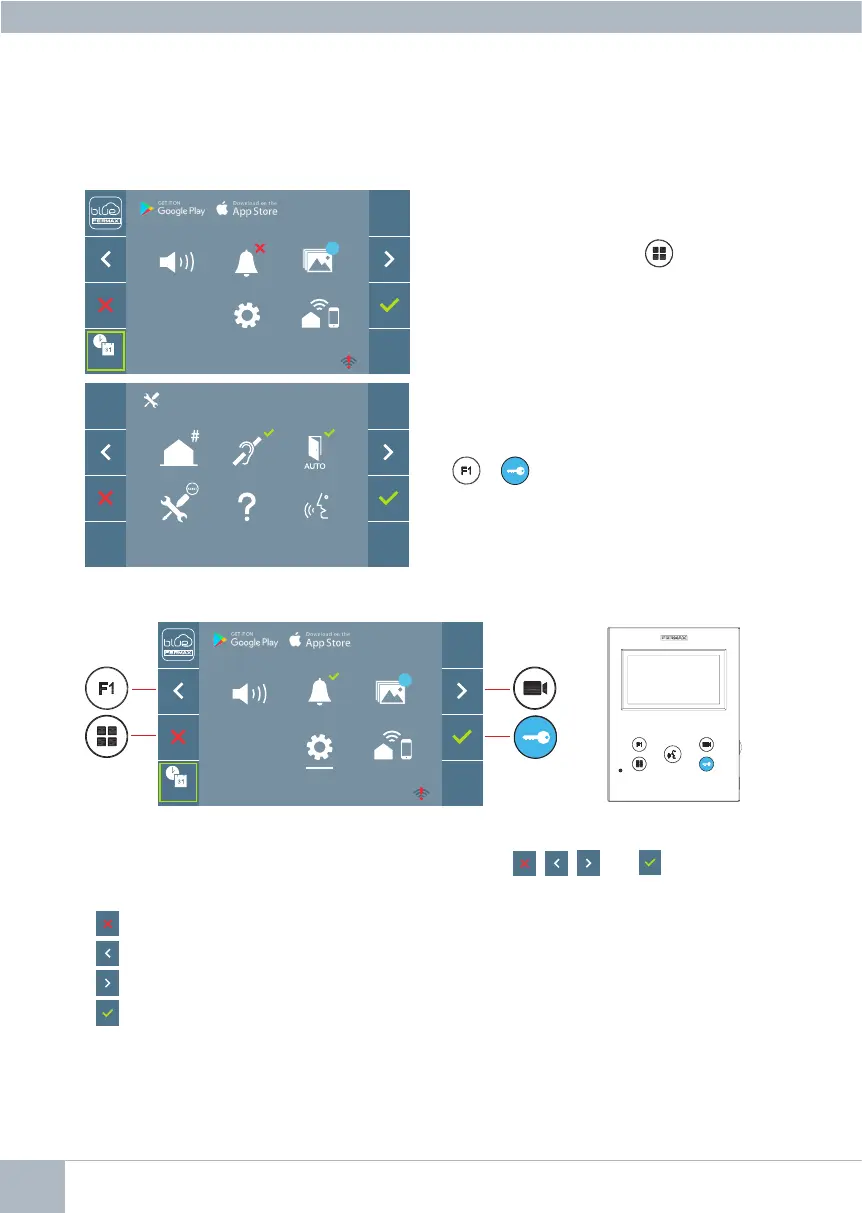
2. Whilst on the User Menu, press the following
buttons simultaneously:
+
2. PROGRAMMING: NAVIGATION BUTTONS AND MONITOR PUSH-BUTTONS
navigation buttons
The icons displayed on the screen (navigation buttons: , , and ), are controlled
via the corresponding push-buttons located on the monitor:
: Return to the previous screen or stand-by.
: Select the previous option from the menu.
: Highlight the next option on the menu.
:Conrmtheselectionand activate the function.
Notes:
- The white line at the bottom of the icon indicates the function that is currently in effect.
This may be selected by pressing.
- The monitor exits the programming dialogue automatically after 60 seconds of inactivity.
To access the Administrator Menu when the monitor is programmed, two steps must be
performed:
1. Press the MENU button to access the
User Menu.
monitor push-buttons
F2
_ _ : _ _
_ _ : _ _
99
F2
_ _ : _ _
_ _ : _ _
99














 To Next Page