DUOX PLUS WIFI VEO XS MONITOR 17
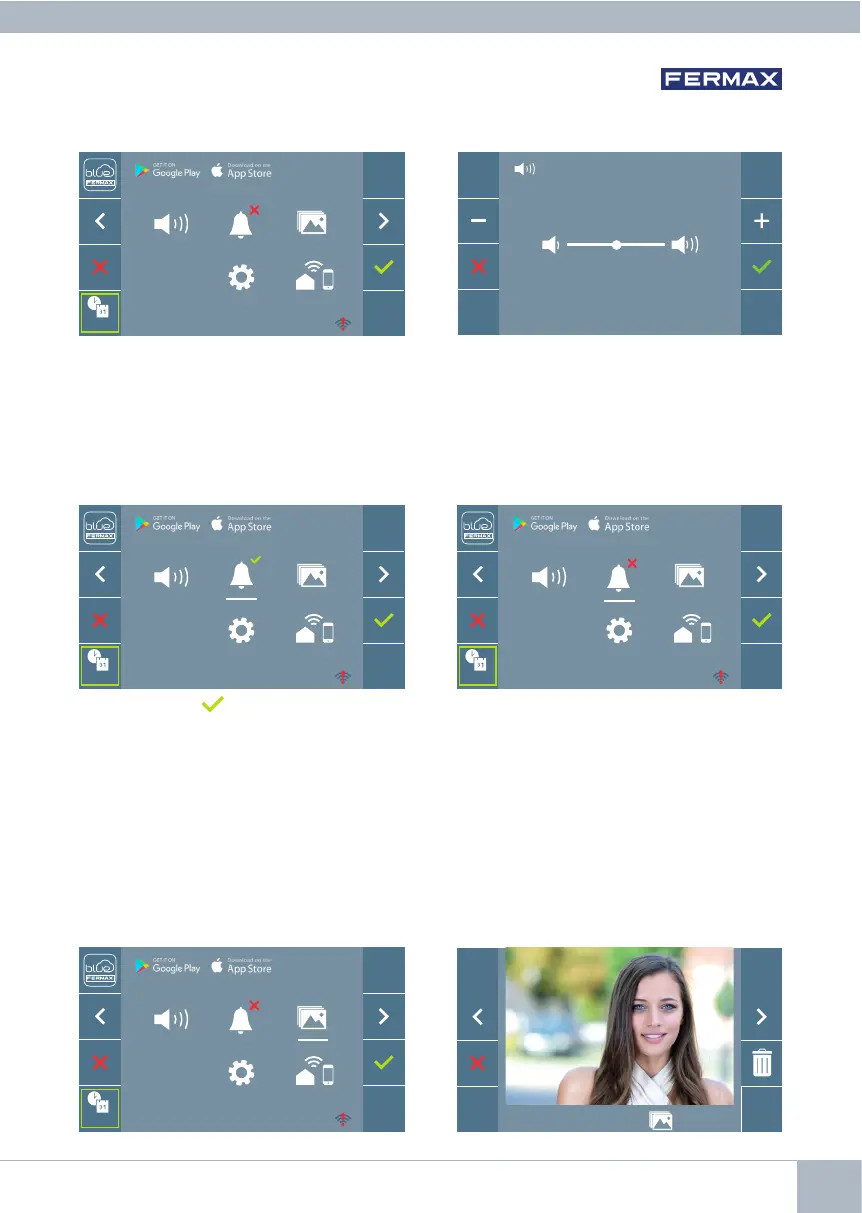
4.1 USER MENU: MONITOR VOLUME SETTINGS
It is possible to adjust the volume of the ringtone within a range of ten possible values.
Firstly, the current volume is displayed
and can be increased (+) or decreased (-)
with the corresponding buttons. These will
allow you to achieve your desired settings.
4.2 USER MENU: DO NOT DISTURB MODE
This icon allows you to enable/disable the Dial Tone (Do Not Disturb).
Press the icon to change the selection. By default normal operation is selected (The
call is heard).
The red LED on the monitor blinks slowly when the Do Not Disturb mode is active.
Note: If the Do Not Disturb mode is active, you may reactivate the call via this screen or
by sliding the potentiometer to any position other than the minimum.
4.3 USER MENU: DISPLAY IMAGES
This icon allows you to view images that have been automatically captured and delete
them. For more information see Chapter Operation: Image Display.
10/04/2019 09:28 130 / 149
F2
_ _ : _ _
_ _ : _ _
F2
_ _ : _ _
_ _ : _ _
F2
_ _ : _ _
_ _ : _ _
F2
_ _ : _ _
_ _ : _ _














 To Next Page