Pag 22
FINGERPRINTFINGERPRINT
FINGERPRINTFINGERPRINT
FINGERPRINT
FINGERPRINTFINGERPRINT
FINGERPRINTFINGERPRINT
FINGERPRINT
d 2. 2
0 y
0 y
M S 2
d 2. 1
REMOTE UNIT
FOR ACCES CONTROL
+
321
7 8 9
0
x
-
654
d 2. 1
d 2. 1
REMOTE UNIT
FOR ACCES CONTROL
+
321
7 8 9
0
x
-
654
x
0 y
REMOTE UNIT
FOR ACCES CONTROL
+
321
7 8 9
0
x
-
654
t r d
M S 2
d 2. 2
0 y
0 y
d 2. 1
REMOTE UNIT
FOR ACCES CONTROL
+
321
7 8 9
0
x
-
654
d 2. 1
t r d
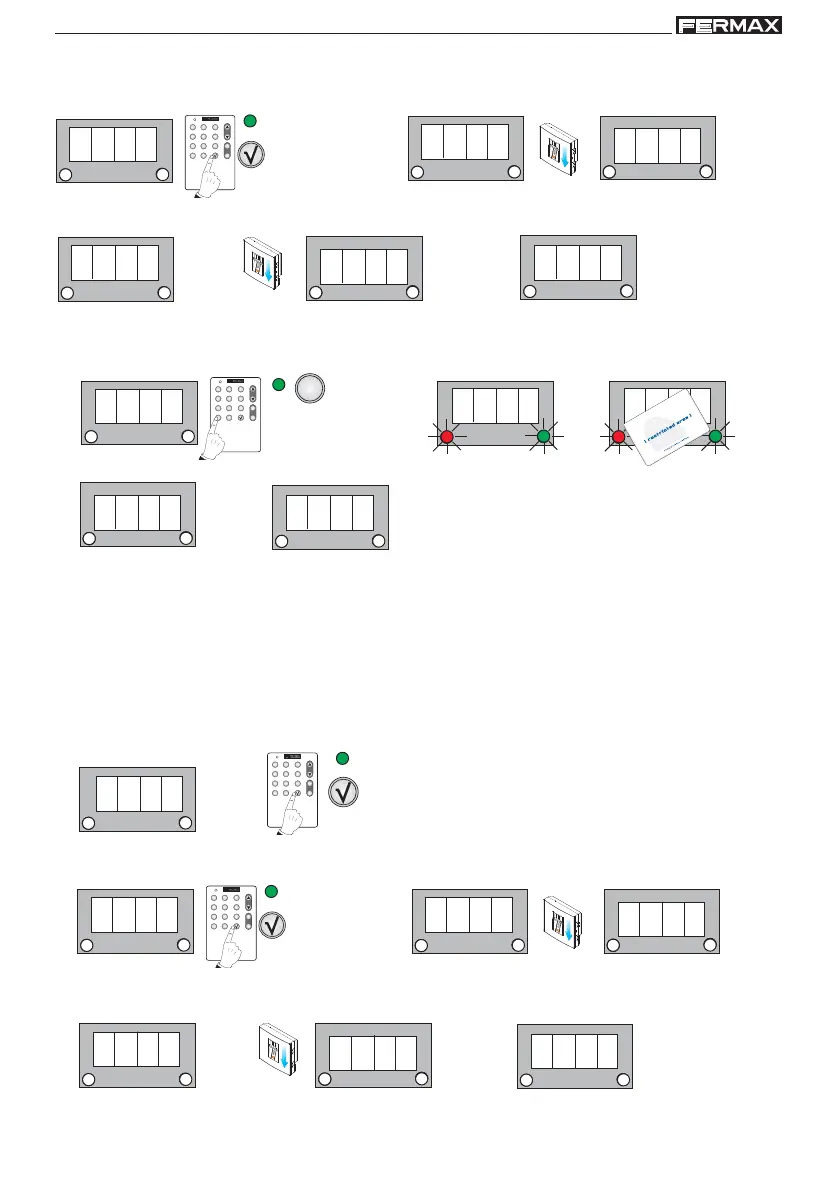
1. d2.1 is shown, confirm if we wish to register a second master fingerprint. Enter the new user fingerprint
you wish to register as a master fingerprint on the system.
1 beep
Confirm for master
fingerprint.
1 beep
2. d2.2 is shown. Enter the fingerprint again to confirm.
1 beep
1 beep
1b. d2.1 is shown, cancel if we wish to register a master card. The LEDs of the reader start to flash, present
the card that we wish to register in the system as the master card.
1 beep
Cancel for master
card
1 beep
1 beep
c) Add a trade fingerprint/card
The trades option is a special "free access" function, which is activated from the reader
by entering a registered fingerprint/card. As such, we can register a trade fingerprint or
a trade card.
This function is especially useful when you want to offer free access to an area to be
controlled. In this mode, any fingerprint/card entered will activate the lock-release.
1 beep
1 beep
1 beep
Confirm for trade
fingerprint
1. d2.1 is shown, confirm if we wish to register a trade fingerprint. Enter the new user fingerprint you wish
to register as a trade fingerprint on the system.
2. d2.2 is shown. Enter the fingerprint again to confirm.
1 beep
1 beep



 To Next Page