Pag 7
FINGERPRINTFINGERPRINT
FINGERPRINTFINGERPRINT
FINGERPRINT
FINGERPRINTFINGERPRINT
FINGERPRINTFINGERPRINT
FINGERPRINT
0001
0002
0003
0004
Yaga Seelan
Will Smith
Tom Cruise
Sarah Parker
Nº Usuario
Nombre Usuario
d 1. 1
REMOTE UNIT
FOR ACCES CONTROL
+
321
7 8 9
0
x
-
654
A d d
0 y
d 1. 2
0 0 0 1
Add Users
To register new users. Every user has an associated "user number" from 0001 to maximum.
The codes are stored in the memory in sequence: user number - user fingerprint.
Number of Users:
* 4500 in 1 fingerprint per person mode.
* 2970 in 2 fingerprint per person mode.
NOTE:
- It is very important to compile a list linking the user names and numbers (fingerprint
recorded position) such that it will only be possible to delete a fingerprint if you know its
associated position. The only other option is to delete ALL fingerprints on the reader,
therefore we re-iterate the importance of compiling a list with aforementioned data.
Example of table:
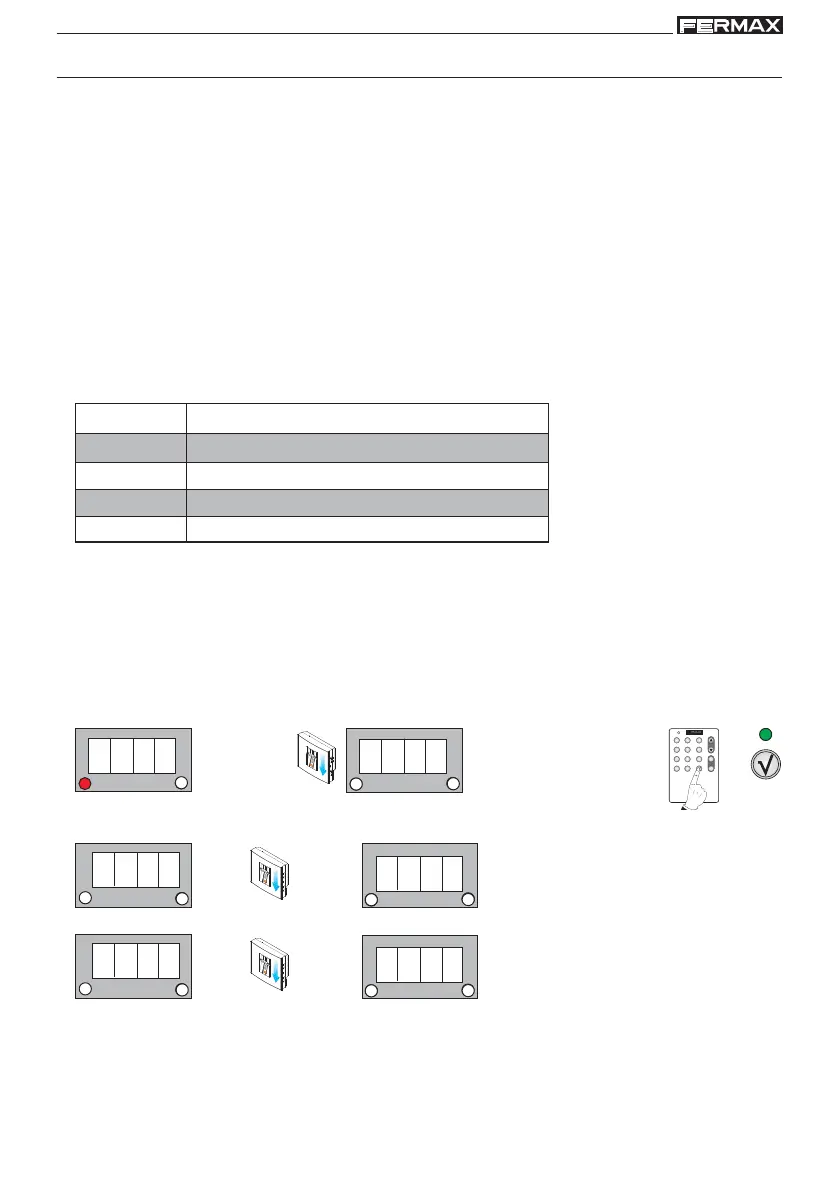
The sequence for registering a user passes through all of the possible options
consecutively:
- 1 fingerprint user mode
- 2 fingerprint user mode
- With proximity card or code
Enter Programming Mode
Standby Mode
1. Enter the master fingerprint
1 beep
2. Confirm the Add option with the
validation key
3. d1.1 is shown. Enter the user fingerprint you wish to register in the system.
1 beep
1 beep
1 beep
4. d1.2 is shown. Re-enter the user fingerprint you wish to register to confirm the fingerprint.
a) Add User in 1 Fingerprint Mode
1 beep
1 beep
1 beep
5. Relay is shown. Using the scroll keys the following sequence will appear relay, both, Au.... There are three
options the action of which associated with this user fingerprint is:
- relay: to open the door
- both: to open the door and activate the auxiliary exit simultaneously
- Au: to activate the auxiliary exit
Select the required option and confirm using the OK key



 To Next Page