Pag 18
Kit Halo & iLoftKit Halo & iLoft
Kit Halo & iLoftKit Halo & iLoft
Kit Halo & iLoft
Kit Halo & iLoftKit Halo & iLoft
Kit Halo & iLoftKit Halo & iLoft
Kit Halo & iLoft
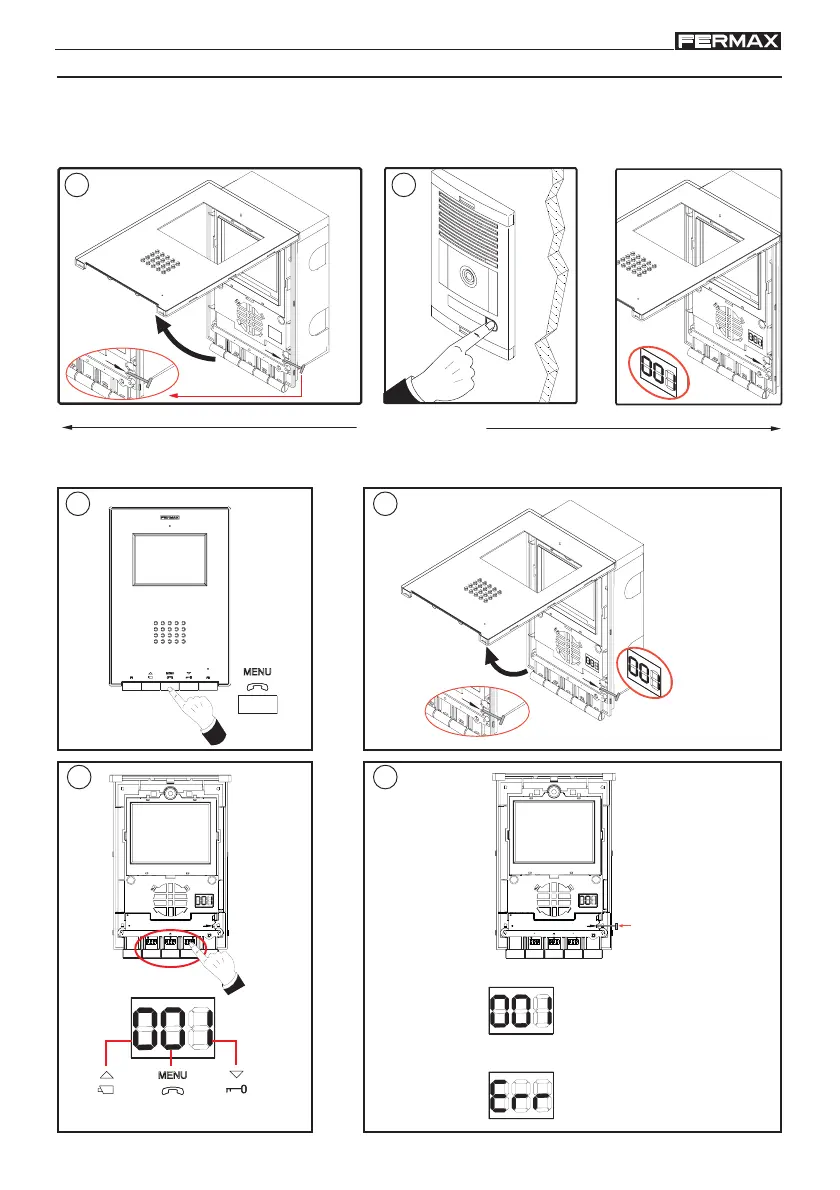
The monitor will not function until it has been programmed!
PROGRAMMING THE iLOFT MONITOR
H
I
G
H
R
E
S
O
L
U
T
I
O
N
C
C
D
C
A
M
E
R
A
PAN & TILT
PROG
.
1
2 sec.
2
P
R
O
G
.
2 sec.
1
3
PROG.
SW3
SW5
SW4SW2
SW1
NOK
4
PROG.
SW3
SW5
SW4SW2
SW1
NOK
(2 sec.)
current number and CORRECT
number NOT CORRECT (Err)
number OK
number NOT OK
(2 sec.)
P
RO
G
.
2
current number
(SW2) (SW3) (SW4)
Option 1: From Panel + Monitor
Option 2: From the Monitor
< 2 min
i












 To Next Page