Need help?
Do you have a question about the Ferno Integrated Patient Transport & Loading System iNX and is the answer not in the manual?
Highlights critical warnings about potential injury or damage during operation and maintenance.
Lists global specifications and standards met by the iNSX, including regional requirements.
Outlines mandatory training, skills, and physical ability for iNSX operators.
Suggests optimal placement of operators and helpers for safe operation, especially with heavy loads.
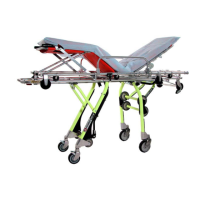
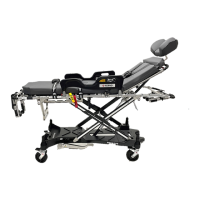
Introduces the iNSX as an integrated patient transport and loading system for emergency services.
Lists detailed technical specifications, dimensions, weight, and power system details of the iNSX.
Explains the iNSX display layout, its zones, and their functions for monitoring system status.
Provides a detailed breakdown of each zone within the iNSX display and their indicators.
Details the Status Zone's role in alerting operators to conditions, faults, and safety notices.
Covers the iNSX battery type, overview, removal, and attachment procedures.
Explains how to use the Ferno battery charger and interpret its indicator lights.
Details the ICS functionality for charging the iNSX battery when secured in the iNSLINE.
Describes the auto-equalize feature and operation of the extend/retract buttons.
Details the procedure for raising and lowering the shock frame for patient positioning.
Explains how to use actuator-release handles for manual leg extension or retraction without power.
Covers essential steps before placing the iNSX in service, including training and setup.
Details the process and safety precautions for powered leg extension and retraction.
Provides step-by-step instructions for transferring patients onto and off the iNSX.
Offers guidelines and warnings for safely rolling the iNSX, including height and terrain considerations.
Provides detailed steps for securely loading the iNSX into an ambulance using the iNSLINE system.
Details the procedure for safely unloading the iNSX from an ambulance using the iNSLINE system.
Provides instructions for extending and retracting iNSX legs manually without using powered functions.
Guides on loading the iNSX into an ambulance manually without using powered functions.
Provides instructions for unloading the iNSX from an ambulance manually without using powered functions.
Outlines recommended maintenance intervals and the importance of keeping records.
Explains how to set the iNSX to automatically stop at the proper ambulance loading height.
Explains iNSX status codes, their meanings, priorities, and troubleshooting solutions.
 General
| Width | 24 in (61 cm) |
|---|---|
| Frame Material | Aluminum |
| Charging Time | 4 hours |
| Weight Capacity | 700 lbs |
| Wheel Size | 6 in (15.2 cm) |
| Compatibility | Ferno iNX loading system |
| Height (Highest Position) | 41.5 in (105.4 cm) |
| Load System | Hydraulic |
| Control System | Handheld remote control |

 To Next Page