20
AUTOMATIC COOKING PROGRAM
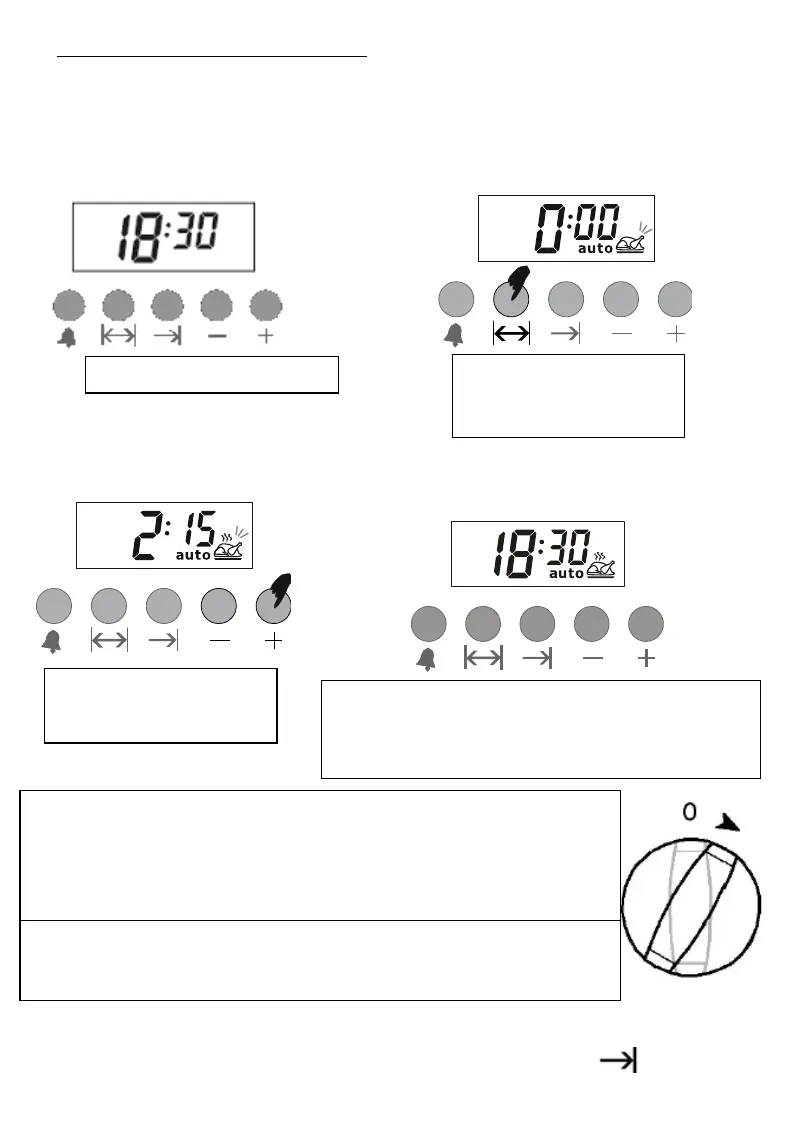
If you will start cooking the food you put into the cooker, simply enter the
cooking time.
For example: We put our food into the cooker and want it to be cooked for 2
hours and 15 minutes.
In the example given above, we have seen how to enter the cooking time to
start automatic cooking process immediately. You may press key to see
2) Enterthecooking
time settingmode.
3) Enterthe time by
using (+)or (-) keys.
4) After a couple of seconds, it will show the
current time, showing the food is being
cooked.
Your cooker timer is set to cook your food for 2 hours and 15
minutes from now on. Do not forget to bring to the command
buttons on the cooker to suitable position according to the
cooking function and temperature level you desire.
Note: When you program for cooking or when the program runs,
you may switch to Manual Mode to cancel the program.


 To Next Page