Operation
13
main menu – SETUP -> MIDI
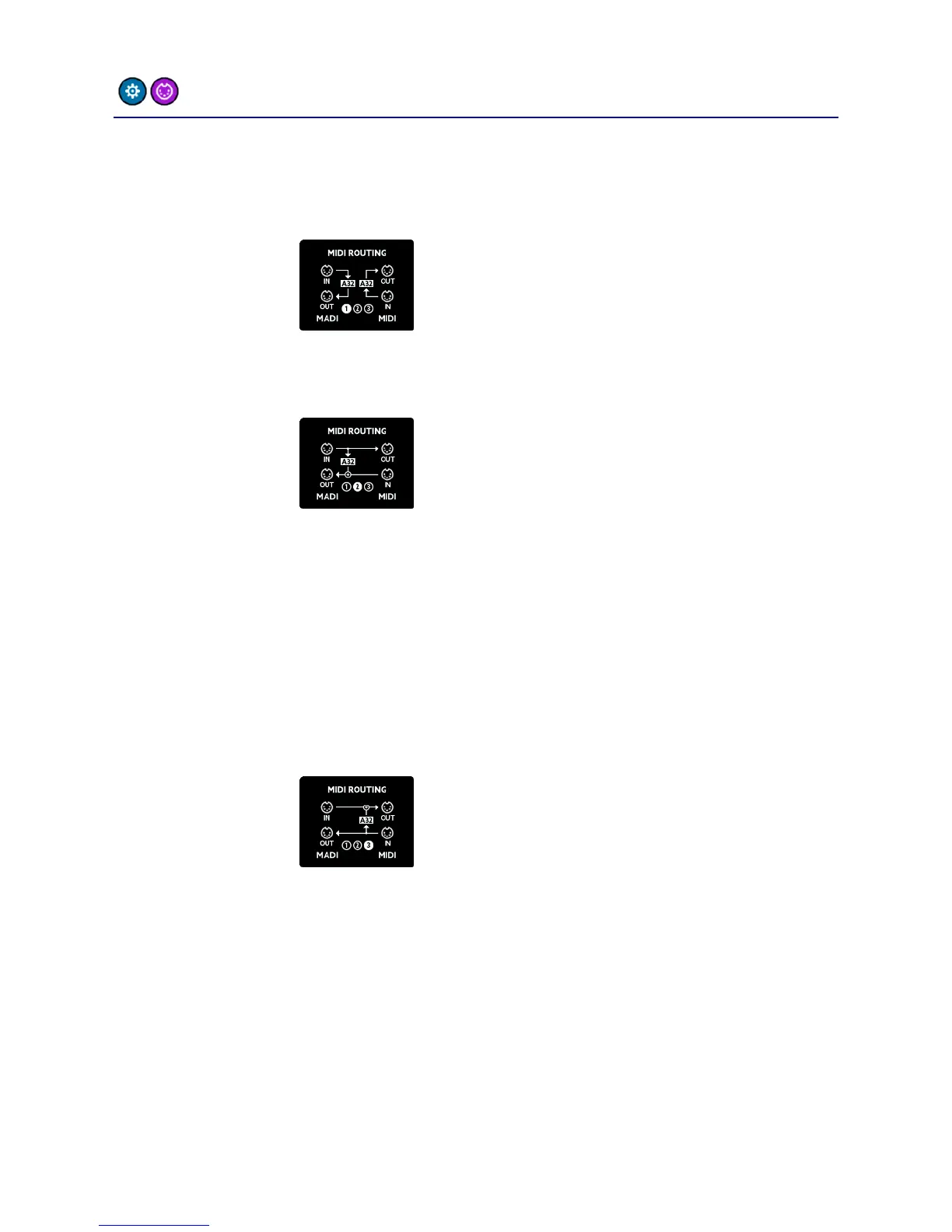
The MIDI routing screen is intended to allow you to choose the way
MIDI data is routed between MIDI and MIDI over MADI:
MIDI-over-MADI and MIDI are separated.
Control messages for the A32 are
scanned from both input ports and
replies are sent back to the
corresponding output port.
MIDI-over-MADI and MIDI are
connected: Data from the MIDI-over-
MADI port is sent to MIDI, and MIDI
input is sent back to MIDI-over-MADI.
The A32 receives and sends control
messages from/to the MIDI-over-MADI
port.
This way you can convert between MIDI-
over-MADI and MIDI while the A32
listens to the MIDI-over-MADI port.
MIDI-over-MADI and MIDI are
connected: Data from the MIDI-over-
MADI port is sent to MIDI, and MIDI
input is sent back to MIDI-over-MADI.
The A32 receives and sends control
messages from/to the MIDI port.
This way you can convert between MIDI-
over-MADI and MIDI while the A32
listens to the MIDI port.



 To Next Page