Ferroli F24
47
Time Clock
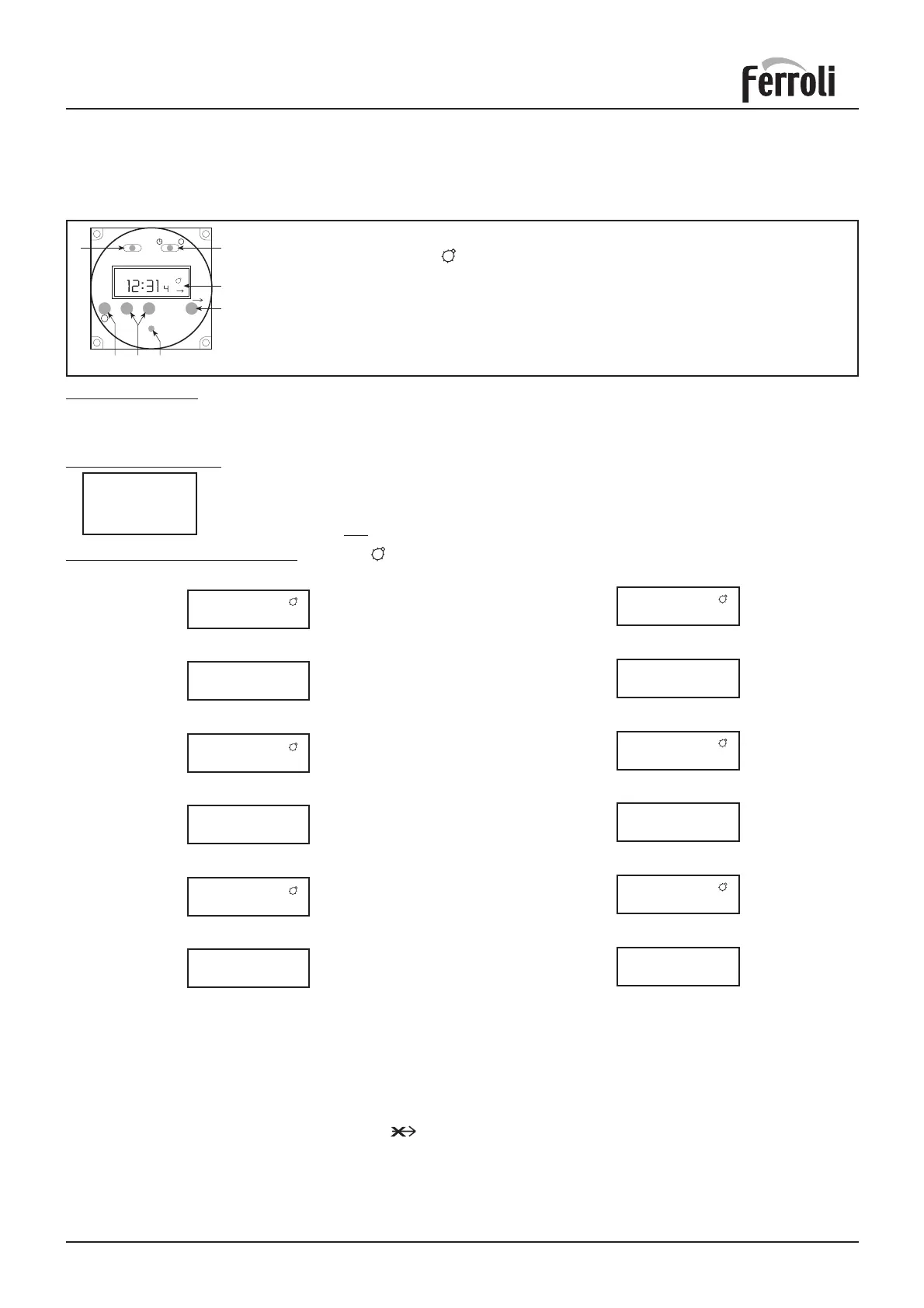
A 24 hour time clock is fitted to the boiler to control the central heating, this will come into operation when the
selector switch is turned to the position marked “heating timed and hot water”.
AUTO
+
-
R
OVER RIDE
x
x
A
B
E
RDP
AUTO
P
OI
F
P
To set time of day
1. Slide switch (A) to left position
2. Using button + and
-
adjust until the correct time is shown on display (B).
Pre Set Programmes. The timer is pre programmed with 3 ON and 3 OFF times.
6:30 - 8:30
12:00 - 12:00
16:30 : 22:30
To Set Own ON and OFF times. Symbol in Display = ON time
If these are suitable no programming is required and the slide switch (A) can be moved to the
Auto position and the central heating will be ON for these periods.
(12:00 - 12:00 will not switch on the boiler)
A Slide switch: set clock - auto - set programme
B Display. Symbol in Display = Timer ON
P Select programme ON/OFF 1.....8
D Push buttons Time + Time
-
E Override: Boiler will switch ON if it is OFF; and OFF if it is ON
F I=Heating continuous - AUTO=Heating timed - O=Heating disabled
R Reset (with pencil) only with switch A in set clock position
1.1 Use buttons + and - to set 1st ON time eg. 6:00
Display
2.1 Use buttons + and - to set OFF time, eg. 9:00
Display
3.1 Use button + and - to set 2nd ON time, eg. 12:30
Display
4.1 Use button + and - to set 2nd OFF time eg. 14:00
Display
5.1 Use button + and - to set 3rd ON time, eg. 16:00
Display
6.1 Use button + and - to set 3rd OFF time eg. 23:30
Display
8. On completion of programming slide switch (A) to Auto position,
the time of day will be displayed and the central heating will switch
ON and OFF according to the programme set.
1. Slide switch (A) to right position (P)
Display
2. Press button (P)
Display
3. Press button (P)
Display
4. Press button (P)
Display
5. Press button (P)
Display
6. Press button (P)
Display
7. The timer can be programmed with up to 8 ON and
8 OFF times by repeating the above procedure.
6:30
1
8:30
2
12:00
3
12:00
4
6:00
1
9:00
2
12:30
3
14:00
4
16:30
5
22:30
6
16:00
5
23:30
6
Over ride
By pressing the over ride button (E) the timer programme is over ridden ie, if programme is in OFF time it
will come ON and if in ON time will go OFF.
The timer will revert back to it set programme on reaching the next ON or OFF time.
When the programme is on over ride the sign will be shown in the display window (B).
Reset Button
By the use of a pencil the reset button can be pushed (R). This will clear all programmes apart from those
factory pre set.
Reset is only possible with switch (A) in set Clock position!








 To Next Page