5
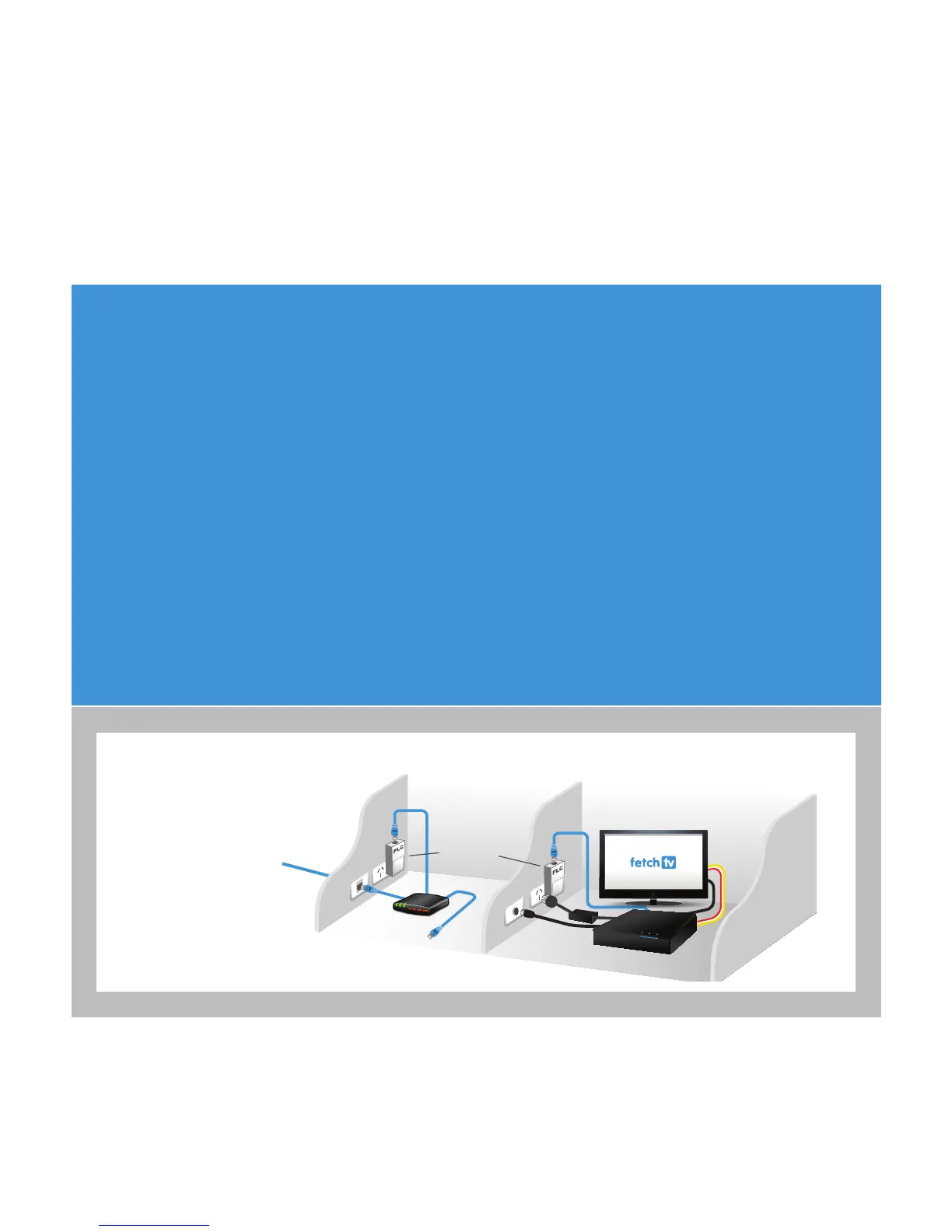
Connection Option 3 – PLC Adaptors
You can use this option if you cannot connect using Ethernet Cable and you ordered PLC Adaptors with your Fetch
TV service. The PLC adaptor will transmit your Fetch TV service to your STB using the existing power cables inside
your walls.
1. Plug one PLC adaptor into an electrical socket located near your broadband modem.
2. Plug one end of an Internet Ethernet cable into the port on the PLC device.
3. Plug the other end into any available port on your broadband modem.
4. Plug the other PLC adaptor into an electrical socket located near your TV and STB.
5. Plug one end of an Internet Ethernet cable into the port on the PLC device.
6. Plug the other end into the port labelled Internet on the back of your STB.
The PLC Adaptor should be plugged directly into the wall socket. Do not use a double adaptor or power board for
the PLC unless there is no other socket available, in which case they must not have surge protectors or noise
ltering. If using a power board, plug the PLC adaptor into the rst outlet (the one nearest the cord).
Connecting with
PLC Adaptors
Room 1
Outside
Broadband
Connection
Fetch TV
Signal
Fetch TV
Signal
TV Aerial
AV
Cable
Normal
Broadband
Use
Broadband
Modem
Room 2
PLC Adapter



 To Next Page