Go to fetco.com for the latest versions of all information Page 4 User Guide & Operator instructions P171 NEW MARCH 2018
90°C
90°C
[[¯]] 6.00L
90°C
[[¯]] 6.00L
90°C
[[¯]] 6.00L
90°C
[[¯]] 6.00L
90°C
90°C
[[¯]] 6.00L
90°C
[[¯]] 6.00L
90°C
[[¯]] 6.00L
90°C
[[¯]] 6.00L
90°C
90°C
[[¯]] 6.00L
90°C
[[¯]] 6.00L
90°C
[[¯]] 6.00L
90°C
[[¯]] 6.00L
Operational Description
:Recipes, Brew, Starting Menus and General Brewing Sequence
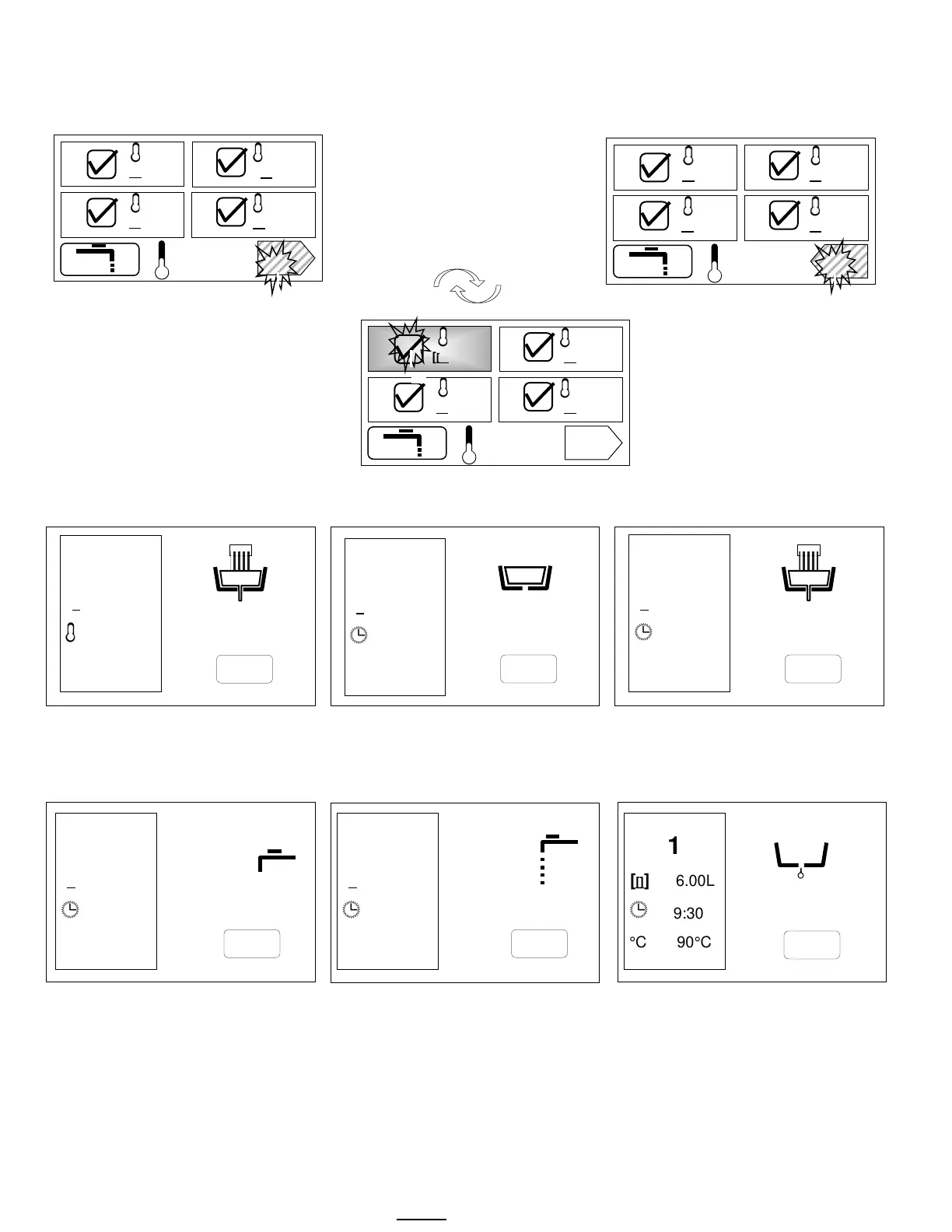
8 DEFAULT RECIPE SCREENS –Toggle button between screens to access recipes 1-4 and 5-8
TOUCH AND HOLD 2-3 seconds
Toggle to recipe-choose 1-8
Menus 1-4
Touch right pointing arrow for 5-8
Menus 5-8
Touch left pointing arrow to go back
Touch Menu ICON #1 to START BREW
Touch for 2-3 seconds to begin brew.
Have container under brew funnel
Screens with informational icons shown for factory set recipe #1-(See Icon table for more information)
Pulse Brew brew icon brew in
progress
Brew-valve is open in pulse brew mode
.
Valve opens-closes for pulse brew
Pulse Brew brew icon brew in
progress paused icon brew-valve is
closed
Icons showing open state in pulse
brew mode-(brew-valve reopened)
Brewing and Pause icons cycle…
Left box shows recipe settings Factory set: 4 on/off pulse cycles
Brew completed. 1:00 min bypass delay
for drip-out and hot water tank recovery
Bypass is cycling and is turned ON
Drip Delay
1:30 minitues
User can determine any bypass delay
See following page for programming
At 0:00, recipe screen will refresh
Icons shown for factory set recipe #1
9:30…
1
[[]] 6.00L
9:30
°C 90°C
…8:41…
1
[[]] 6.00L
9:30
°C 90°C
...7:48
1
[[]] 6.00L
9:30
°C 90°C
…2:30…
1
[[]] 6.00L
9:30
°C 90°C
…3:30…
1
[[]] 6.00L
9:30
°C 90°C
1
[[]] 6.00L
9:30
°C 90°C
…1:30



 To Next Page