5
Chapter 1 Introduction
SPDIF or
DIGITAL
AUDIO OUT
(OPTICAL)
Sockets
Note: The location and names of the sockets on the TV may vary according to TV model, and not all sockets available on all models.
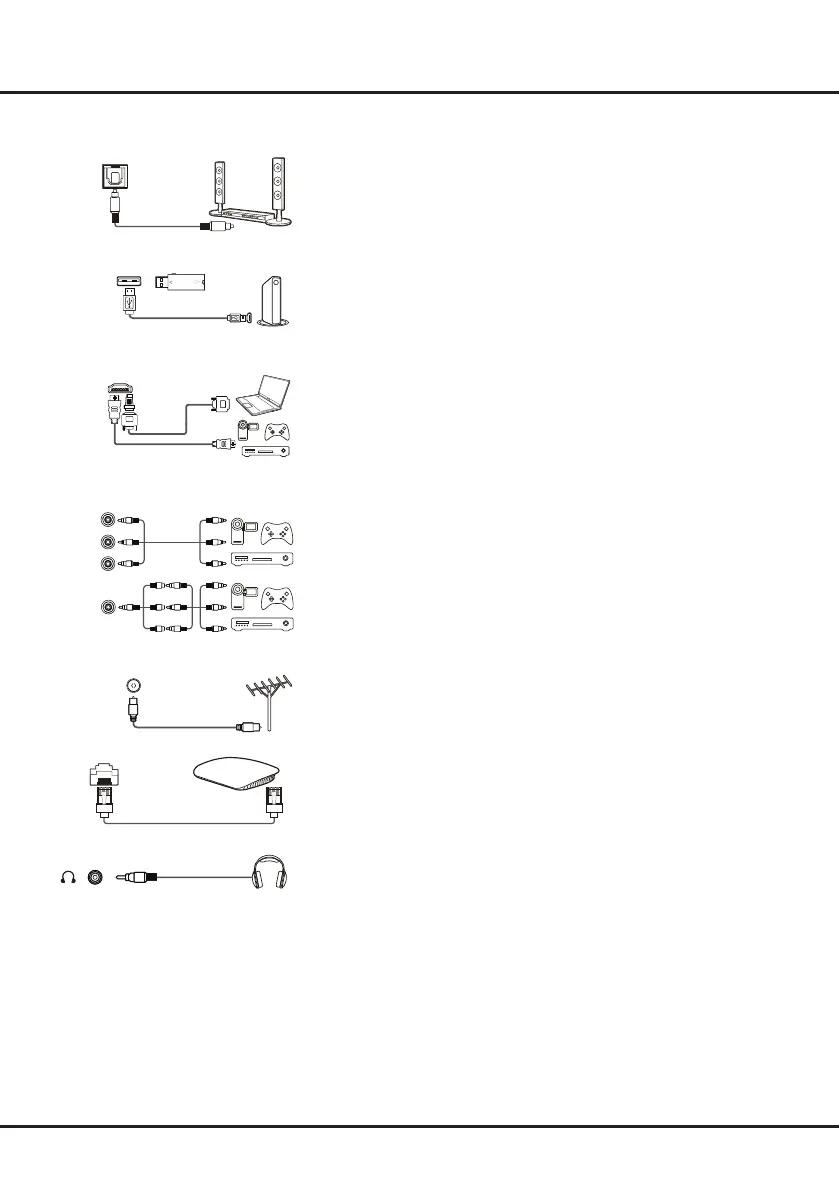
SPDIF or DIGITAL AUDIO OUT(OPTICAL) socket (output)
The SPDIF socket can be used to connect a compatible digital audio
receiver.
USB2.0 socket (input)
This USB socket can be used to connect an USB device.
Note: The number of USB sockets on the TV may vary according to TV
model.
HDMI, HDMI (SERVICE) or HDMI(ARC) socket (input)
The HDMI (High-Definition Multimedia Interface) socket can be used to
connect a Blu-ray player, PC with a compatible video card installed, certain
DVD players or a high-definition compatible digital satellite decoder. This
socket provides an uncompressed digital connection that carries both video
and audio data by way of an integrated mini-plug cable.
AV RCA audio + video sockets (input)
The AV IN sockets can be used to connect a range of equipment, including
video recorders, camcorders, decoders, satellite receivers, DVD players,
or games consoles. The VIDEO IN socket provides composite video
connection.
AV IN adapter socket
The AV IN adapter socket can be used to connect the attached AV adapter
cable with VIDEO and AUDIO L & R IN sockets.
ANTENNA IN socket (input)
This socket can be used to connect the outside aerial.
LAN
RJ45 plug for connecting to external modem or network access equipment.
Headphone socket (output)
This socket can be used to connect headphones or stereo earphones.
Note: When the Headphone socket is connected, the speakers will be
muted.
Warning: Excessive sound pressure from earphones and headphones can
cause hearing loss.
USB 2.0
HDMI
SERVICE)
ARC)
AV IN
V L R
V L R
V L R
AV IN
V L
R
L
VIDEO
R
V L R
or


 To Next Page