Sidus F1B – free flight electronic timer
9/11
Charging the batteries
A micro LiPo battery field Charger is supplied with the system. The red / black cable must
be connected to any 9-12 Vdc power source (for example to the car lighter socket). The
same Charger is used to charge both the Timer and the Programmer LiPo batteries
separately. Full recharge of a battery will take about 2 hours.
Use only the battery charger supplied with the system. Discard a LiPo battery if it
shows bulges or scratches. Never leave a LiPo battery unattended while charging.
Charge must take place in a safe place and always far from flammable materials.
Status of the charger leds
• 9-12Vdc power connected, no LiPo battery connected: Green ON, Red ON
• Charge in progress: Red ON, Green OFF
• Charge complete: Red OFF, Green ON
Charging the Timer battery
Connect the charger 3-pin plug to the Timer recharge socket located on the side of the
pylon: the battery remains connected to the Timer. A spare battery can be directly
connected to the 2-pin socket on the charger.
Charging the Programmer battery
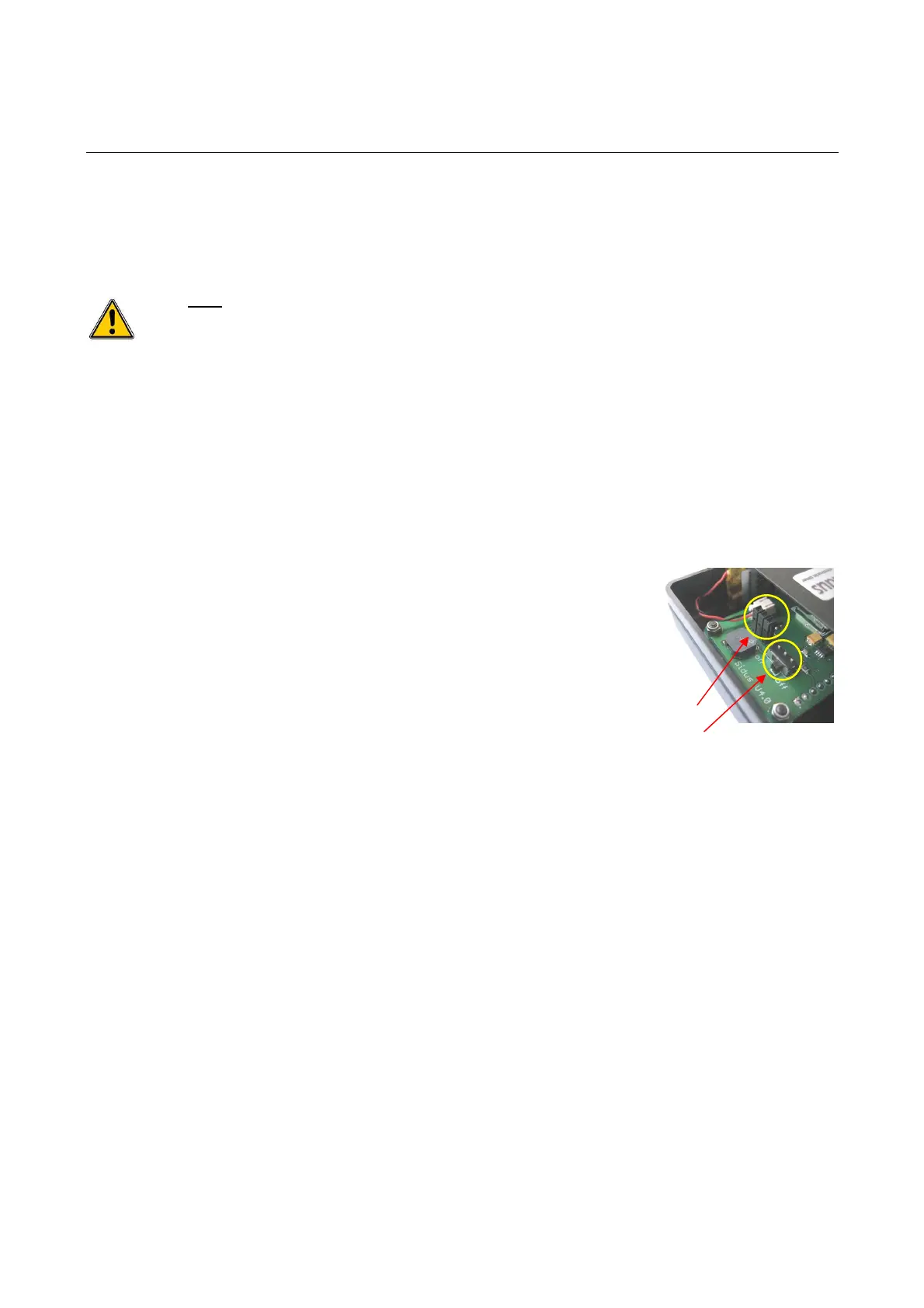
Connect the charger 3-pin plug to the Programmer recharge
socket, accessible by removing the slide cover on the bottom of the
case. the battery remains connected to the Programmer.
recharge socket
ON-OFF switch


 To Next Page