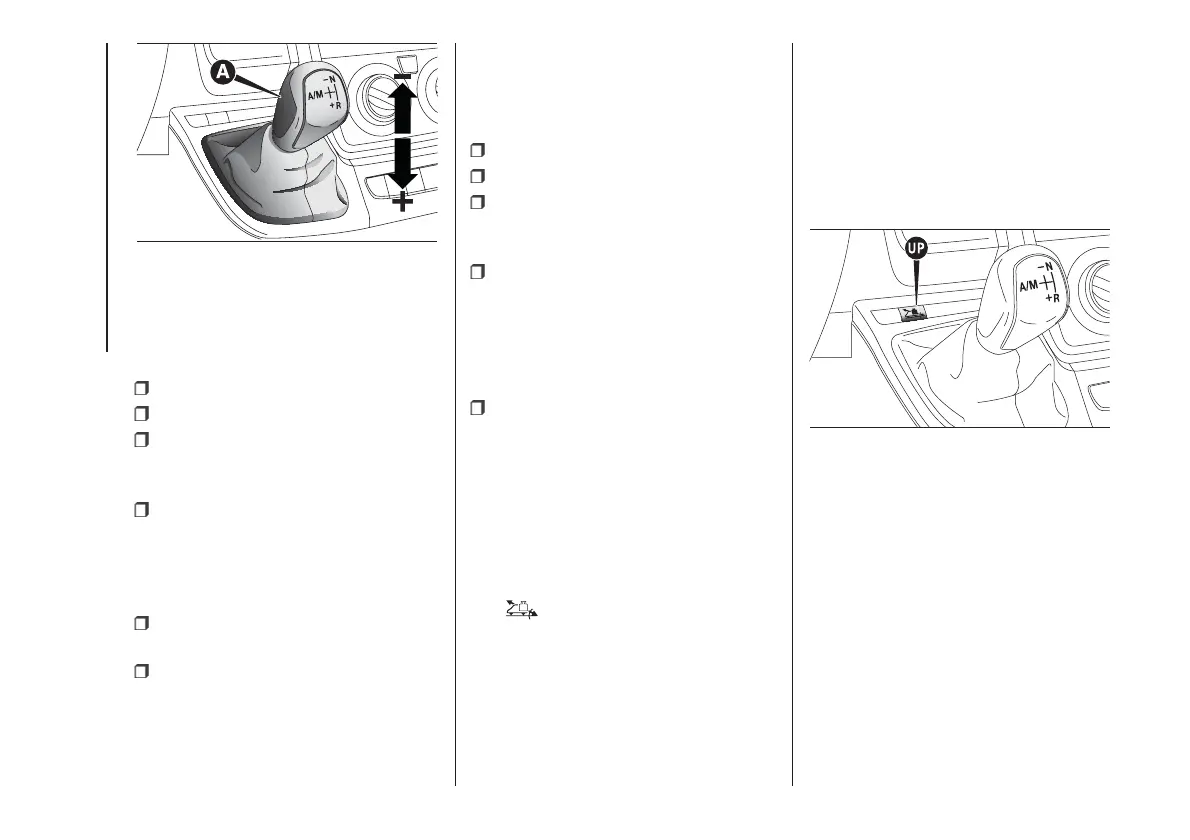
MANUAL MODE
IMPORTANT To use the system
correctly, it is advisable to only use your
right foot to operate the pedals.
Press the brake pedal;
start the engine;
if AUTO is on the display, move the
shift lever to A/M to select MANUAL
mode;
push the shift lever towards (+) (shift
up) to engage first gear (if starting
from N or R, simply move the lever to
the middle position), or R to engage
reverse;
release the brake pedal and press
the accelerator pedal;
when driving, push the shift lever
towards (+) to engage a higher gear or
towards (–) to engage a lower gear.
AUTOMATIC MODE
IMPORTANT To use the system
correctly, it is advisable to only use your
right foot to operate the pedals.
Press the brake pedal;
start the engine;
if AUTO is not on the display, move
the shift lever to A/M to select
AUTOMATIC mode;
push the shift lever to A/M to enable
automatic mode; push the shift lever
towards (+) (shift up) to engage first
gear (if starting from N or R, simply
move the lever to the middle position),
or R to engage reverse.
Release the brake pedal and press
the accelerator pedal.
AUTOMATIC OPERATION
(AUTO with UP function
on)
The UP function can be turned on by
pressing the UP fig. 109 button located
among the dashboard controls. After
turning this function on, the warning
light
on the instrument panel turns
on, together with a confirmation
message on the reconfigurable
multifunction display.
With the UP function on, the system
will select the most suitable gear
depending on the vehicle speed, the
engine speed and the intensity with
which the accelerator pedal is pressed,
with the aim of tackling roads with
steep gradients in a smooth and
comfortable manner.
If necessary, (for example when
overtaking), after pressing the
accelerator pedal fully, the system shifts
down one or more gears to provide
suitable torque and power for the
acceleration requested by the driver
(this all takes place automatically
whether the UP function is on or off).
108
F0N0349M
109
F0N0348M
118
STARTING AND DRIVING













 To Next Page