Disabling
To permanently disable the alarm (e.g.
during a long period of inactivity), simply
lock the vehicle by turning the metal
insert of the key with remote control in
the lock.
IMPORTANT If the batteries of the key
with the remote control run out or
the system fails, the alarm can
be switched off by placing the key in
the ignition switch and turning it to
MAR-ON.
DOORS
DOOR CENTRAL
LOCKING/UNLOCKING
Locking from the outside
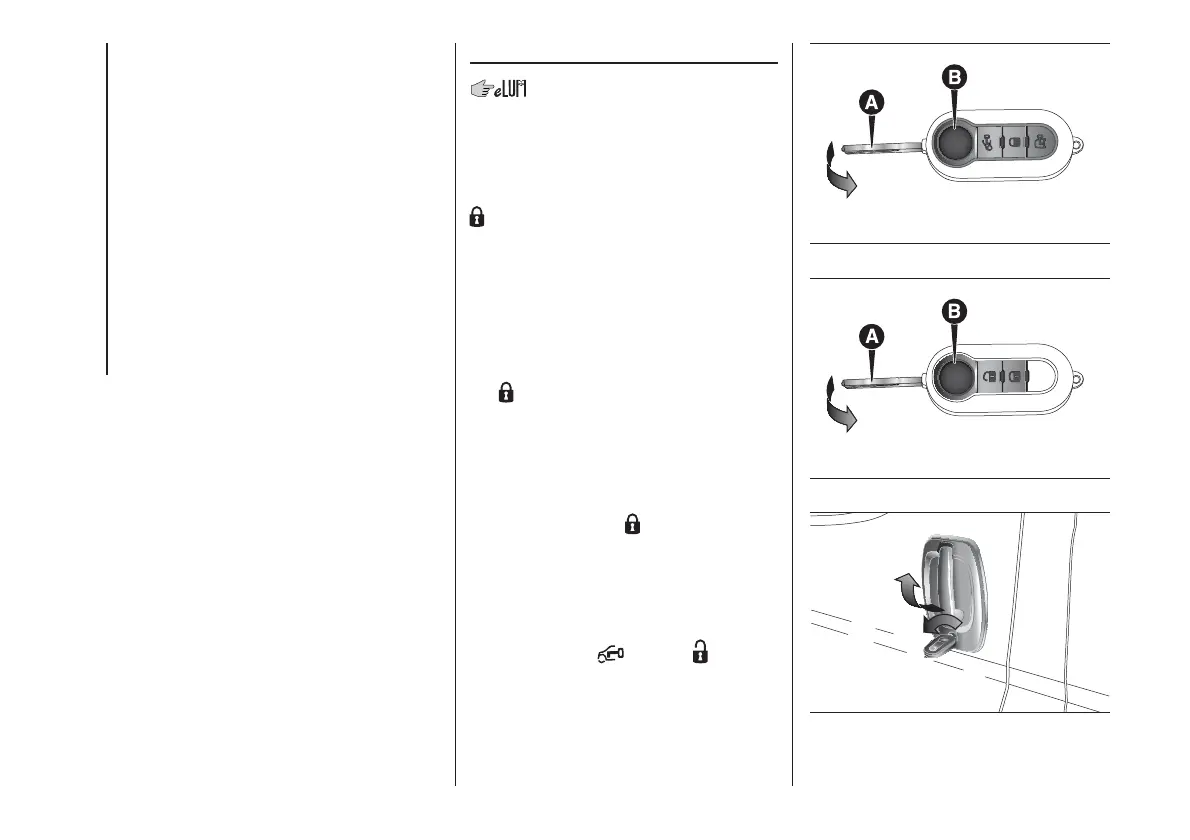
With the doors closed, press the button
on the remote control fig. 4 - fig. 5
or insert the metal insert A into the
driver's door lock and then turn it. The
doors will only be locked if all doors
are shut.
To extract the metal insert, press button
B.
If one or more of the doors is open after
the
button on the remote control is
pressed, the direction indicators and
the LED on the button A fig. 7 will flash
quickly for about three seconds. With
the function on, the button A fig. 7
is disabled.
Pressing the button
on the remote
control twice rapidly turns on the dead
lock device (see the "Dead lock device"
paragraph).
Door unlocking from the outside
Briefly press the
fig. 4 or fig.
5 button, depending on the version, to
remotely unlock the front doors, turn on
the timed interior courtesy lights and
flash the direction indicators twice.
4
F1A0112
5
F1A0113
6
F1A0114
12
KNOWING YOUR VEHICLE













 To Next Page