THIRD BRAKE LIGHTS
To replace the bulb proceed as follows:
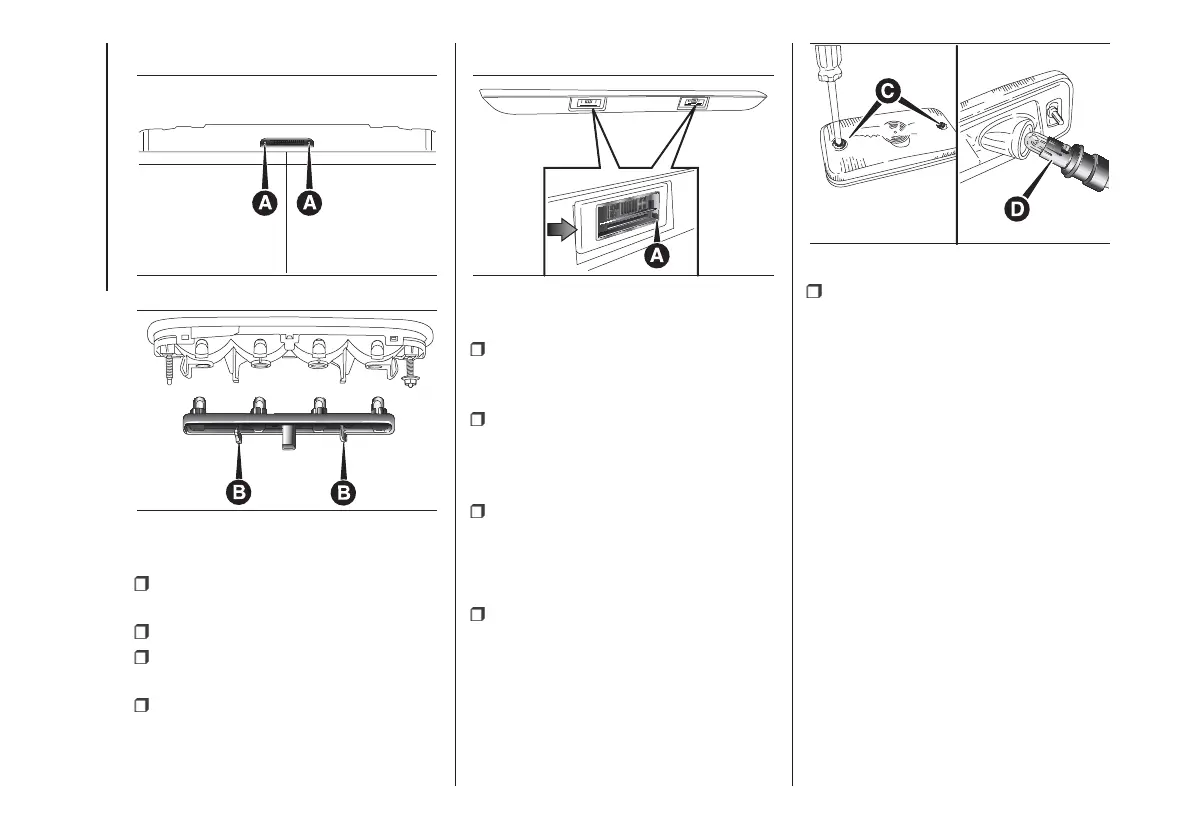
undo the two fixing screws A fig.
141;
extract the lens unit;
press the tabs B fig. 142 together
and remove the bulb holder;
remove the snap-fitted bulb and
replace.
NUMBER PLATE LIGHTS
To replace the bulb proceed as follows:
operate in the point indicated by
the arrow and remove the lens unit A
fig. 143;
change the bulb releasing it from the
side contacts and making sure the
new bulb is correctly fastened between
the contacts;
refit the snap-fitted lens unit.
SIDE LIGHTS
(for versions/markets, where provided)
To replace the bulb proceed as follows:
for extra-long van:
– undo the two fixing screws C fig. 144
and remove the headlight;
– remove the bulb holder D on the rear
of the light cluster, turning it through
a 1/4 turn;
– remove the snap-fitted bulb and
replace.
for chassis cabs with platform:
– remove the bulb-holder on the rear of
the light cluster, turning through 1/4
turn;
– remove the snap-fitted bulb and
replace.
141
F1A0204
142
F1A0205
143
F1A0206
144
F1A0207
150
IN AN EMERGENCY













 To Next Page