The warning light will come on in
the instrument panel.
MAIN BEAM HEADLIGHTS
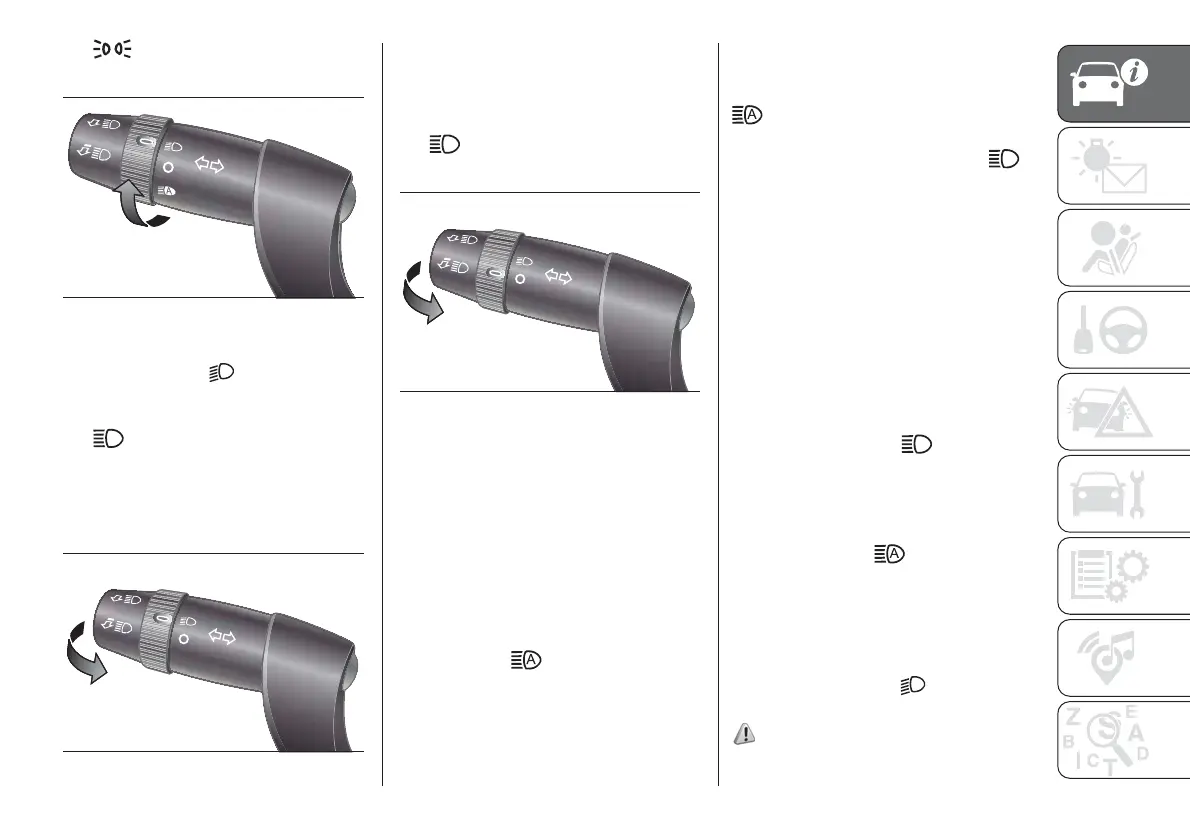
With the ring in the
position, pull the
stalk towards the steering wheel (2nd
unstable position) fig. 40.
The
warning light switches on in
the instrument panel.
To turn the main beams off, pull the
stalk towards the steering wheel again
(dipped beams will come back on).
FLASHING
Pull the stalk towards the steering
wheel (1st unstable position) fig. 41
regardless of the position of the ring.
The
warning light switches on
in the instrument panel.
AUTOMATIC MAIN BEAM
HEADLIGHTS
In order not to dazzle other road users,
the main beam headlights are
automatically turned off when
approaching oncoming vehicles or
when following a vehicle travelling in the
same direction.
The system is enabled through the
menu item and by rotating the light
selector to the
position.
When the main beam headlights are
turned on for the first time by pulling the
stalk, the function is enabled and the
icon is displayed; if the main beam
headlights are actually on, the
corresponding blue warning light
is
displayed as well.
If the driving speed is over 40 km/h and
the function is activated, pulling the
stalk again to the main beam headlight
position deactivates the function.
If the driving speed is below 15 km/h
and the function is activated, the
function switches the main beam
headlights off. Pulling the stalk again to
the main beam headlight position is
interpreted as a request for the main
beam headlights to stay on, therefore
the blue warning light
on the
dashboard turns on and the main beam
headlights stay on until the speed
exceeds 40 km/h again. The function is
enabled again automatically when 40
km/h is exceeded
.
If the stalk is pulled again in this
condition, to request main beam
headlight deactivation, the function
remains off and the main beam
headlights switch off.
Rotate the ring to the
position fig.
39 to disable the automatic function.
31) 32)
39
F1A0065
40
F1A0066
41
F1A0067
25













 To Next Page