IMPORTANT When parking, take the
utmost care over obstacles that may be
above or under the camera range.
IMPORTANT Always use extreme
caution and verify the real conditions of
the area behind the vehicle with you
own eyes. Reversing while looking only
at the screen is dangerous and can
lead to an accident or collision with an
object. The rear-view monitor is simply
a system to aid reversing. The images
on the screen can show a situation that
differs from the real one.
When the display is cold, the images
could scroll on the monitor or the
screen and could be more blurred than
usual, making it difficult to check the
conditions of the area around the
vehicle. Always use extreme caution
and verify the real conditions of the area
behind the vehicle with you own eyes.
IMPORTANT Do not apply excessive
force to the camera. You could alter the
position and angle of the camera. Do
not disassemble, modify or remove it as
this could compromise the hermetic
seal.
IMPORTANT The camera cover is
made of plastic. Do not apply
degreasing agents, organic solvents,
wax, or glass coating agents to the
camera cover. If any are spilled on the
cover, wipe off with a soft cloth
immediately.
IMPORTANT Do not rub the camera
cover forcefully with an abrasive or hard
brush. The camera cover or lens may
be scratched which might affect the
images.
IMPORTANT If water, snow or mud is
deposited on the camera lens, clean it
with a soft cloth. If this does not clean
it, use a mild detergent.
IMPORTANT If the camera is subjected
to abrupt temperature changes (from
hot to cold or vice versa), the rear-view
monitor may not work properly.
IMPORTANT When replacing tires,
contact a Fiat Dealership. Replacing the
tires can cause the guide lines that
appear on the display to be diverted.
IMPORTANT If the vehicle has been
involved in a frontal, lateral or rear
collision, the rear parking camera’s
alignment (location or installation angle)
may have been altered. Contact a Fiat
Dealership.
IMPORTANT If the display shows "no
video signal", there may be a problem
with the camera. Contact a Fiat
Dealership.
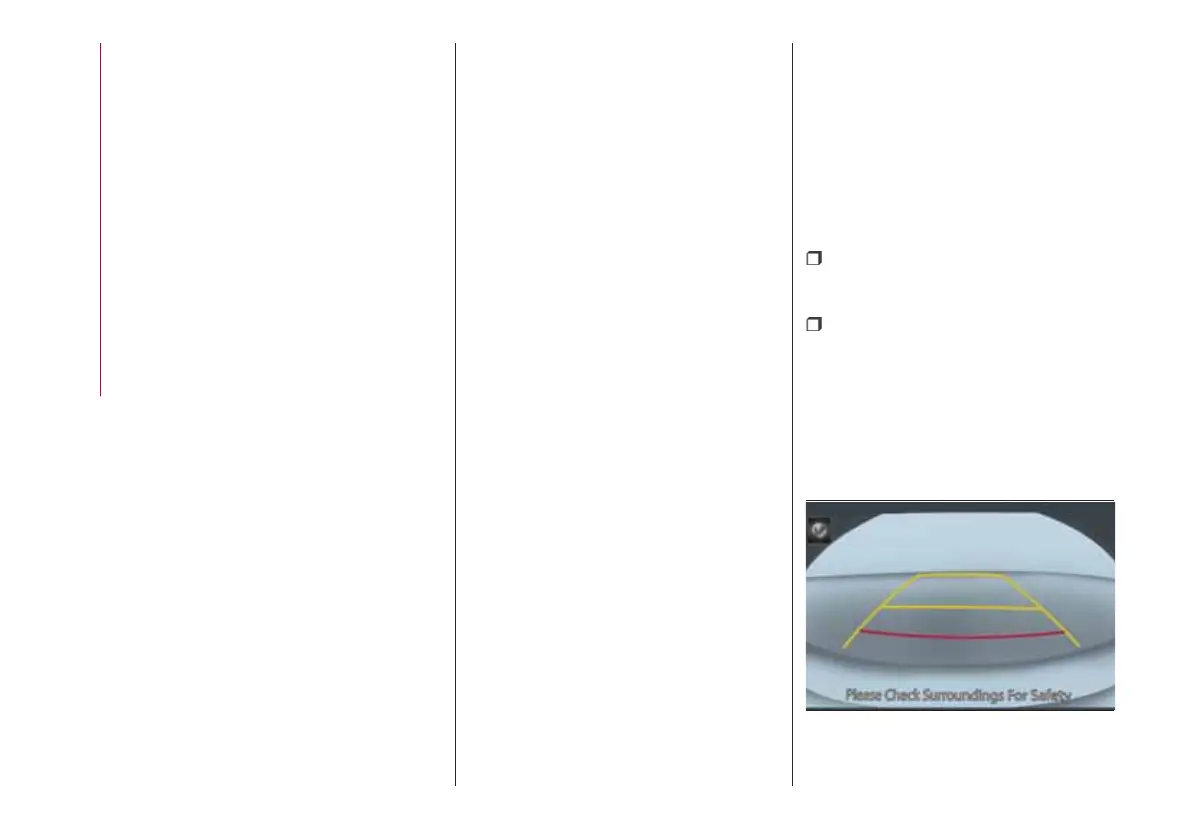
VIEWING THE DISPLAY
Guide lines which indicate the width of
the vehicle (yellow)fig. 97 are displayed
on the screen as a reference to the
approximate width of the vehicle in
comparison to the width of the parking
space you are about to back into.
Use this display view for parking your
vehicle in a parking space or garage.
vehicle width guide lines (yellow):
these guide lines serve as a reference
showing the width of the vehicle.
distance guide lines: these lines
indicate the approximate distance of a
point measured from the rear of the
vehicle (from the end of the bumper).
The red and yellow line indicates the
points at about 50 cm, for the red line
and 1 m for the yellow line, from the
rear bumper (central point of each line).
97
07080913-111-111
122
STARTING AND OPERATING











 To Next Page