press the INFO switch and set the
two lower digits (tenths and ones place)
to the desired vehicle speed. The
numerical value changes each time the
INFO switch is pressed;
press the INFO switch continuously
until a beep sound is heard. The set
vehicle speed is displayed on the
vehicle speed alarm screen.
GEAR SHIFT INDICATOR
The gear shift indicator supports you to
obtain optimum fuel economy and
smooth driving.
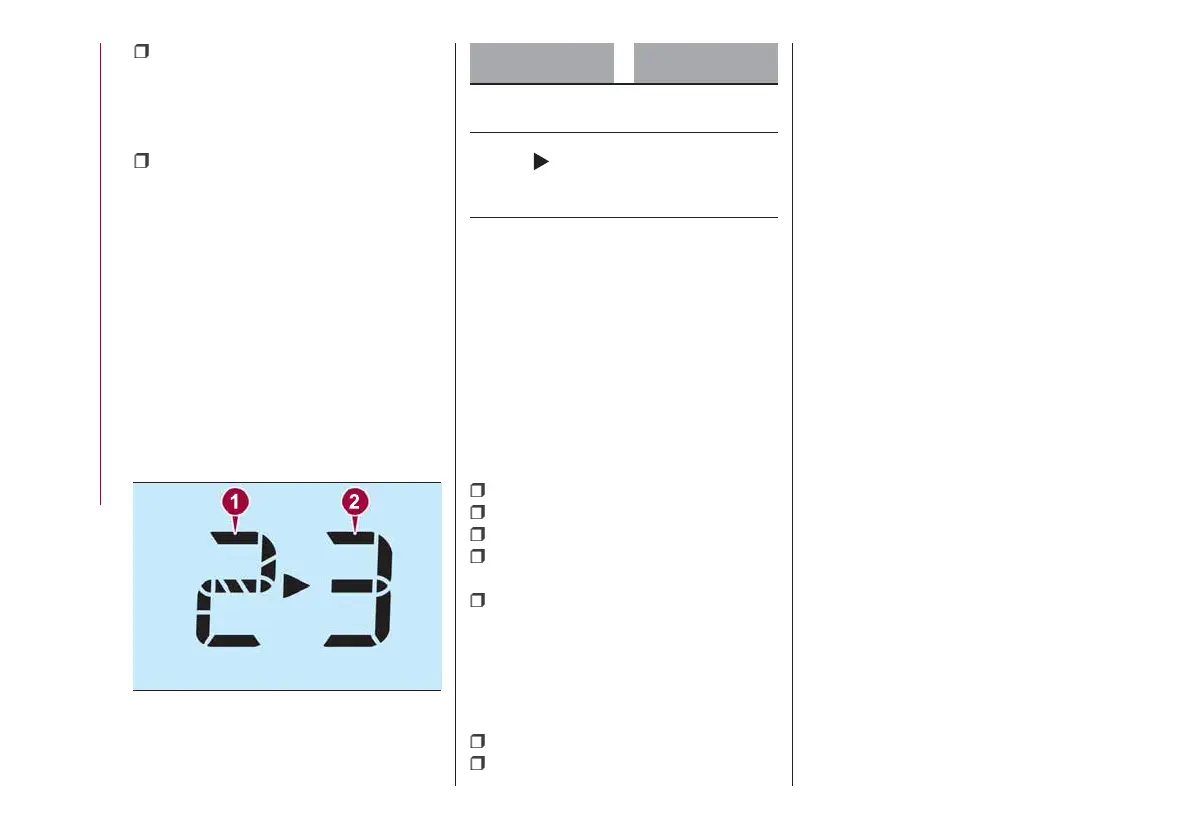
It displays the selected gear position 1
fig. 55 in the instrument cluster as well
as notifies the driver to change to the
most suitable gear position
2 corresponding to the actual driving
condition.
Indication Condition
Numeral
The selected gear
position is displayed
and numeral
Shift up or down to
the indicated gear
position is
recommended
IMPORTANT Do not rely solely on the
shift-up/shift-down recommendations
by indications. The actual driving
situation might require shift operations
different from indication. To avoid the
risk of accidents, the road and traffic
conditions have to be judged correctly
by the driver before shifting.
Versions with manual transmission
The gear shift indicator turns off when
the following operations are performed:
the vehicle is stopped;
the vehicle is put in neutral;
the vehicle is driven in reverse;
the clutch is not fully engaged when
accelerating from a stop;
the clutch pedal remains depressed
for 2 seconds or longer while driving.
Versions with automatic
transmission
The gear shift indicator turns off when
the following operations are performed:
the vehicle is stopped;
manual shift mode is cancelled.
Manually shifting up
(versions with automatic transmission)
Using selector lever: to shift up to a
higher gear, tap the selector lever back
+ once.
55
05210102-12A-001
50
KNOWING THE INSTRUMENT PANEL











 To Next Page