
 Need help?
Do you have a question about the FIBARO Dimmer 2 and is the answer not in the manual?
Procedure to reset the device to its original factory settings.
Steps to add the Dimmer 2 to an existing Z-Wave network.
Steps to remove the Dimmer 2 from a Z-Wave network.
How to control the dimmer using momentary switches.
How to control the dimmer using toggle switches.
Using network commands for global device control.
Direct control and menu access using the device's B-button.
Parameters for setting minimum/maximum brightness and lamp warm-up.
Parameters defining dimming step size and timing for manual/auto control.
Parameter to save device state after power interruption.
Parameters for timer functions, network commands, and auto-calibration.
Settings for detecting faulty bulbs or device overload.
Parameter to set a specific brightness level on switch-on.
Configuration for different switch types and association command framing.
Settings for 3-way switching, association security, and scene functionality.
Parameters for controlling load behavior (leading/trailing edge).
Parameters for on/off mode, dimmability, soft-start, and calibration triggers.
Device response to overloads, surges, and general purpose alarms.
Device reactions to water, smoke, CO, and temperature alarms.
Configuration for alarm state duration and event reporting.
Settings for reporting power quality issues and energy consumption.
Enabling self-measurement and selecting active power calculation methods.
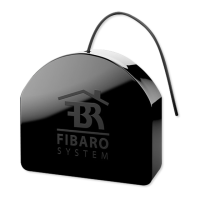
The FIBARO Dimmer 2 is a secure, Z-Wave Plus certified light dimmer switch designed for use in Europe. It allows users to switch or dim connected light sources either wirelessly via Z-Wave radio waves or through a directly connected wall switch. The device is equipped with a smart algorithm for light source detection, which simplifies configuration and ensures high compatibility with various lighting types.
The primary function of the FIBARO Dimmer 2 is to control lighting, offering both on/off switching and dimming capabilities. It can operate with a wide range of light sources in either 2-wire or 3-wire connections, meaning it can function with or without a neutral lead. This flexibility makes it suitable for various electrical installations. Beyond dimming, the device can also be used as a switch for non-dimmable light sources when installed in a 3-wire connection.
A key feature of the Dimmer 2 is its ability to monitor active power and energy consumption. This functionality allows users to track their electricity usage, which can help in reducing energy bills. The device is compatible with any Z-Wave or Z-Wave Plus Controller, ensuring seamless integration into existing smart home systems.
The Dimmer 2 supports various load types, including conventional incandescent and halogen light sources, dimmable LED bulbs, dimmable compact fluorescent (CFL) tube lamps, and ELV electronic transformers (for 12V halogen lamps and dimmable LED bulbs). It also works with MLV ferromagnetic transformers for 12V halogen lamps. For light sources with minimal power (5VA, power factor > 0.5), the FIBARO Bypass FGB-002 can be used to ensure proper operation. Without dimming functionality, it can also control compact fluorescent lamps, fluorescent tube lamps with electronic ballasts, and LED bulbs (power factor > 0.7).
The Dimmer 2 offers flexible control options. When connected to a momentary switch, a single press will turn the light on/off, activating it at the previously set brightness level. Holding the switch down will brighten or dim the light, cycling between 1% and 99% brightness. A fast double-click will set the load to 99% (full brightness). For toggle switches, a single toggle will turn the light on/off at the last set brightness, and a double toggle will set the load to 99%.
The device responds to Z-Wave ALL ON/ALL OFF commands, which can be sent by a Z-Wave controller, typically from remote controls. This allows for system-wide control of lighting. Users can configure whether the Dimmer 2 responds to ALL ON, ALL OFF, both, or neither, using advanced parameters.
The integrated B-button on the device housing provides additional control and configuration options. A single click can cancel an alarm mode, exit an error mode, or select a desired MENU option. Three quick clicks send a Node Info Z-Wave command frame, useful for adding or removing the device from the network. Holding the B-button for at least 2 seconds enters the MENU mode, indicated by an LED.
The MENU mode offers several functions, each identified by a specific LED color:
Releasing the B-button after the desired color appears selects the function, and a subsequent click confirms the choice.
The Dimmer 2 supports various configuration parameters to customize its behavior. These include setting minimum and maximum brightness levels, incandescence levels and times for specific lamp types, dimming step sizes and times for automatic and manual control, and defining the device's state after a power failure. It also offers timer functionality for automatic turn-off and allows for the activation/deactivation of ALL ON/ALL OFF commands.
Advanced features include forced auto-calibration, auto-calibration status reporting, and burnt-out bulb detection based on sudden power variations. Users can set a time delay for burnt-out bulb or overload detection. The device also allows for a forced switch-on brightness level, ensuring the light always turns on to a specific intensity with a single click.
The Dimmer 2 supports different switch types, including momentary, toggle, and roller blind switches, with configurable functionality for each. It also offers scene activation functionality, where specific actions can trigger predefined scenes. The roles of S1 and S2 keys can be swapped, providing flexibility in wiring and control.
The load control mode can be set to forced leading edge, forced trailing edge, or automatic, which is determined during auto-calibration. This ensures optimal performance for different load types.
The device also includes soft-start functionality, with options for no soft-start, short soft-start (0.1s), or long soft-start (0.5s), which helps in warming up the filament of halogen bulbs. Auto-calibration can be triggered after power on, after each power on, or after a LOAD ERROR alarm.
In case of overload or surge, the Dimmer 2 can be configured to either permanently disable until re-enabled by command or external switch, or to attempt to turn on the load three times (useful for momentary power supply failures). It also has a configurable power limit for overload protection.
The Dimmer 2 can respond to various alarm types, including general purpose, water flooding, smoke/CO/CO2, and temperature alarms, with options to turn on the load, turn off the load, or make the load blink. It also reports overload, load error, and overcurrent alarms.
The FIBARO Dimmer 2 supports firmware updates over the air (OTA), provided the central controller supports this function. During the update process, the LED indicator will signal the status with a cyan color: slow blinking indicates data transfer and saving to flash memory, while fast blinking indicates data copying from external memory to the microcontroller.
For network installation, it is crucial to ensure the device is in its factory default state before inclusion. If inclusion fails, users should verify that both devices operate on the same frequency and remove any "dead" devices from associations to prevent delays.
The device can be reset to factory defaults without a Z-Wave controller. This involves disconnecting power, removing the Dimmer 2 from the wall switch box, reconnecting power, pressing and holding the B-button until the LED indicator turns yellow, quickly releasing and clicking the B-button again. After a few seconds, the device will restart, signaled by a red LED, and enter calibration mode.
Proper antenna arrangement is important for optimal signal reception. The antenna should be located as far as possible from metal elements (connecting wires, bracket rings, metal boxes, door frames) to prevent interference. The antenna should not be cut or shortened, as its length is precisely matched to the operating frequency band.
The Dimmer 2 uses Z-Wave's two-way communication and meshed network capabilities, where every mains-powered node acts as a repeater, ensuring reliable communication even if the receiver is not in direct wireless range of the transmitter. This self-healing network structure contributes to the robustness and low maintenance of the system.
The device also supports Z-Wave network security modes, allowing users to define how commands are sent to association groups (secure or non-secure). This enhances the security of the smart home system.
 General
| Wireless Protocol | Z-Wave |
|---|---|
| Dimming Range | 0-100% |
| Protection Class | IP20 |
| Maximum Load | 250W (resistive load) |
| Operating Temperature | 0°C to 35°C |
| Z-Wave Frequency | 868.4 MHz (EU) / 908.4 MHz (US) / 921.4 MHz (ANZ) |
| Rated Load Current | 1.1 A |
| Output Power | 250 W (incandescent), 150 W (LED) |
| Range | Up to 50m outdoors |
| Dimensions | 42.5 mm x 38.25 mm x 20.3 mm |

 To Next Page