PRINCIPLE
FEATURES
The MC4 combination lock offers a choice of 28 000 combinations, all different.
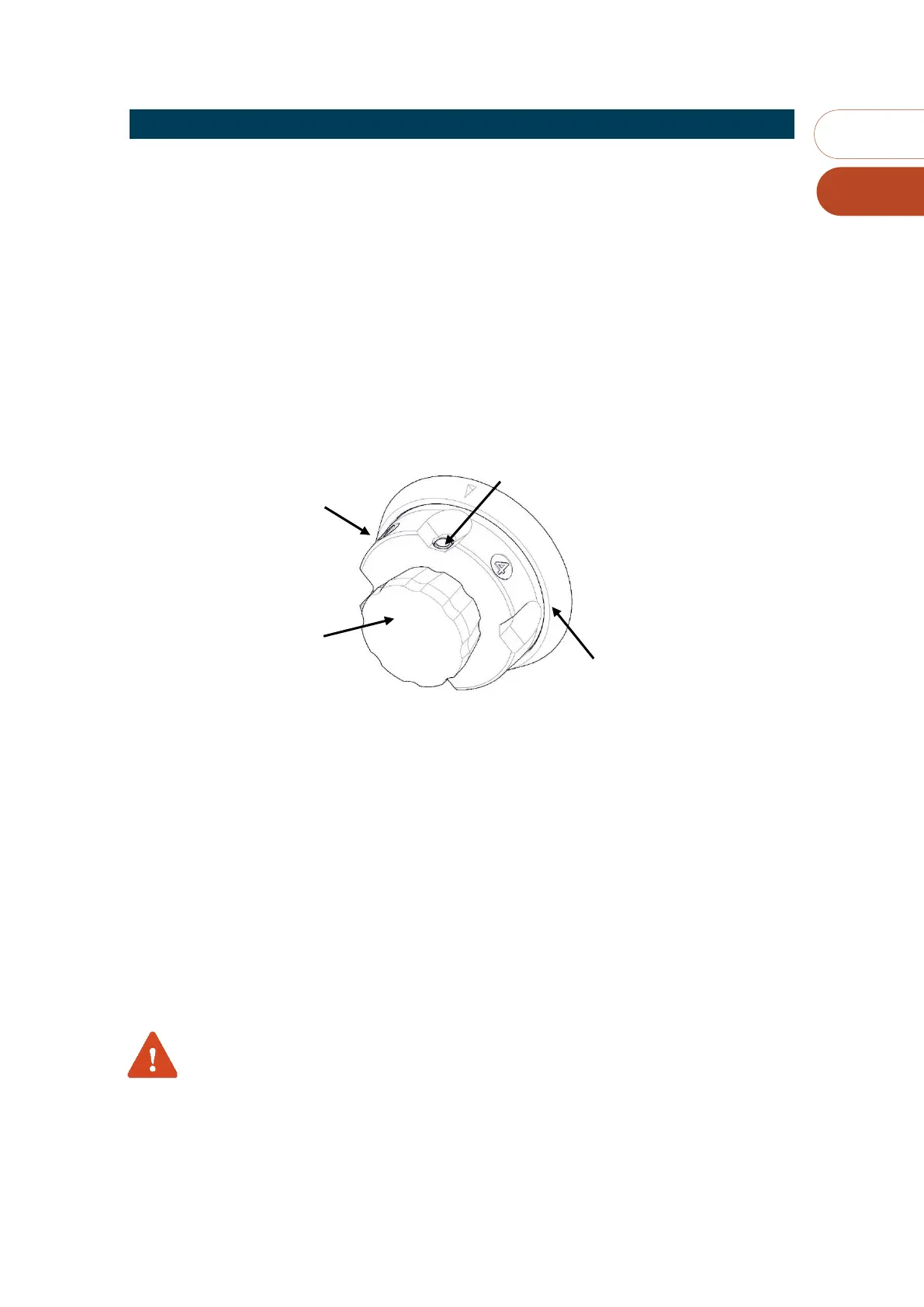
On the outside of the door, there are three main components:
◼ A fixed dial ring with a pointer used to position the markers on the counter selector dial.
◼ A mobile slector with five morkers: One “O” and four figures.
◼ A central knob used to select a number from 0 to 12 (counting the clicks) on each of the
counters (markers 1, 2, 3 and 4).
This central knob is also used to operate the bolt of the combinaison lock in order to open or close
it.
SELECTION OF A COUNTER (1 TO 4)
To select a counter, for example 3:
◼ Press the mobile selector button and turn it to the right or the left until marker “3” is
opposite the fixed ring pointer.
◼ Release the selector button without holding back.
TO SET THE COUNTER SELECTED (1 TO 12)
To set a number (5 for example) on the selected counter, proceed as follows
◼ Turn the central knob to the left until it reaches the stop
◼ Turn the central knob to the right counting the clicks (5 for example).
If you have doubts, turn button completely to the left and count again.
REMARK
To set a complete code, repeat previous steps alternately to set all counters.



 To Next Page