4
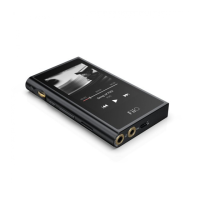
2. Buttons and ports explained
1) Touchscreen (16 million colors, 480x800 pixels): Displays the user interface and other information;
for operating the unit via screen touches and/or in conjunction with buttons on the unit;
2) Power / Lock: While M9 is powered off, hold for 2s to turn on; while powered on, hold to display
power off / reboot menu; press briefly while powered on to turn screen on / off; Press and hold for 10
seconds to reboot.
3) Volume knob: Scroll up to turn up the volume, scroll down to turn down the volume.
4) Play / Pause: Press while playing to pause music, press while paused to continue playback;
5) Previous track: Short press, play the previous track; Long press, the track will run fast backward.
6) Next track: Short press, play the next track; long press, the track will run fast forward;
7) Micro SD card slot: Supporting up to 512GB capacity
8) Indicator light: Blue light in working condition, red light when charging, turn off indicator light
when power off;
9) Type C USB data/ charging port: Used for charging, transmitting data, USB Audio output. The
DC5V 2a adapter is recommended for charging and can be fully charged in 2 hours.
10) 2.5mm balanced headphone output: Supports 2.5mm TRRS balanced headphone
11) 3.5mm PO/LO/ SPDIF coaxial output: Shared Phone/line / coaxial output port. Switch between
the three outputs in M9 Settings ->Audio Settings -> Multifunctional Output.
CTIA-spec headsets with in-line remote control supported with the following remote control
operation (single button remotes and main button of multi-button remotes supported):
Volume Up/Down: click to turn up/down the volume once, hold to turn up/down the volume
continuously to Max volume/Mute;
Play / Pause: press main button once briefly to toggle between play and pause;
Next track: double-click main button quickly;
Previous track: triple-click main button quickly;


 To Next Page