5
First Use & Tuning - Initial Settings
1. Use the EX6 in an open area on a flat, clean surface with plenty of
room to move around the extruder and allow for heat dissipation from
the vents.
2. Plug the machine into a power outlet with the specified input voltage.
3. Turn on the “POWER” switch. All PID Temperature controllers will
turn on, and the "STOP" button will illuminate.
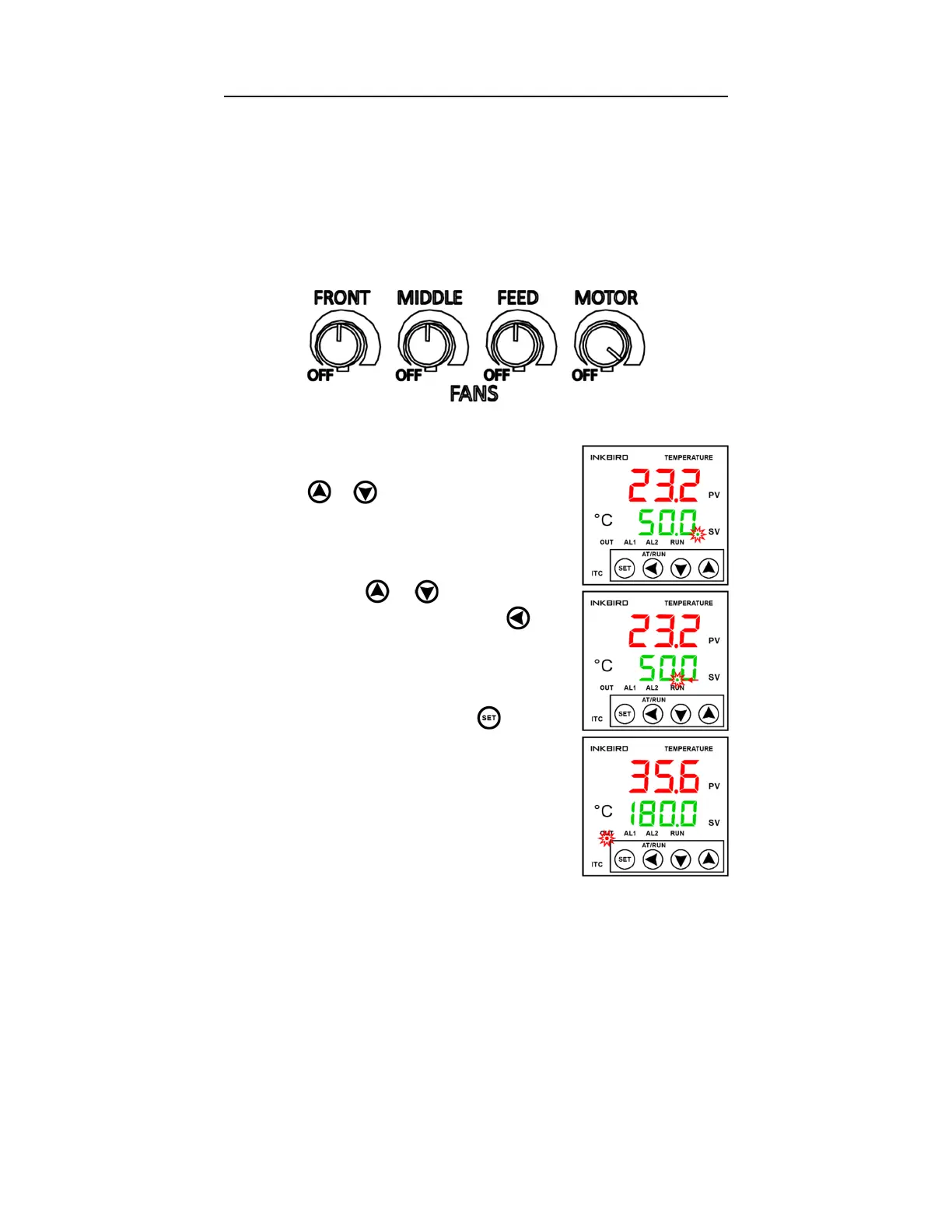
4. Set the Fans to these recommended base settings:
5. Set the PID controllers to within ±30°C of your expected operating
temperatures.
a. To program the set temp, press the
or key once, and the decimal
point will flash at the first selected
digit:
b. Use the and keys to adjust the
selected digit value. Use the key
to select the next digit:
c. Once the set temp is adjusted to the
desired value, press the key twice
to set the value. The “OUT” indicator
will turn on when power to the
heaters for that zone is switched on:
NOTE: Some smoke caused by remaining oils
from manufacturing is normal during the first
startup. If smoke continues or increases after
tuning, contact Filabot.


 To Next Page
 Loading...