6
First Use & Tuning - Self-Tuning PID Function
6. Run the self-tuning PID function on all 4 controllers at the same time.
Be sure the measured temp “PV” is at least 30°C cooler than your
set temp "SV" before starting self-tuning function. Doing this
increases the accuracy of the calculated PID parameters. If
temperatures reach the set temp before self-tuning can be started,
set all temperatures low and turn all fans to full speed until
temperatures decrease. Return set temps to your previous setting,
then begin self-tuning the controllers:
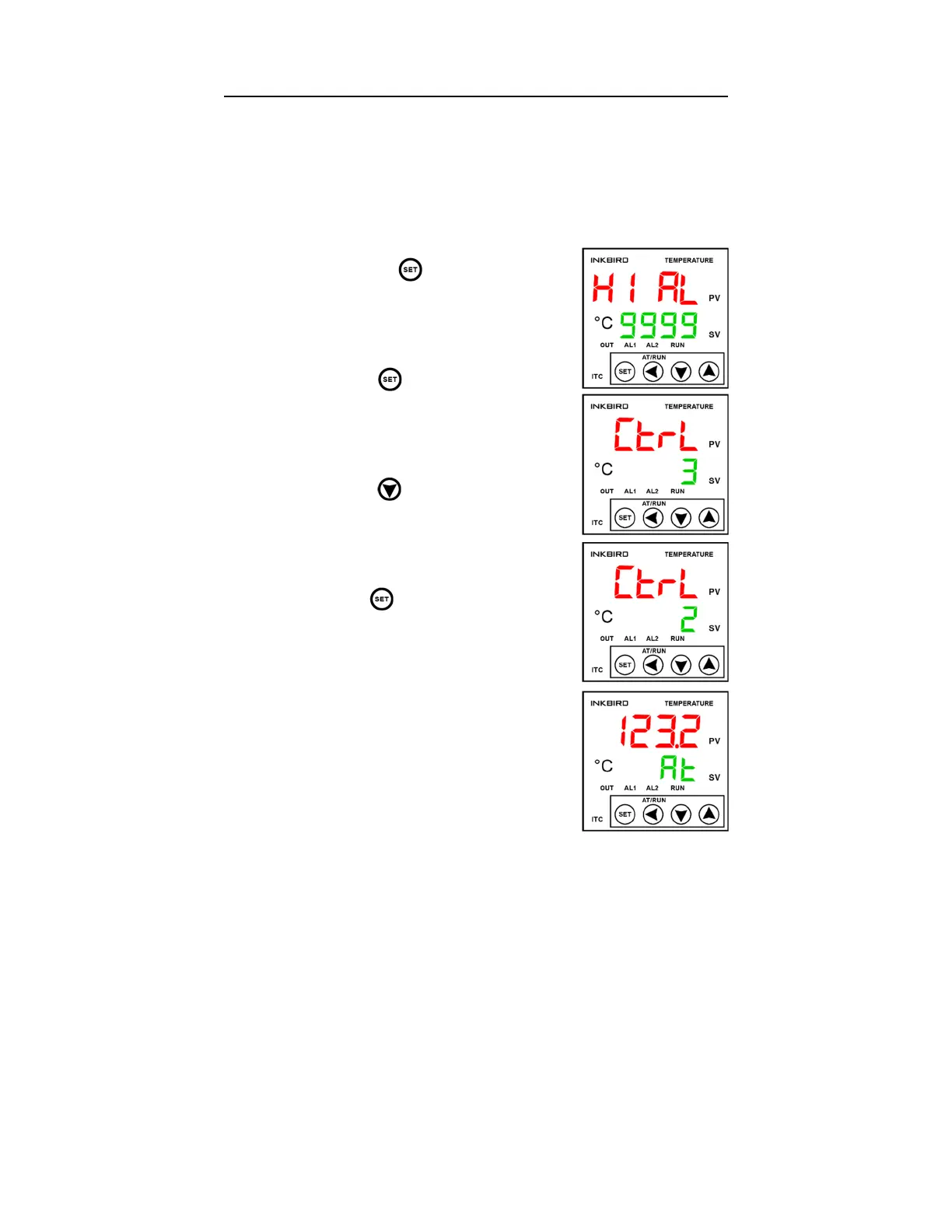
a. Hold the key until the display
shows “HI AL 9999”:
b. Press the key 5 times until the
display shows “CtrL 3”:
c. Press the key once to change the
value to “2”:
d. Hold the key to scroll back to the
main display. “PV” will display the
current temp, and "SV" will flash
between “At” and your set temp while
the auto-tuning function is running:
NOTE: While the auto-tuning function is running,
temperatures will overshoot the set temp
significantly. This is normal during the tuning
process which can take around ½ hour. After the
“At” function completes, wait until the temperatures
stabilize at their set temp before beginning to
extrude. To ensure the PID controllers perform at
their highest accuracy, we recommend re-tuning
whenever operating at a temperature more than 30°C higher or lower than
the temperature the previous tune was set at. For advanced users, the full
Inkbird manual can be found on the EX6 page at Filabot.com.


 To Next Page
 Loading...