EasyManua.ls Logo

Fillmaster Systems Auto - Menu Navigation Guide; Calibration and Manual Dispensing; Bottle Management and Flavor Levels; System Settings and Information

Default Icon
16 pages
Print Icon
To Next Page IconTo Next Page
To Previous Page IconTo Previous Page
Loading...
Fillmaster Auto™ | User Guide
9
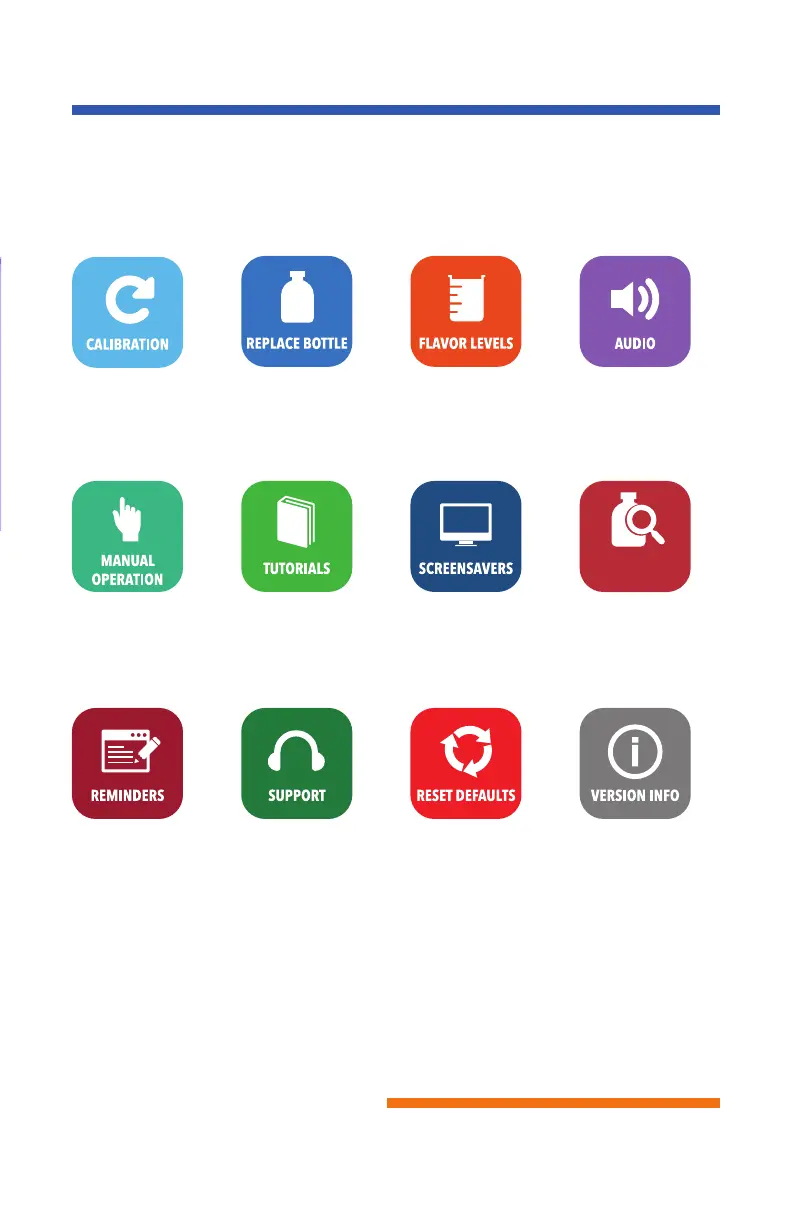
Menu Guide
Allows you to
calibrate the machine
to dispense to the
tenth of an mL.
To replace a flavor
or open the door
where flavors are
located.
Learn how much
flavor is left in each
bottle.
Turns audio
on or o.
Manually dispense
water & flavors in mLs.
Learn more about
the machine and
go through demos.
Turn screensavers
on & o when machine
is not in use.
Turn automatic
dispenses on & o
Fillmaster Tech Support:
1-800-284-7873
Web Support:
info@fillmastersystems.com
Returns all settings
back to factory
specifications.
Indicates which
software and database
version the machine
is currently running.
Set a reminder to
tell you when to
change tips or
calibrate machine.
BOTTLE
SENSOR
Fillmaster® Systems, LLC
9475 Gerwig Lane, Columbia, MD 21046
1-800-884-5771 www.fillmastersystems.com

Related product manuals