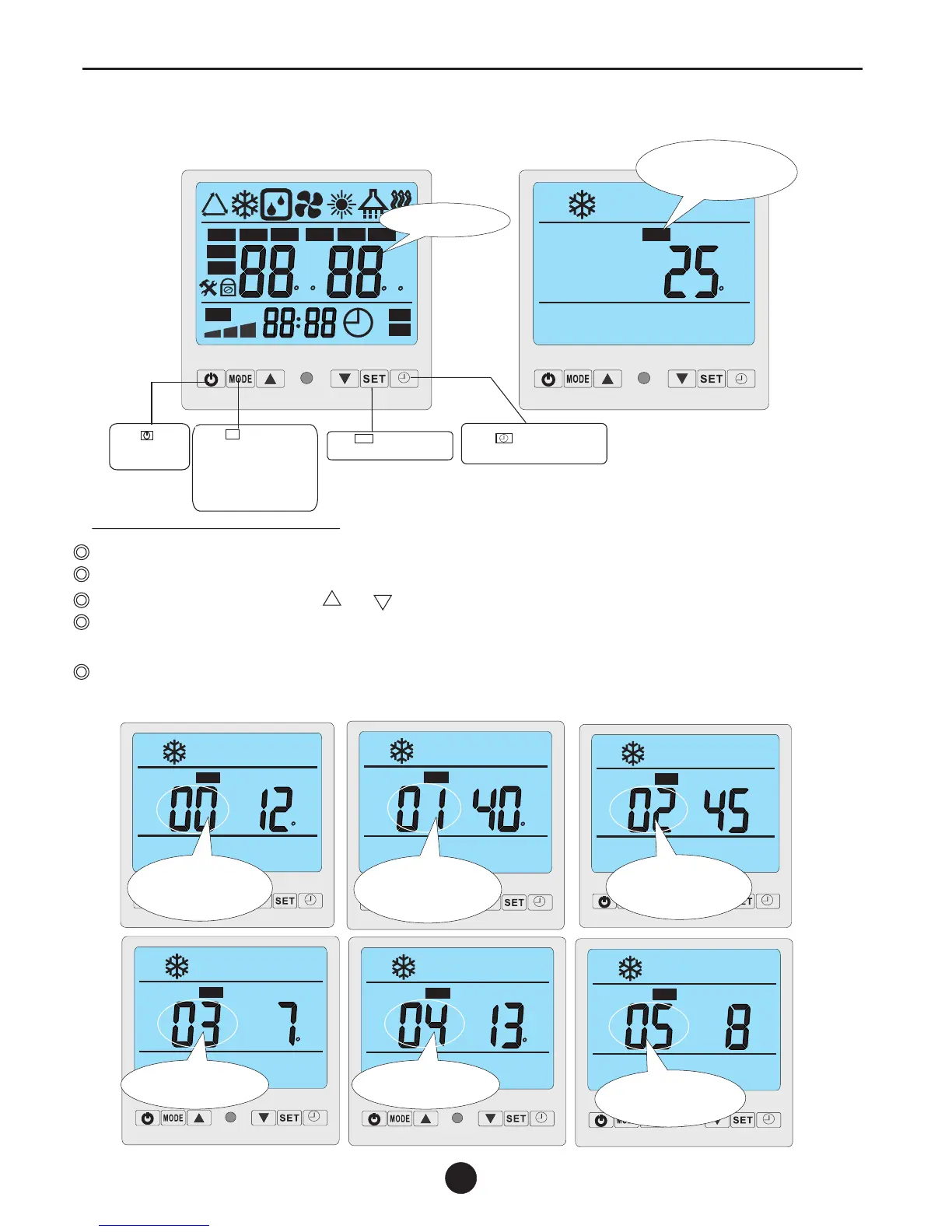
5.2 The functions of controller display
1
2
MIN
TEMP
ON
OFF
%
h
%
C F
C F
AUTO
h
MIN
IN
S
E
T
VALVE
OUT
ROOM
NO.
HUM
FAN
Initialization
Press to turn
on and turn off
the units.
Press button to
change modes press 5S
to set operation parameter
under stand by status,or
check the operation
parameter under running
or stand by status.
M
Press button 5S to set
clock.
SET
Press 5S to set
Timer ON/OFF
C
ROOM
Stand by status
The LCD display ambient
temp.And current mode
3
11
C
NO.
Parameter 00
to set inlet water temp.under
cooling mode (8-28℃)default
setting:12℃
C
NO.
Parameter 01
to set inlet water temp.under
heating mode (15-40℃)default
setting:40℃
NO.
Parameter 02
Total working time of
compressor after frosting
(you had better do not set)
MIN
C
NO.
Parameter 03
Setting initialzation temp for
defrosting "-7℃" ("- "no display,
range(0- -30℃"
,
C
NO.
3
5
Parameter 04
Terms of Exit Defrosting
Function(2-30℃)
default setting:13℃
NO.
MIN
3
5
Parameter 05
Max.Time of defrosting
(1-12min)
Default setting:8min.
Setting operation parameter
Under standby status,press M button 5s to enter Operation Parameter setting interface;
Press"M"again to start setting (parameter from 00-D,see the Operation Parameter Table);
Under parameter setting,press or to set data;
Please note no motion on the display for 10s,the LCD will display water-in/water out temp.(under running)or
ambient temp.(under standby status)
Under running status,you can press"M” to check current parameter,but can not change data of parameter!
" "
5s
Remarks:Standby status means the unit is connected with electricity but not running.
Swimming pool Heat Pump


 To Next Page